Platform: the feature surface of a running Everruns Platform, self-hosted or Everruns Cloud; architecture is under Explanation
---
# Budgets
> Cap session spending in dollars, tokens, or custom credits, with soft pause thresholds and automatic enforcement.
Source:
Budgets let you cap how much a session (or agent, user, or organization) can spend. When a session hits its budget, Everruns stops scheduling further LLM calls. This prevents runaway costs from long-running or misbehaving agents. 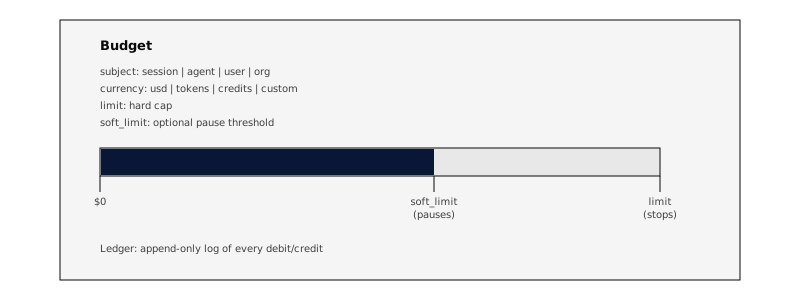 ## How It Works After every LLM generation, Everruns computes the cost and debits it from any active budgets for that session. In subagent trees, session-scoped budgets are shared at the root session, so child and grandchild turns spend from the same pool. If the balance reaches zero, the session stops. 1. **LLM call completes**: Everruns extracts token counts (input + output). 2. **Compute debit**: Converts tokens to the budget’s currency: * `usd`: uses per-model pricing (cost per million tokens for input/output) * `tokens`: raw token count * `credits`: 1 credit = 1,000 tokens * Custom currencies fall back to token count 3. **Debit ledger**: Appends an immutable ledger entry and updates the balance. 4. **Evaluate rules**: Checks thresholds: * Balance at 20% of limit → warning event * Spending exceeds soft limit → session pauses * Balance reaches zero → session stops Enforcement is **post-hoc**: the check runs after each LLM call, not before. This avoids blocking the hot path. The last generation may slightly overshoot the limit; this is expected and by design. ## Currencies | Currency | Unit | How cost is calculated | | --------- | ----------------------- | ----------------------------------------------------------------------------- | | `usd` | US dollars | Per-model pricing from model profiles (input/output rates per million tokens) | | `tokens` | Raw tokens | Direct count of input + output tokens | | `credits` | 1 credit = 1,000 tokens | Token count divided by 1,000 | | Custom | Any string | Falls back to raw token count | USD budgets use real per-model pricing, so the same dollar limit buys far more turns on a small model than on a frontier one. These session and agent budgets are limits you set. They are separate from the prepaid credit balance of an organization on the Everruns demo instance, which pays for the built-in model provider and stops it at zero balance. ## Soft Limits and Pausing A **soft limit** pauses the session before hitting the hard stop. This is useful in interactive sessions where a human can decide to top up or stop. 1. Spending exceeds `soft_limit` → budget status becomes `paused` 2. The worker detects the pause between atoms → stops scheduling the next LLM call 3. Session transitions to `paused` state 4. User can resume by increasing the limit, topping up, or calling the resume endpoint For headless sessions (no human watching), the hard limit fires at balance zero and terminates the turn. ## Stacked Budgets Multiple budgets can apply to the same session. The **most restrictive** budget wins. This lets you combine different types of limits: * A **$10 USD session budget** caps dollar cost * A **2M token budget** caps total token usage regardless of model pricing Budget stacking is enforced across the session hierarchy: root session, app channel, app, agent, user, and organization. The most restrictive matching budget wins. ## CLI Usage Set a budget when creating a session:
```bash
# $10 USD budget (currency defaults to usd)
everruns sessions create --budget-limit 10
# Explicit currency
everruns sessions create --budget-limit usd:10
# With soft limit — pauses at $8, hard stop at $10
everruns sessions create --budget-limit usd:10 --budget-soft-limit usd:8
# Token budget
everruns sessions create --budget-limit tokens:2000000
# Stacked — both limits, whichever hits first
everruns sessions create --budget-limit usd:10 --budget-limit tokens:2000000
```
## MCP Usage The `agent_run` MCP tool accepts budget parameters directly:
```json
{
"name": "agent_run",
"arguments": {
"message": "Analyze this codebase",
"agent_id": "agent_abc123",
"budget_limit": 10.00,
"budget_currency": "usd",
"budget_soft_limit": 8.00
}
}
```
Budget operations are also available as catalog commands via the `execute` tool:
```bash
# Create a budget for an existing session
create_budget --subject_type session --subject_id ses_xxx \
--currency usd --limit 10 --soft_limit 8
# Check a session's budget status
check_session_budgets --session_id ses_xxx
# Top up an exhausted budget
top_up_budget --budget_id bdg_xxx --amount 5 --description "Extra allowance"
# List all budgets for a session
list_session_budgets --session_id ses_xxx
```
## API ### Budget CRUD
```plaintext
POST /v1/budgets Create budget
GET /v1/budgets List budgets (?subject_type=&subject_id=)
GET /v1/budgets/{id} Get budget with current balance
PATCH /v1/budgets/{id} Update limit / soft_limit / status
DELETE /v1/budgets/{id} Soft-delete (sets status=disabled)
```
### Budget operations
```plaintext
POST /v1/budgets/{id}/top-up Add credits (negative ledger entry)
GET /v1/budgets/{id}/ledger Paginated ledger entries (?limit=&offset=)
GET /v1/budgets/{id}/check Check budget status
```
### Session shortcuts
```plaintext
GET /v1/sessions/{id}/budgets List budgets for this session
GET /v1/sessions/{id}/budget-check Check all budgets (session + hierarchy)
POST /v1/sessions/{id}/resume Resume paused budgets
```
### Create a session budget
```bash
curl -X POST https://your-instance/api/v1/budgets \
-H "Authorization: Bearer $API_KEY" \
-H "Content-Type: application/json" \
-d '{
"subject_type": "session",
"subject_id": "ses_01abc...",
"currency": "usd",
"limit": 10.00,
"soft_limit": 8.00
}'
```
### Top up an exhausted budget
```bash
curl -X POST https://your-instance/api/v1/budgets/{budget_id}/top-up \
-H "Authorization: Bearer $API_KEY" \
-H "Content-Type: application/json" \
-d '{
"amount": 5.00,
"description": "Emergency top-up"
}'
```
If the budget was `paused` or `exhausted` and now has positive balance, it automatically reactivates. ## Events Subscribe to budget events via SSE to react in real time: | Event | When | Key data | | ------------------ | ------------------------------- | ------------------------------------------- | | `budget.warning` | Balance at 20% of limit | `budget_id`, `balance`, `limit`, `currency` | | `budget.paused` | Spending exceeds soft limit | `budget_id`, `balance`, `soft_limit` | | `budget.exhausted` | Balance reaches zero | `budget_id`, `balance`, `limit` | | `budget.resumed` | User resumes after pause/top-up | `budget_id`, `balance`, `limit` | ## Agent Awareness The `budgeting` capability is included in the **Worker harness** by default. Any session using the Worker harness automatically gets budget-aware behavior: * The agent’s system prompt includes a “Budget Awareness” section with guidelines for efficient output when budget is constrained * The agent gets a `check_budget` tool to query remaining balance before expensive operations When budget is running low, a budget-aware agent will prioritize completing current tasks efficiently rather than exploring new directions. ## Budget Lifecycle 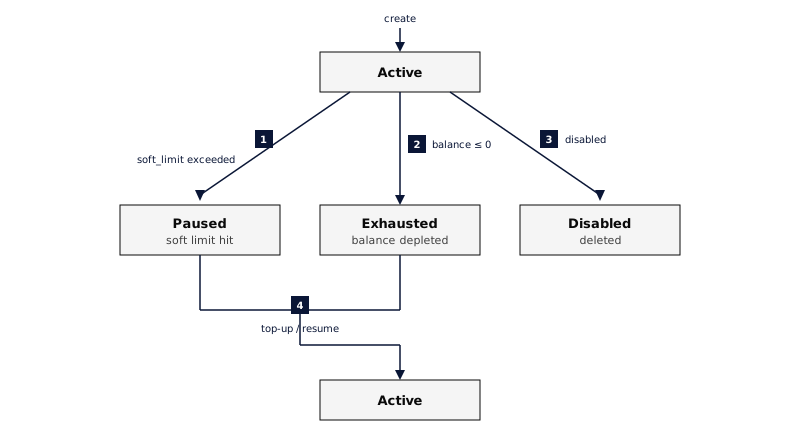
---
# Context Compaction
> How Everruns manages LLM context windows through automatic compaction strategies, observation masking, summarization, and hierarchical memory tiers
Source:
Long-running agent sessions accumulate more history than a model can use effectively. **Context compaction** keeps a bounded working context, durable continuity and access to older evidence. Summaries are lossy, so the retained journal remains the source for verifying details. Internal summary calls use the model’s default sampling settings, including on reasoning models that do not accept a temperature parameter. Summaries can vary between runs; verify consequential details against the original journal. Everruns provides multiple compaction strategies that can be combined. The default `auto` strategy selects provider-native compaction when supported and portable continuity on local paths, with cheap masking and overflow recovery where appropriate. 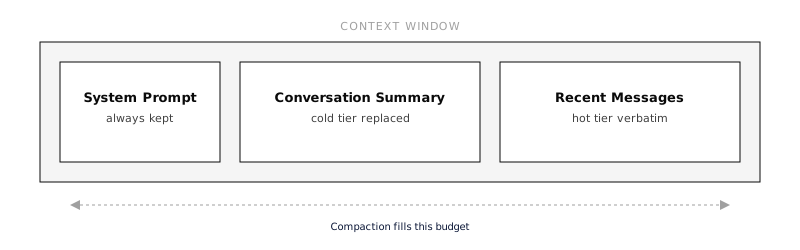 ## How It Works Enable `compaction` as the single capability for managed long-session context:
```json
{
"capabilities": [
{
"ref": "compaction",
"config": {
"strategy": "auto",
"context_budget_tokens": 64000
}
}
]
}
```
It includes `query_history` for retrieving older evidence when permitted. Raw session events remain unchanged. `infinity_context` is a deprecated compatibility entry; new configurations do not need to list both capabilities. Used alone, the legacy entry retains its trimming behavior and does not enable paid summaries. History search includes prior tool observations in Framework sessions. Search previews show an excerpt around the matching text and identify truncated content. Retrieve the original message by its ID when the surrounding evidence matters. A matching excerpt retains the original message’s role and does not turn tool or file contents into instructions. ## Working context and continuity The working-history target is independent of the model’s maximum context window. A larger model window does not mean the whole conversation should be sent every time. Current instructions and tools are assembled separately; the runtime also reserves output capacity and applies the provider’s hard limit. On local `auto` or `summarization` paths with checkpoint storage, proactive compaction folds contiguous journal pages into an encrypted, durable portable summary and keeps a recent tail of complete tool exchanges. A successful summary replaces an exact prefix. Later turns and restarted workers restore that summary plus messages after its boundary. Compaction never treats an omitted loading window as summarized history. Opaque reasoning in the recent tail is replayed only when its recorded model, driver and configured provider account match the current request. Legacy artifacts without that provenance are omitted from requests; the original events remain intact. This does not make native checkpoints portable. The current user input stays verbatim even when a long tool loop moves its journal record inside the summarized prefix. The preferred recent-message tail can shrink to keep a completed parallel tool batch together. An incomplete exchange or a source batch too large for the summary model still fails visibly; compaction does not discard unmatched calls or results to make it fit. Portable summaries retain provenance, unresolved questions and later corrections. Activated skill instructions are carried verbatim outside generated prose. Generated continuity is reference material, not permission to change current instructions. A summary can still lose details: use `query_history` to verify claims or recover source evidence. Search returns message IDs that can be fetched with `message_id`; `message_range` retrieves a bounded absolute range. Source user requirements are passed to the summarizer in full, within the source-page budget. Long reproducible observations may be clipped with explicit omission markers. Summary generation is a separate, paid model call recorded in the trace and usage totals. Input and requested output share the summary model’s reported context window; smaller models receive a smaller output allowance. Empty, truncated and tool-calling responses are rejected. Completed candidates are saved before installation, so retrying the same source after an installation failure can reuse the candidate. Messages arriving during a summary remain in the raw suffix. The first compaction of an existing large session can require several calls; subsequent calls process new history incrementally. Explicit native compaction preserves generated-token usage for billing. Those tokens do not measure the retained window. When its token count is unavailable, the trace reports serialized byte measurements instead. Native calls have separate `llm.generation` usage records, including completed responses rejected for insufficient reduction. When the provider omits its price, available token usage and model pricing supply a labelled estimate. Compaction metadata retains attribution; the next main call does not include that spend again. Native estimates assume uncached input when compact usage has no cache breakdown. Usage records retain configured provider identity so hosted accounting can distinguish managed providers from customer-owned keys. ## Triggers and provider modes Compaction operates at two points: 1. **Proactively**: local continuity follows `context_budget_tokens` (default 64,000 history tokens), with room reserved for output. The final request check also considers tools and instructions against the provider window. Native compaction uses `budget_percent` (default 85%) and current-history pressure. This can avoid a failed request. 2. **Reactively**: if the LLM still returns a `RequestTooLarge` error (estimation can undercount), the compaction cascade runs and the request is retried automatically. Current raw tool evidence can trigger reduction below the working and model-window budgets. Lifetime token usage alone does not trigger another compaction. The proactive estimate includes the schemas offered to the model, not just messages. Deferred tools contribute their visible schema stubs, not the private full schemas kept for later discovery. History trimming reserves room for those declarations and system instructions. If that fixed input alone reaches the estimated context window, the request fails explicitly: reduce active schemas or instructions, or choose a larger-context model. Removing conversation history cannot fix it. Estimates use bytes divided by four, including the larger strict-schema shape where applicable; they are not provider token counts. Cache-stable tool epochs also reserve room for replayed schema changes. Under pressure Everruns can restart the declaration epoch with the current catalog before trimming history. Provider wrappers, hosted tools and opaque checkpoints can still change actual usage, so reactive overflow recovery remains necessary. Provider-native epochs preserve their required replay representation. Local strategies use portable continuity when available; reactive overflow recovery remains a final safety net:
```
flowchart TD
accTitle: Compaction selects one history reduction mode
accDescr: The runtime planner selects compatible native replay, provider-managed replay, or portable continuity with recent history. The retained journal remains searchable in every mode when permitted.
P[Runtime context planner] --> N[Compatible native checkpoint and suffix]
P --> M[Provider-managed wire prefix]
P --> S[Portable continuity and recent exchanges]
J[Retained session journal] --> S
J --> Q[Bounded query_history retrieval]
```
The UI shows a divider between messages whenever compaction happens: > **Context compacted** · 90.7K → 51.6K estimated tokens · masking The divider prefers token measurements when available. Masking can reduce tokens while retaining every message; unchanged message counts do not indicate failure. Counts may be estimates and can differ from provider usage. Click the divider for strategy and timing details. ## Strategies ### Auto (default) Selects a supported native mode, or local portable continuity with cheap masking. This is the recommended setting for most use cases. ### Observation Masking Replaces old tool outputs with compact summaries while keeping the message structure intact. This is free (no LLM call) and preserves tool call IDs for tracing. Two summary formats: | Format | Example | When to use | | -------------------- | ----------------------------------------------------------- | --------------------------------- | | `one_line` (default) | `[read_file → 47 lines, 2340 bytes]` | Most cases, minimal footprint | | `head_tail` | First 3 lines + `... (14 lines omitted) ...` + last 3 lines | When partial output context helps | The most recent N tool outputs are kept verbatim (default: 2). Runtime masking advances in batches, skips small outputs and only reports effective reductions. Reapplying a masked view is not an additional model call. ### Native Provider Compaction Delegates compaction to the LLM provider’s own endpoint. Currently supported by OpenAI’s Responses API (`/responses/compact`). When available, this can be more intelligent than generic strategies since the provider understands its own tokenization. Everruns sends either a stateful response handle or a standalone transcript to the compact endpoint, never both. The returned ordered context is encrypted at rest as a durable checkpoint and reused across later turns and process restarts. Each request combines the latest checkpoint for the exact provider/model with raw messages written after its source boundary; changing provider or model can restore a portable checkpoint, or rebuild from the retained journal when none exists. Compaction never deletes or rewrites session events. Public `context.compacted` events contain only counts, timing, strategy, and an optional checkpoint identifier. Provider-native encrypted context remains confined to the internal provider and storage paths. ### Summarization Uses an LLM to generate a structured summary of older messages. The summary replaces those messages in context and is wrapped in `[CONVERSATION_SUMMARY]` tags so subsequent compactions can re-summarize it. Local summaries distinguish user requirements from instructions embedded in tool results or fetched material. They retain the source and basis of unresolved claims, explicit user adoption, and later confirmations or corrections through repeated summaries. Active Skills remain verbatim. These are summarizer instructions, not a guarantee of factual accuracy; native provider compaction is unchanged. You can configure: * Which model to use through the current provider (default: same as the agent) * What information to preserve (decisions, files modified, errors, etc.) * Custom instructions appended to the summarization prompt ### Aggressive Trim Legacy and request-local recovery paths can drop the oldest messages to fit a token budget while preserving system instructions and recent messages. This is lossy for the active prompt. It does not establish a portable continuity checkpoint or delete journal events. Managed portable recovery advances a validated summary boundary instead; if it cannot safely advance, the original overflow remains an error. ## Worker Harness Defaults The built-in **Worker** harness inherits `compaction` with automatic proactive reduction. It includes history retrieval through its compatibility dependency; you do not need a separate `infinity_context` entry. The planner selects a provider-compatible native checkpoint when available. Otherwise, a validated portable checkpoint can be used with another model or provider. Opaque native content is never translated or sent across provider/model boundaries. When no portable checkpoint exists, a local path can build one from the retained journal; this has an initial summarization cost. In `auto`, a compatible native checkpoint whose serialized footprint exceeds the working target can also start a new portable epoch from the journal. This is a size heuristic, not a provider token measurement. Use `native` to keep explicit provider-native compaction without that local transition. Eligible Anthropic models can use provider-managed compaction. Within that epoch, Everruns preserves the required wire prefix and disables competing local masking and trimming. Provider-side context reduction does not necessarily reduce HTTP request bytes. Native checkpoints remain provider/model/format specific. `query_history` is disabled when provider-bound prompt hooks make raw-history retrieval unsafe. Portable journal summaries are also disabled at that boundary. Stored audit history is never a route around prompt filtering. ## Configuration Compaction is a capability configured per agent or harness via `AgentCapabilityConfig`. ### Default (auto strategy, proactive)
```json
{
"capabilities": ["compaction"]
}
```
### Custom strategy and budget
```json
{
"capabilities": [
{
"ref": "compaction",
"config": {
"strategy": "auto",
"proactive": true,
"budget_percent": 0.85
}
}
]
}
```
### Observation masking only (no LLM calls)
```json
{
"capabilities": [
{
"ref": "compaction",
"config": {
"strategy": "observation_masking",
"observation_masking": {
"keep_recent_tool_outputs": 10,
"summary_format": "head_tail"
}
}
}
]
}
```
### Summarization with a cheaper model
```json
{
"capabilities": [
{
"ref": "compaction",
"config": {
"strategy": "summarization",
"summarization": {
"model": "claude-haiku-4-5-20251001",
"preserve": ["decisions", "files_modified", "errors", "api_keys"],
"instructions": "Focus on architecture decisions and API contract changes"
}
}
}
]
}
```
### Full configuration with memory tiers
```json
{
"capabilities": [
{
"ref": "compaction",
"config": {
"strategy": "auto",
"proactive": true,
"budget_percent": 0.80,
"observation_masking": {
"keep_recent_tool_outputs": 5,
"summary_format": "one_line"
},
"summarization": {
"model": null,
"preserve": ["decisions", "files_modified", "errors", "current_plan"],
"instructions": null
},
"memory_tiers": {
"hot_messages": 20,
"warm_messages": 100
}
}
}
]
}
```
## Configuration Reference ### Top-level | Field | Type | Default | Description | | ----------------------- | ------- | -------- | -------------------------------------------------------------------------------- | | `strategy` | string | `"auto"` | Compaction strategy: `auto`, `native`, `observation_masking`, or `summarization` | | `proactive` | boolean | `true` | Compact before hitting context limits (recommended) | | `context_budget_tokens` | integer | `64000` | Working-history target, minimum 4096; hard provider limits still apply | | `budget_percent` | float | `0.85` | Trigger proactive compaction at this fraction of the context window | For `auto` and `native`, proactive pressure invokes provider-native compaction when the driver supports it and stores the result as a durable checkpoint. The driver’s effective model context window takes precedence over the built-in profile, so external drivers can report their actual limit. Stateful `previous_response_id` requests skip local proactive pressure checks because their request body is only a delta over provider-held context; reactive too-large recovery remains available. A native result must materially reduce provider-reported tokens, or serialized bytes when token usage is unavailable: at least 5%, with a 32-unit floor for small measurements. Smaller results do not install or replace a checkpoint and do not emit `context.compacted`. A newly installed checkpoint is not proactively replaced again until a meaningful raw-message suffix has accumulated. Failed and no-op native attempts are also held behind a retry watermark until estimated input grows by both 4,096 tokens and 5%, avoiding repeated compact calls against the same source. Branch and rollback selection ignore watermarks from a different transcript lineage. When it is re-armed, the next native compact request preserves the prior opaque checkpoint items in order before appending that suffix, for both proactive and reactive compaction. ### Observation Masking | Field | Type | Default | Description | | -------------------------- | ------- | ------------ | ---------------------------------------------------------- | | `keep_recent_tool_outputs` | integer | `2` | Number of recent tool outputs to keep verbatim | | `summary_format` | string | `"one_line"` | How to summarize masked outputs: `one_line` or `head_tail` | ### Summarization | Field | Type | Default | Description | | -------------- | -------------- | --------------------------------------------------------------------------------- | --------------------------------------------------------- | | `model` | string \| null | `null` | Model for summarization. Null = same as the agent’s model | | `preserve` | string\[] | `["decisions", "files_modified", "errors", "current_plan", "skill_instructions"]` | Information categories to preserve in summaries | | `instructions` | string \| null | `null` | Custom instructions appended to the summarization prompt | ### Memory Tiers | Field | Type | Default | Description | | --------------- | ------- | ------- | --------------------------------------------------------------- | | `hot_messages` | integer | `20` | Recent messages kept verbatim (full content) | | `warm_messages` | integer | `100` | Older messages with observation masking applied to tool outputs | These counts are retained for compatibility with the memory-tier helpers. They do not set the durable portable checkpoint boundary. The managed planner uses the token target, exact journal sequences and complete tool exchanges. Older evidence stays queryable through the retrieval included by `compaction`, when permitted. ## Memory Tier Diagram 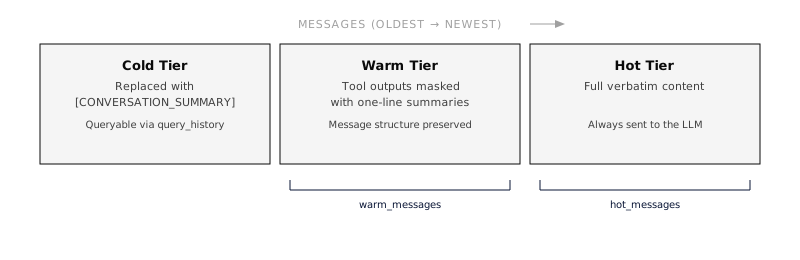 ## Combining with Infinity Context New configurations enable only `compaction`. Existing configurations that explicitly list both remain supported:
```json
{
"capabilities": [
"infinity_context",
{
"ref": "compaction",
"config": {
"strategy": "auto",
"proactive": true
}
}
]
}
```
An explicit legacy `infinity_context.context_budget_tokens` setting can lower the effective working target when both are present. Remove the legacy entry and set the desired target on `compaction` when migrating. The internal compatibility dependency provides retrieval and bounded bootstrap loading; it is not a second independent checkpoint reducer. ## Defaults, configuration and inspection Base enables `compaction`; Conversation, Worker, Bashkit Worker, Sandbox Worker and Platform Chat inherit it. The Framework uses the same presets. A Framework session with no explicit harness also enables compaction when the `builtins` feature is compiled in. A custom harness owns its capability list: add `compaction` explicitly if it needs managed continuity. In the harness or agent capability settings, the compaction editor exposes the working-history token budget and proactive toggle. Advanced settings select the strategy, native trigger, summary model and summary instructions. The working budget is a soft target, separate from the provider’s hard context window; complete recent exchanges and pinned instructions can exceed it. A summary model names a model served by the current provider, rather than an organization model record. Advanced settings not edited in the form are retained. Chat and Playground have a **Context** button showing the effective policy, history retrieval availability and safe saved-checkpoint metadata. Transcript markers distinguish **Checkpoint saved** from a request-local reduction. They show available token measurements, progress and safe failure status. A skipped attempt closes progress without claiming that smaller context was installed. `GET /v1/sessions/{session_id}/context-report` (also `everruns sessions context `) returns the last recorded main-model request estimate and the effective `compaction` status. `as_of_sequence` identifies the measured request; `measurement_available: false` means no recent main-model sample is available. Summary-generation usage is excluded from that measurement. It is not a forecast of the next request. Inspection never starts compaction or calls a model, and does not expose summary text or provider-opaque state. `checkpoint_store_available` describes whether the inspected host has a store, not whether its backend survives a process crash. `null` means a remote host has not reported that information. For data-plane sessions, `last_event` reports the latest lifecycle observation even when direct checkpoint inspection is unavailable. Its checkpoint identifier records an installation at that event; it does not guarantee that the checkpoint is compatible with a newly selected model. Native checkpoints are scoped to their provider and model. Framework applications read the same safe policy and checkpoint projection from `session.inspect().await?.compaction`. Storage durability follows the hosting adapter: `MemoryHosting` keeps continuity only for the lifetime of its memory store. Use a persistent hosting adapter for restart recovery. ## Events Compaction emits SSE lifecycle and result events: | Event | When | Key fields | | ---------------------------- | -------------------------------------------------- | ----------------------------------------------------------------------------------------------------------------------------------------------------- | | `context.compacting` | Semantic compaction starts | `reason` (proactive_budget, request_too_large, manual), `strategy`, `messages_before`, optional `tokens_before` / `bytes_before` | | `context.compacted` | Material semantic reduction completes | `strategy_used`, `messages_before`, `messages_after`, optional before/after token or byte metrics, `duration_ms`, `steps[]`, optional `checkpoint_id` | | `context.compaction.skipped` | A native attempt cannot safely install a reduction | Reason, strategy and pressure measurements | | `context.compaction.failed` | A native compaction operation fails | Stage, error and pressure measurements | Each step in the cascade is recorded with its strategy name, resulting message count, and duration. Provider-encrypted native compact content is never included in these public events. Request-local masking may emit a `context.compacted` measurement when it reduces the estimated prompt size; that event alone does not establish a durable checkpoint. Portable summaries and native calls emit separate `llm.generation` usage events with request metadata `purpose: continuity_summary` and `purpose: context_compaction`, respectively. These auxiliary calls do not replace the main request in context-size inspection. Native usage events omit the provider-encrypted replacement content. An oversized source, a rejected or non-reducing summary, and a request that still cannot fit after permitted compaction end the attempt with an error. Replaying the same deterministic failure does not repair it. Original history remains available; genuine storage failures retain their recovery behavior. ## Best Practices * **Start with defaults.** The `auto` strategy with `proactive: true` handles most cases well. * **Lower `budget_percent`** (e.g., 0.70) if your agents use large tool outputs frequently, this gives more headroom before the context fills. * **Increase `keep_recent_tool_outputs`** if your agent often references recent tool results across multiple turns. * **Use a cheaper model for summarization** (e.g., Haiku) to reduce cost and latency when the summarization step runs. * **Set a working target** with `context_budget_tokens` for sessions that run for hours or days; keep history retrieval available for evidence. * **Customize `preserve`** to match your agent’s domain, if your agent tracks database schemas or API contracts, add those to the preserve list. ## See Also * [Infinity Context](https://everruns.com/docs/capabilities/infinity-context/), Message history windowing and retrieval * [Capabilities Overview](https://everruns.com/docs/capabilities/), How capabilities are configured * [Harnesses](https://everruns.com/docs/features/harnesses/), Where capability configs are applied * [Events](https://everruns.com/docs/features/events/), SSE event streaming reference ## Automatic quality monitoring Organization owners and admins can enable **Compaction quality monitoring** in **Settings → Organization**. It is off by default and applies to sessions using any harness, including built-in harnesses; adding another capability is unnecessary. Changes made through Chat are staged until you select **Save changes**. With a zero daily budget, operational checks report compaction failures, reported checkpoint installation and measured request reduction without a judge call. Unchanged message counts are not failures. An operational pass confirms the reported runtime step, rather than independently proving checkpoint durability or semantic fidelity. For sampled continuity checks, choose an organization model, a sample percentage and a daily USD allowance. Bounded source and subsequent excerpts from the compaction turn go to that model’s provider. Checks assess one compaction boundary and its continuation, not the entire lifetime of an endless session. Native checkpoint contents remain opaque. Missing evidence, excluded sessions, unsafe raw-history access, unavailable pricing or exhausted allowance produce **Insufficient evidence**, never a pass. Request-local masking receives operational checks without a paid continuity job. The panel separates operational and continuity verdicts, links findings to session traces and lets admins agree or disagree with an assessment. Findings stay in the organization for 30 days. Existing Observer health alerts report sufficiently large pass-rate drops. Monitoring never changes agent instructions or retries a user turn. A sampled continuity failure is a suspected issue, not proof that compaction caused it or that all other information was preserved. Use the organization API to enable mechanical checks:
```http
PATCH /v1/orgs/{org}
Content-Type: application/json
{
"quality_monitoring": {
"enabled": true,
"sampling_rate": 0.02,
"model_id": null,
"daily_budget_usd": 0,
"excluded_tags": ["private"]
}
}
```
`GET /v1/orgs/{org}/quality-monitoring` returns policy, seven-day coverage and UTC-day spending. `/quality-monitoring/scores` returns recent findings; `PUT /quality-monitoring/scores/{score}/review` accepts `{"agrees": false}`. Policy updates replace the monitoring policy. `eval` sessions are always excluded. The CLI exposes the same report as `everruns orgs quality-monitoring get --org ` and recent findings as `everruns orgs quality-monitoring scores list --org `. Disabling monitoring stops new and queued assessments; an already dispatched provider call cannot be recalled. The allowance uses atomic conservative reservations, including retry capacity. Uncertain attempts keep their allowance until UTC midnight; reserved allowance and provider-reported cost are shown separately. This admission cap relies on catalog pricing and is not an invoice reconciliation guarantee. Embedded applications can use the shared [Framework observation API](https://everruns.com/docs/framework/evaluation-and-traces/#compaction-observation). The Framework does not silently enable organization monitoring or send content to a judge.
---
# ID Schema
> How Everruns formats and validates public resource identifiers, Stripe-style prefixed IDs.
Source:
Every resource in the Everruns API (agents, sessions, skills, knowledge bases, and so on) is identified by a **prefixed public ID**. The prefix tells you at a glance what kind of resource you are looking at; the suffix is an opaque 32-character token. This pattern was popularized by Stripe (`cus_`, `sub_`, `pi_`). Treat the suffix as a meaningless string, do not parse it, sort by it, or infer information from it. The only guarantees the API makes about an ID are its format, its uniqueness within an organization, and its stability over the lifetime of the resource. ## Format All resource identifiers use the same shape:
```plaintext
{prefix}_{32-hex-chars}
```
* `{prefix}` is a short lowercase token that identifies the resource type (for example `agent`, `session`, `skill`). * `_` separates the prefix from the suffix. * `{32-hex-chars}` is an opaque 32-character lowercase hexadecimal token. Example:
```plaintext
agent_5c7f3a91b24e48d6a0e91f3b7c4d2e85
```
Identifiers match a fixed pattern: the resource’s prefix, an underscore, then exactly 32 lowercase hexadecimal characters. For an `agent`, the literal regex is `^agent_[0-9a-f]{32}$`. The API rejects malformed values with `400 Bad Request`. ## Treat the suffix as opaque The suffix carries no public meaning. In particular: * **Do not sort by it.** Use `created_at` (or whatever timestamp field the resource exposes) for chronological ordering. * **Do not infer age, ordering, or shard placement from it.** The encoding may change without notice. * **Do not parse it as a UUID.** The hex format is a transport convenience; future resources may use different internal schemes while keeping the same wire format. This decoupling is intentional. The internal database key for a resource and its public ID are deliberately separate concepts, clients only ever see the public ID. ## Client-Supplied IDs For resources that accept client-supplied IDs on create, you can pass your own `id` as long as it matches the format above and uses the correct prefix for the resource type. If you omit `id`, the server assigns one. A subset of resources additionally expose `PUT /v1/{resource}/{id}` as an upsert: the same call creates the resource if it does not exist (`201 Created`) and updates it in place if it does (`200 OK`). Where supported, this makes idempotent provisioning straightforward, replay the same `PUT` and the end state is identical. The OpenAPI reference is the source of truth for which resources support this; not every resource has a `PUT` route. ## Serialization IDs are always serialized as JSON strings. The field name is `id` for the resource itself and `{resource}_id` when referenced from another resource:
```json
{
"id": "agent_5c7f3a91b24e48d6a0e91f3b7c4d2e85",
"session_id": "session_2b8a4d12c673491fae058b7d9c1f6a40"
}
```
## Prefix Reference The prefix is part of the public contract for each resource. The most common ones are listed below; the canonical list lives in the OpenAPI specification. The prefix in the table below is the token that appears before the `_` separator, an `agent` resource has IDs that start with `agent_`. | Resource | Prefix | | -------------- | --------- | | Agent | `agent` | | Session | `session` | | Skill | `skill` | | Knowledge base | `kb` | | Memory | `mem` | | MCP server | `mcp` | | Schedule | `sched` | | Image | `img` | | Agent avatar | `avatar` | | User | `user` | | Organization | `org` | ## Design Notes | Question | Answer | | ------------------------------------ | ----------------------------------------------------------------------------------------------------------------------------------------------------------------------------------------------------------------------------------- | | Why prefixed IDs? | They make IDs self-describing and prevent accidentally passing, say, an agent ID where a session ID is expected. | | Why opaque suffixes? | Decoupling the wire format from internal storage gives the platform room to evolve without breaking clients, and prevents callers from leaning on accidental properties (ordering, creation time) that aren’t part of the contract. | | Why lowercase hex? | Case-insensitive matching, URL-safe, easy to copy and paste. | | Are IDs unique across organizations? | Each ID is unique within its owning organization. The same `id` value could in principle appear in two different orgs, but you only ever see IDs scoped to orgs you belong to. |
---
# Network Access Control
> Control which hosts and URLs agents can reach using layered allowlists and blocklists on harnesses, agents, and sessions
Source:
By default, agents with the `web_fetch` capability can access any public URL. **Network access lists** let you restrict which hosts and URLs an agent can reach, giving you fine-grained control over outbound network access. Access lists are configured at three levels, harness, agent, and session, and each layer can only make access *more* restrictive, never less. ## Configuration A network access list has two fields: | Field | Purpose | Default | | --------- | ---------------------------------------------- | --------------------- | | `allowed` | If non-empty, only matching URLs are permitted | `[]` (no restriction) | | `blocked` | Always denied, even if matched by `allowed` | `[]` | ### Pattern Format Patterns support three formats: | Format | Example | Matches | | --------------- | ----------------------------- | ------------------------------ | | Exact domain | `api.example.com` | Any URL on that exact domain | | Wildcard domain | `*.example.com` | The domain and all subdomains | | URL prefix | `https://api.example.com/v1/` | URLs starting with that prefix | Domain matching is case-insensitive. Blocked patterns always take precedence over allowed patterns. ### API Examples Set a network access list when creating or updating an agent:
```json
POST /v1/agents
{
"name": "Research Agent",
"system_prompt": "You are a research assistant.",
"network_access": {
"allowed": ["*.github.com", "api.openai.com"],
"blocked": ["evil.example.com"]
}
}
```
Restrict a specific session further:
```json
POST /v1/sessions
{
"agent_id": "agent_...",
"network_access": {
"blocked": ["internal.corp"]
}
}
```
To clear a network access list on update, send an empty object:
```json
PATCH /v1/agents/{id}
{
"network_access": {}
}
```
## Layer Merging Network access lists merge across three layers using restrictive semantics, each layer can only narrow what the parent allows:
```plaintext
Harness (baseline)
∩ Agent (can only restrict further)
∩ Session (can only restrict further)
```
The merge rules: | Field | Rule | Rationale | | --------- | ------------------------------------------------------------------------ | ------------------------------------------------- | | `allowed` | **Intersection**: child entries kept only if covered by a parent pattern | Child cannot grant access the parent didn’t allow | | `blocked` | **Union**: all blocked patterns combined | Child cannot un-block a parent’s block | If a child layer doesn’t set `allowed`, it inherits the parent’s list unchanged. ### Example Given this configuration:
```plaintext
Harness: allowed: ["*.github.com", "*.openai.com"]
Agent: allowed: ["api.github.com"], blocked: ["evil.com"]
Session: blocked: ["malware.github.com"]
```
The effective policy for the session is: * **Allowed**: `["api.github.com"]`, kept because it’s a subset of `*.github.com`; `*.openai.com` dropped because the agent didn’t include it * **Blocked**: `["evil.com", "malware.github.com"]`, union of all layers Only `api.github.com` is reachable, and both `evil.com` and `malware.github.com` are explicitly denied. ### Harness Inheritance If a harness inherits from a parent harness (via `parent_harness_id`), the network access list is merged through the inheritance chain before any agent or session layer is applied. The same intersection/union rules apply. ## Enforcement The merged network access list is checked in `web_fetch` before every HTTP request. If a URL doesn’t match the effective policy, the tool returns an error:
```plaintext
URL blocked by network access policy: https://blocked-domain.com/path
```
Standard SSRF protections (blocking private IPs, loopback, cloud metadata endpoints) are always enforced regardless of the network access list. These lists narrow what one agent may reach. The deployment-wide policy (`EVERRUNS_EGRESS_POLICY`), per-org grants and the optional tenant egress proxy sit underneath them; see [Outbound traffic](https://everruns.com/docs/advanced/physical-architecture/#outbound-traffic). ## Capabilities Affected | Capability | Enforced | Notes | | --------------- | -------- | --------------------------------------------- | | `web_fetch` | Yes | Checked before every HTTP request | | `bashkit_shell` | N/A | No network builtins (curl/wget not available) |
---
# Physical Architecture
> The physical components that make up an Everruns deployment, control plane, workers, PostgreSQL, NATS, Valkey, and the reverse proxy, and how they fit together.
Source:
The [getting-started architecture](https://everruns.com/docs/explanation/architecture/) page describes the *logical* shape of Everruns: a control plane, a worker tier, and a shared database. This page goes one level deeper and describes the *physical* components an operator actually deploys, what each one is for, when it is optional, and how data flows between them. 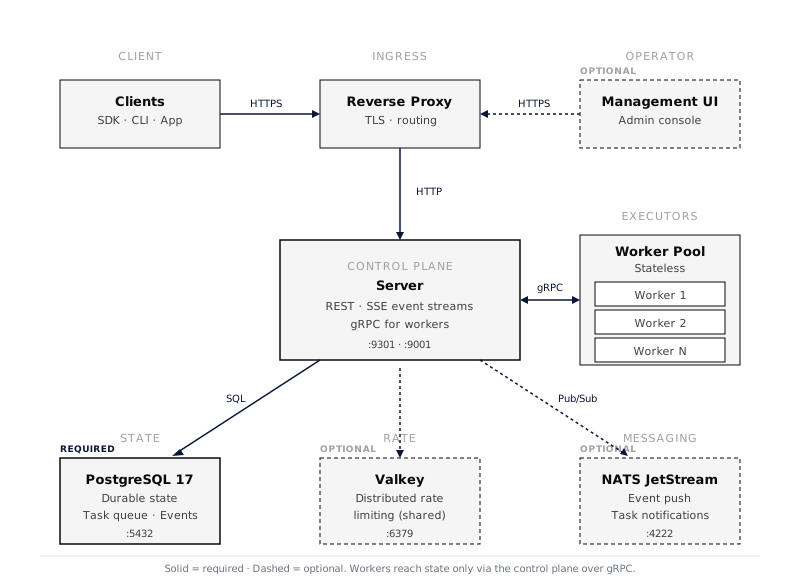 ## Components at a glance | Component | Role | Required | Default port | | ---------------------- | -------------------------------------------------------------------------------------- | ---------------------------------------------------------- | --------------------------- | | Reverse proxy | TLS termination and route fan-out for `/api`, `/mcp`, `/.well-known/*`, UI | Yes (or equivalent ingress) | 443 | | Control plane (server) | REST API, SSE event streams, gRPC server for workers, owns all state | Yes | 9301 (HTTP), 9001 (gRPC) | | Worker pool | Stateless executors of the agentic loop: each leases a session and runs its whole turn | Yes | – (outbound only) | | PostgreSQL 17 | Durable storage for agents, sessions, events, durable task queue | Yes | 5432 | | NATS | Live session events across control-plane instances, task notifications | Optional for one control-plane instance, required for more | 4222 | | Valkey | Distributed sliding-window rate limiting across control-plane instances | Optional | 6379 | | Management UI | Operator interface for agent and provider configuration | Optional | – (served by proxy) | | Tenant egress proxy | Gives tenant outbound traffic its own address, per-org limits and usage counts | Optional | 4750 (proxy), 4751 (health) | Workers never talk to PostgreSQL, NATS, or Valkey directly. Every read and write goes through the control plane’s gRPC service on port 9001. This is what lets workers run with no database credentials, no encryption keys, and no awareness of the data tier. ## PostgreSQL, the only required stateful component PostgreSQL holds the Platform’s authoritative metadata and session history. With the default `STORAGE_BLOB_BACKEND=db`, file and image bytes also live there. With `STORAGE_BLOB_BACKEND=s3`, bytes live in the configured object store, so recovery needs both the database and that store. Preserve the deployment’s encryption keys separately; a database backup alone cannot recover encrypted secrets. See [Object storage](https://everruns.com/docs/sre/environment-variables/#object-storage-s3-compatible-blob-backend). What lives in PostgreSQL: * Agents, sessions, messages, and durable events * The session leases workers run turns under, and the durable task queue for background work (both claimed via `SKIP LOCKED`) * Encrypted LLM provider credentials, MCP server registrations, capability config * Per-session virtual filesystems, knowledge bases, and the event log used for SSE replay Operational requirements: * **PostgreSQL 17.** UUIDv7 is implemented via a custom SQL function; PG 18’s native `uuidv7()` will be adopted once it is widely available on managed services. * **Direct connection for `LISTEN/NOTIFY`.** Pooled or proxied endpoints (PgBouncer, Neon `-pooler`, RDS Proxy) interleave notification frames with query traffic. Set `DATABASE_URL` to the pooled endpoint for normal queries and `DATABASE_UNPOOLED_URL` to a direct session-scoped endpoint for listeners. Startup fails fast if the configured listener URL looks pooled. * **Pool sizing.** With `EXPECTED_INSTANCES=N` set, each instance sizes its pool so that `pool × instances` stays under 80% of `PG_MAX_CONNECTIONS`. * **Migrations.** Auto-applied on server startup via embedded sqlx migrations, protected by a PostgreSQL advisory lock so multiple control-plane instances can boot together without racing. See [`docs/sre/environment-variables.md`](https://everruns.com/docs/sre/environment-variables/) for the full list of database-related variables. ## NATS, required for more than one control-plane instance Live session events (what a chat streams over SSE) are pushed from the instance that published them to the instances serving the clients. NATS carries that push between instances. How a control-plane instance delivers them depends on its setup, and `/health` reports the choice as `event_delivery`: | Setup | `event_delivery` | Behavior | | ---------------------------------------------------------------------------------------- | ---------------- | ------------------------------------------------------------------------------------------------------------------------------------------------------------------------------------------------------------------------------------------------------------------------------------------------------ | | `NATS_URL` set and reachable | `nats` | Events reach every instance. Delta events (`output.message.delta`, `reason.thinking.delta`, `tool.output.delta`, and voice transcript deltas) skip PostgreSQL and use Core NATS pub/sub without retained replay. Durable events still persist to PG, so SSE reconnection via `since_id` keeps working. | | One instance, no `NATS_URL` | `in_memory` | Events are pushed inside the one process. Every event, deltas included, is also written to PG. Correct for a single control-plane instance only. | | `NATS_URL` awaiting startup recovery, or `EXPECTED_INSTANCES` above 1 with no `NATS_URL` | `polling` | Each open stream polls PostgreSQL for new events (100 ms while busy, backing off to 1 s while quiet). Every event is written to PG. Streams stay correct across instances, at the cost of extra queries and latency. `/health` reports `status: degraded`, and the system doctor shows a warning. | Run more than one control-plane instance only with NATS, and set `EXPECTED_INSTANCES` so an instance started without NATS falls back to polling instead of in-memory delivery. The system doctor flags a problem when several instances run and any of them uses in-memory delivery, because clients on one instance would miss events published through another. If `NATS_URL` is configured but startup connection attempts fail, the server retries in the background every 30 seconds (each attempt is bounded to 20 seconds), while continuing to serve through PostgreSQL polling. Once connected, it cycles existing polling SSE streams with a `disconnecting` notice. Clients reconnect with their last durable cursor, subscribe before replay, and deduplicate overlapping durable events. `/health` and the system doctor then report `nats` instead of `polling`. Deployments without `NATS_URL` remain on their selected fallback. Live session delivery uses Core NATS pub/sub, not a retained JetStream event stream. Durable events are replayed from PostgreSQL and carry a persisted sequence/cursor. Events delivered ephemerally through NATS do not carry a durable sequence and must not advance the reconnect cursor. Token deltas remain best-effort, including during reconnects; completed messages remain in durable session history. NATS also carries task notifications: `task.available.{activity_type}` subjects replace PG `NOTIFY` for worker wakeup, dropping notification latency from about 30 ms to about 1 ms. Only the control plane connects to NATS; workers talk to the server via gRPC. ## Valkey, optional distributed rate limiting Valkey is a Redis-compatible key-value store (a Linux Foundation fork of Redis). Everruns uses it for exactly one thing: sliding-window rate limiting that is coordinated across control-plane instances. When `VALKEY_URL` is not set, rate limiting falls back to an in-memory governor, accurate per-instance, but with N instances behind a load balancer a single IP can consume up to N× the intended budget. Set `VALKEY_URL` when you run more than one control-plane instance and need a shared budget. Connection details: * Accepts `redis://`, `rediss://` (TLS), `valkey://`, `valkeys://` (TLS) schemes * Uses atomic Lua scripts for sliding-window counters * **Fail-open:** if Valkey is unreachable, the rate limiter allows the request rather than rejecting traffic on a side-channel outage * Only the control plane connects to Valkey; workers do not need access ## Worker pool, no shared state Workers are the most operationally boring component in the deployment. They have: * No database connection * No encryption key * No NATS or Valkey access * No durable local state For agent turns, workers lease a session from the control plane over gRPC and drive its whole reason–act loop, appending events through the control plane. If a worker dies, its session lease expires (10 seconds by default) and another worker reconstructs the unfinished turn from the event log. Fenced writes reject a displaced holder; external requests already in flight still require the tool’s recovery policy and idempotency. Background activities use a separate durable task queue and stale-task reaper. Add workers for throughput; remove them to save cost. See [Worker authentication](https://everruns.com/docs/sre/runbooks/durable-mode-setup/) for the `WORKER_GRPC_AUTH_TOKEN` and optional mTLS setup that secures this internal channel. ## Reverse proxy contract A reverse proxy (or platform ingress that enforces the same routes) is mandatory in production: | Route | Destination | Notes | | ---------------- | ------------- | ----------------------------------- | | `/api/*` | Control plane | Disable proxy buffering for SSE | | `/mcp` | Control plane | Do **not** rewrite under `/api` | | `/.well-known/*` | Control plane | OAuth discovery; do **not** rewrite | | `/health` | Control plane | Health check target | | Everything else | UI | If UI is deployed; otherwise 404 | TLS terminates at the proxy. Worker gRPC traffic stays on the private network, never expose port 9001 publicly. See [`local/Caddyfile`](https://github.com/everruns/everruns/blob/main/local/Caddyfile) and [`infra/docker-compose/docker-compose.yaml`](https://github.com/everruns/everruns/blob/main/infra/docker-compose/docker-compose.yaml) for working configurations. ## Outbound traffic The control plane and workers both make outbound calls, and Everruns splits them in two: * **Platform traffic** is what the deployment itself owns: LLM providers, the utility model, system email, sandbox provider APIs. It always leaves directly, from the deployment’s own address. * **Tenant traffic** is what an agent, a capability, an MCP server or an integration chooses: web fetches, tool calls to third-party APIs, remote MCP servers. Every such request goes through one boundary, the egress service, which applies the policy below and writes an audit line with its org, session and decision (`everruns::egress::audit` log target). ### Egress policy `EVERRUNS_EGRESS_POLICY` decides which public hosts tenant traffic may reach: | Mode | Behavior | | ---------------- | ---------------------------------------------------------------------------------------------------- | | `open` (default) | Any public host. | | `curated-writes` | GET and HEAD reach any public host; writes, MCP and integration traffic need the built-in allowlist. | | `curated-all` | Every request needs the allowlist. | In both curated modes a built-in deny list is checked first, URLs are capped at 2048 characters and IP-literal hosts are refused. An organization can be granted extra hosts or open egress for its own traffic; see [Network Access Control](https://everruns.com/docs/advanced/network-access/). Private, loopback and cloud metadata addresses are refused in every mode, with DNS pinned so a lookup cannot be swapped between the check and the connection. ### Tenant egress proxy Set `EVERRUNS_EGRESS_PROXY_URL` and `EVERRUNS_EGRESS_PROXY_SECRET` on the control plane and workers, and tenant traffic leaves through `everruns-egress-proxy` instead of directly. Platform traffic never uses it. You get two things: * **Its own outbound address.** Give the proxy host a separate public IP. If a tenant’s traffic gets that address blocked somewhere, model calls, email and billing keep working, and the address can be replaced without touching the rest of the deployment. * **Per-org limits and usage.** Each request carries a five-minute token, signed with the shared secret, that names its org and session. The proxy verifies the token, resolves the destination again and refuses non-public addresses and SMTP ports, applies per-org caps, and counts bytes and requests per org and session each minute. The binary ships in the server image. Limits are off unless you set them, and usage goes to the log (`everruns::egress::usage` target). A control endpoint (`EGRESS_PROXY_CONTROL_URL`) can supply limits per org and receive usage instead. A proxy URL with a missing or short secret fails closed: tenant requests error rather than leave directly. Variables: [Tenant egress proxy](https://everruns.com/docs/sre/environment-variables/#tenant-egress-proxy).
```bash
# Proxy host
EVERRUNS_EGRESS_PROXY_SECRET=<32+ random bytes>
EGRESS_PROXY_ORG_RPM=600 # optional caps
EGRESS_PROXY_ORG_BYTES_PER_DAY=5000000000
everruns-egress-proxy
# Control plane and workers
EVERRUNS_EGRESS_PROXY_URL=http://egress-proxy:4750
EVERRUNS_EGRESS_PROXY_SECRET=
```
## Development modes The same binaries collapse into smaller deployments for local work: * **`DEV_MODE=true` (single process).** Nothing to install or run beside the binary: the server starts a temporary PostgreSQL of its own and deletes it on exit. Execution runs in-process inside the server binary; the gRPC server is disabled. Data is lost on restart. Useful for UI iteration and API development. * **`just start-all` (full local).** Brings up PostgreSQL, Valkey, and NATS as local processes (no Docker required) and starts the server + worker against them. Mirrors production wiring on a single machine. * **Docker Compose.** The production-shaped topology in one machine; see [Docker Compose](https://everruns.com/docs/getting-started/docker-compose/). ## Multi-instance deployment Multiple control-plane instances can run behind a load balancer with no session affinity: | Concern | How it stays correct | | ---------------------- | --------------------------------------------------------------------------------------------------------------------------------------------------------------------- | | Database connections | `EXPECTED_INSTANCES=N` divides the pool so `pool × instances ≤ 80% of PG_MAX_CONNECTIONS` | | SSE delivery | NATS subjects fan out to every instance (required for more than one instance; without it, instances poll PostgreSQL and report `degraded`); reconnects are idempotent | | Turn and task claiming | `SKIP LOCKED` on session leases and the durable task queue partitions work naturally; a session’s fenced lease keeps one worker on it | | Migrations | PostgreSQL advisory lock prevents concurrent runs | | Rate limits | Valkey-backed sliding-window counters are shared; in-memory falls back to per-instance | Workers do not require coordination, add as many as you need, in as many regions as you need, as long as they can reach the control-plane gRPC port. ## Further reading * [Architecture (Getting Started)](https://everruns.com/docs/explanation/architecture/), the logical model * [Environment Variables](https://everruns.com/docs/sre/environment-variables/), every knob and its default * [Network Access Control](https://everruns.com/docs/advanced/network-access/), per-agent and per-org outbound rules * [Docker Compose](https://everruns.com/docs/getting-started/docker-compose/), a production-shaped local setup * [Custom backends](https://everruns.com/docs/framework/custom-backends/), low-level execution-host composition
---
# Tool Output Pipeline
> How Everruns processes tool results from execution to the model, verbosity budgets, distillation, persistence, hard limits, and where the full output lives
Source:
Agents generate most of their context from **tool output**: shell commands, file reads, web fetches, SQL queries, and MCP tool calls. Left unmanaged, a single verbose command (`git diff`, a 10,000-row query, an installer log) can blow past the model’s context window, drive up cost, and bury the signal the agent actually needs. Everruns runs every tool result through a **multi-stage pipeline** that shrinks what the model sees while keeping the full original recoverable. This page explains each stage, the order they run in, and, crucially, *where the full output goes* so the agent can get it back. ## The big picture
```plaintext
tool runs
│
▼
raw output ──────────────────────────────────────────────┐
│ │ (full, lossless)
▼ │
1. Verbosity budget (exec/sandbox tools only) │
│ auto/concise/normal/verbose/full │
▼ │
2. Capability hooks │
│ • Tool Output Distillation (non-exec tools) │
▼ ▼
3. Final infrastructure hooks /outputs/
│ • Persist Output (exec tools → VFS) {tool_call_id}.stdout
│ • Output Hard Limit (64 KiB ceiling) {tool_call_id}.stderr
▼ ▲
inline result → stored in the session, │
shown to the model next turn ──────────────────────┘
(read_file recovers the full original)
```
Two ideas run through the whole pipeline: 1. **Storage stays lossless.** Whatever the model sees inline, the full output is written to the session filesystem (the *destination*). The inline view always carries a pointer back to it. 2. **Each stage shrinks, none deletes.** Truncation, distillation, and masking only change the *view*. The agent can always `read_file` the persisted original. ## Stage 1: Verbosity budget (exec tools) Exec and sandbox tools (`bash`, `*_exec`, sandboxed shells) clean their output (strip ANSI, collapse carriage returns) and apply a **verbosity budget** before returning. The mode is configurable per call; the default is `auto`: * **Success (`exit_code == 0`)** → collapse to a compact summary (\~512 bytes), because the full log is persisted (Stage 3) and the agent rarely needs it inline. * **Failure (non-zero exit)** → keep a larger diagnostic window (\~8 KiB) so the error stays debuggable in-loop. The full pre-truncation output is stashed on the result as `raw_output` for the persistence hook to consume. Non-exec tools (MCP, web fetch, client tools) do **not** have a verbosity budget, that gap is what Stage 2 exists for. ## Stage 2: Tool Output Distillation (non-exec tools) [Tool Output Distillation](https://everruns.com/docs/capabilities/) targets the tools Stage 1 doesn’t: **MCP tools and `web_fetch`**, whose results otherwise enter history verbatim. It runs as a capability hook, so it executes *before* the final hooks. For a large non-exec result, distillation produces a compact, **content-aware** inline view: | Output shape | What you get inline | | ---------------- | ---------------------------------------------------------------------------- | | Large JSON array | Schema-preserving sample: the first few rows + `[… N more items elided …]` | | Long string | Head + tail window (both ends preserved), with a byte-elision marker | | Unified diff | A diffstat-style summary: file + hunk headers and `+added / -removed` counts | | Nested object | Each oversized field distilled; small fields untouched | Before it replaces anything, distillation **persists the full original** to the session filesystem (same destination as Stage 3) and injects a recovery pointer. If persistence fails, or the session has no filesystem, it restores the verbatim output rather than leave a lossy result the agent can’t recover. **Reversibility is never sacrificed.** Distillation is on by default in **Worker** and the harnesses built on it. Every transform is deterministic, so identical output distills identically and the model provider’s prompt cache keeps hitting across turns. ## Stage 3: Persistence and the hard limit Two infrastructure hooks always run last, in order: 1. **Persist Output**: for tools that declare the `persist_output` hint (exec/sandbox), writes the full `raw_output` to the session VFS. When content is absent from the inline result, it adds a recovery pointer; complete inline results keep the retained file internal and do not invite a redundant read. It **skips** if a result already carries `output_files` (e.g. distillation already persisted it), so the two never double-write. 2. **Output Hard Limit**: a final, unremovable 64 KiB ceiling. By the time it runs, the result has usually already been budgeted or distilled, so it rarely fires; it’s a backstop against pathological cases. ## The destination, where full output lives Everything the pipeline elides is recoverable from the **session filesystem**:
```plaintext
/outputs/{tool_call_id}.stdout ← full standard output
/outputs/{tool_call_id}.stderr ← full standard error (when present)
```
When the inline result omits persisted content, it carries the recovery pointer in `output_files` and `full_output`, plus a human-readable note telling the model to use `read_file` (with `offset`/`limit`) for the missing detail. Complete inline output has no model-facing pointer. Persisted streams are capped at 1 MiB each. Deleting the session cascades and removes them. This is the key to aggressive shrinking: because the original is one `read_file` away, the inline view can be small without the agent losing the ability to drill in. ## How this relates to compaction The pipeline above operates on **individual tool results at capture time**. [Context Compaction](https://everruns.com/docs/advanced/compaction/) operates **later**, across the whole conversation, when it approaches the context window, masking or summarizing older messages at serialization time. They compose cleanly: * The pipeline keeps each result lean as it’s produced. * Compaction further masks older results when the *accumulated* history grows too large. * [Infinity Context](https://everruns.com/docs/capabilities/) adds a `query_history` tool to retrieve older *messages* that scrolled out of the window. Together: the pipeline controls per-result size, compaction controls total-history size, and both keep the full record recoverable. ## Summary | Stage | Applies to | Effect | Destination of full output | | ----------------- | -------------------------- | -------------------------------------------------------- | --------------------------------------------- | | Verbosity budget | exec/sandbox | Compact summary on success, diagnostic window on failure | `raw_output` → persisted in Stage 3 | | Distillation | MCP / web fetch / non-exec | Content-aware compact view | `/outputs/{id}.stdout` | | Persist Output | `persist_output` tools | Lossless write + pointer | `/outputs/{id}.{stdout,stderr}` | | Output Hard Limit | all | 64 KiB ceiling backstop | (already persisted) | The agent always sees a lean view and can always recover the full original with `read_file`.
---
# A2A (Agent2Agent)
> Let other agents call an Everruns agent over the A2A 1.0 protocol, and let an Everruns agent delegate work to external A2A agents.
Source:
[A2A](https://a2a-protocol.org) is an open protocol for agents to call each other over HTTP. Everruns supports it in both directions: * **Inbound**: an A2A channel makes an Everruns agent callable by any A2A client, such as another vendor’s agent, the official `a2a` CLI, or the A2A Inspector. * **Outbound**: the `a2a_agent_delegation` capability lets an Everruns agent hand work to external A2A agents through `spawn_agent`. Both speak A2A 1.0. The inbound channel also answers A2A 0.3 clients on the same URL. Framework apps can serve their agents over A2A too. See [A2A in the Framework](#a2a-in-the-framework). ## Expose an agent over A2A An A2A channel belongs to an agent. Create it through the API with a key you generate. Everruns stores only the key’s SHA-256 hash, so keep the plaintext somewhere safe.
```bash
EVERRUNS=https://your-everruns-host/api
KEY="evra2a_$(openssl rand -hex 32)"
HASH=$(printf %s "$KEY" | sha256sum | cut -d' ' -f1)
curl -sS -X POST "$EVERRUNS/v1/agents/$AGENT_ID/channels" \
-H "Authorization: Bearer $EVERRUNS_API_KEY" \
-H 'Content-Type: application/json' \
-d "{
\"channel_type\": \"a2a\",
\"channel_config\": {
\"session_mode\": \"session_per_invocation\",
\"message\": \"{{a2a.text}}\",
\"agent_card_name\": \"Research agent\",
\"agent_card_description\": \"Researches a topic and returns notes.\",
\"api_key_hash\": \"$HASH\",
\"api_key_prefix\": \"${KEY:0:15}...\"
}
}"
```
The response carries the channel `id`. Publish it so it accepts traffic:
```bash
curl -sS -X POST "$EVERRUNS/v1/agents/$AGENT_ID/channels/$CHANNEL_ID/publish" \
-H "Authorization: Bearer $EVERRUNS_API_KEY"
```
The channel then serves: | Path | What it is | | --------------------------------------------------------------- | ------------------------------------------------------------------------ | | `POST /v1/channels/{channel_id}/a2a` | The A2A JSON-RPC endpoint. Needs `Authorization: Bearer `. | | `/v1/channels/{channel_id}/a2a/message:send`, `/tasks`, … | The same operations over A2A’s plain HTTP binding (HTTP+JSON). Same key. | | `GET /v1/channels/{channel_id}/a2a/.well-known/agent-card.json` | The public Agent Card, served only while the channel is live. | When the agent has an avatar, the Agent Card carries it as `iconUrl`: the 256 px square preset, on the same origin as the card. ### Configuration | Field | Description | | ------------------------------------------- | ----------------------------------------------------------------------------------------------------------------------------------------------------------------------------------------------------------- | | `session_mode` | `session_per_invocation` starts a fresh session for each new task. `shared_session` sends every call into one long-lived session. | | `message` | Template for the user message the agent receives. `{{a2a.text}}` is the caller’s text parts joined by newlines; `a2a.task_id`, `a2a.context_id`, and `payload` (the raw request params) are also available. | | `agent_card_name`, `agent_card_description` | Shown in the Agent Card. They default to the agent’s name and description. | | `rate_limit_per_minute` | Optional per-caller-IP limit for this channel. Over the limit, calls get HTTP 429. | | `signing_secret` | Optional. When set, every request must also carry an HMAC signature of its body. | Instead of a generated key, a channel can use the shared channel auth modes: HTTP Basic, OIDC or Google JWT bearer tokens, OAuth2 token introspection, or mTLS. The Agent Card advertises whichever scheme is in use and never includes a credential. ### Call it Any A2A 1.0 client works. With the official [`a2a` CLI](https://github.com/a2aproject/a2a-go):
```bash
CARD="$EVERRUNS/v1/channels/$CHANNEL_ID/a2a/.well-known/agent-card.json"
a2a card get -a "$CARD"
a2a send -a "$CARD" --auth "Bearer $KEY" "Summarize the A2A spec in three bullets."
a2a send -a "$CARD" --auth "Bearer $KEY" --stream "Explain A2A tasks in one sentence."
```
Or with plain JSON-RPC:
```bash
curl -sS -X POST "$EVERRUNS/v1/channels/$CHANNEL_ID/a2a" \
-H "Authorization: Bearer $KEY" \
-H 'Content-Type: application/json' \
-H 'A2A-Version: 1.0' \
-d '{
"jsonrpc": "2.0",
"id": 1,
"method": "SendMessage",
"params": {
"message": {
"role": "ROLE_USER",
"messageId": "msg-1",
"parts": [{ "text": "Summarize the A2A spec in three bullets." }]
}
}
}'
```
`SendMessage` waits for the turn to finish and returns the task with the agent’s reply as a `response` artifact. Set `"configuration": { "returnImmediately": true }` to get the task back at once and follow it with `GetTask`, `SubscribeToTask`, or a push notification. The `A2A-Version` header picks the wire format: `1.0`, or `0.3` for older clients. Without it, 1.0 method names such as `SendMessage` are answered in 1.0 and 0.3 names such as `message/send` in 0.3. Clients that speak A2A’s plain HTTP binding (HTTP+JSON) use paths below the same URL instead of a JSON-RPC envelope. The Agent Card lists both bindings. This binding is A2A 1.0 only:
```bash
curl -sS -X POST "$EVERRUNS/v1/channels/$CHANNEL_ID/a2a/message:send" \
-H "Authorization: Bearer $KEY" \
-H 'Content-Type: application/a2a+json' \
-d '{
"message": {
"role": "ROLE_USER",
"messageId": "msg-1",
"parts": [{ "text": "Summarize the A2A spec in three bullets." }]
}
}'
```
| HTTP+JSON | Operation | | ------------------------------------------------------------------------------------------------------------- | ------------------------------------------------------- | | `POST message:send`, `POST message:stream` | `SendMessage`, `SendStreamingMessage` | | `GET tasks/{id}`, `GET tasks?…`, `POST tasks/{id}:cancel`, `POST tasks/{id}:subscribe` | `GetTask`, `ListTasks`, `CancelTask`, `SubscribeToTask` | | `POST`/`GET tasks/{id}/pushNotificationConfigs`, `GET`/`DELETE tasks/{id}/pushNotificationConfigs/{configId}` | The push notification config operations | Errors come back with the matching HTTP status and a `google.rpc.Status` body whose `details[0].reason` names the A2A error, for example `TASK_NOT_FOUND`. ### Supported methods | A2A 1.0 | A2A 0.3 | Notes | | -------------------------------------------------------------- | ----------------------------------------------------------- | ------------------------------------------------------------------------------------------------------------------------------------------------------------------------------ | | `SendMessage` | `message/send` | A `taskId` or `contextId` from an earlier reply continues that conversation. | | `SendStreamingMessage` | `message/stream` | Server-sent events: the task, then the reply as an artifact, then the final status. Needs `session_mode: session_per_invocation`; a `shared_session` channel answers `-32004`. | | `GetTask` | `tasks/get` | Current state and the latest turn’s reply. | | `ListTasks` | `tasks/list` | This channel’s tasks, newest first, filtered by `contextId`, `status`, or `statusTimestampAfter`, with `pageSize` and `pageToken` paging. | | `SubscribeToTask` | `tasks/resubscribe` | Reattach a stream to a running task. A finished task answers `-32004`. | | `CancelTask` | `tasks/cancel` | Cancels the running turn. A finished task answers `-32002`. | | `CreateTaskPushNotificationConfig`, `Get…`, `List…`, `Delete…` | `tasks/pushNotificationConfig/set`, `get`, `list`, `delete` | Webhooks for a task. See below. | The extended Agent Card is not offered (`-32007`). A task’s id is the id of the Everruns session that runs it, and its `contextId` is the same value. A caller can only see and continue tasks started through its own channel. ### Push notifications Register a webhook on a task, or pass one in `SendMessage` as `configuration.taskPushNotificationConfig`:
```json
{
"jsonrpc": "2.0",
"id": 2,
"method": "CreateTaskPushNotificationConfig",
"params": {
"taskId": "",
"id": "my-hook",
"url": "https://hooks.example.com/a2a",
"token": "opaque-value-you-check",
"authentication": { "scheme": "Bearer", "credentials": "hook-secret" }
}
}
```
When the task completes, fails, is canceled, or stops to ask a question, Everruns POSTs the full task (`{ "task": … }`, `Content-Type: application/a2a+json`) to each registered URL. The `token` arrives as `X-A2A-Notification-Token` and `authentication` as `Authorization: {scheme} {credentials}`. Both are stored encrypted and are never returned by `Get` or `List`. A task holds at most ten configs. URLs must be public `https`; private, loopback, and cloud metadata addresses are rejected. A failed delivery is retried twice and dropped on a 4xx other than 429, so treat `GetTask` as the source of truth. ### Questions and approvals When the agent asks a question with `ask_user`, the task goes to `input-required`. The status message carries the question as text and as an `everruns/ask_user` data part with a JSON Schema for the answer. Answer it with `SendMessage` on the same `taskId`. A question that asks for a secret reports `auth-required` instead and links to the session, so a person provides the value in Everruns rather than through another agent. ### Reactions The Agent Card lists the extension `https://everruns.com/ext/a2a/reactions/v1`. To react to one of the agent’s replies, send `SendMessage` on the same `taskId` with a single data part under `everruns/reaction`. `messageId` is the reply’s artifact id, and `action` is `added` or `removed`:
```json
{
"message": {
"role": "user",
"messageId": "m-2",
"taskId": "session_...",
"parts": [{ "kind": "data", "data": { "everruns/reaction": {
"messageId": "message_...", "emoji": "👍", "action": "added"
} } }]
}
}
```
The reaction is stored like any other and does not start a turn by itself. The agent reads it as a short note, as its Reactions setting says. The answer is the task. ### Personal agents (PACT) [PACT](https://github.com/openpactprotocol/openpactprotocol) (Personal Agent Consent and Trust) is how a person’s own agent, such as an assistant on their phone, talks to a company’s agent on their behalf. Everruns implements the PACT Identity profile. Add `pact` to an A2A channel’s config to serve it:
```json
{
"pact": {
"audience": "everruns-acme",
"personal_agents": [
{ "issuer": "https://pa.example", "jwks_uri": "https://pa.example/.well-known/jwks.json" }
]
}
}
```
| Field | Description | | -------------------------------------- | ---------------------------------------------------------------------------------------- | | `audience` | The value personal agents put in the token’s `aud`. Use the same value on every channel. | | `personal_agents[].issuer` | The personal agent’s `iss`, matched exactly. Any other issuer is refused. | | `personal_agents[].jwks_uri` or `jwks` | Where its public keys are: an HTTPS URL, or the JWKS document inline. | | `personal_agents[].enabled` | `false` refuses that personal agent. Defaults to `true`. | The channel is then also served at `/v1/channels/{channel_id}/a2a/pact`, with its PACT Agent Card at `/v1/channels/{channel_id}/a2a/pact/.well-known/agent-card.json`. Each request carries a short-lived ES256 or RS256 JWT that the personal agent signs for one of its users (`sub`). `message:send` answers with the agent’s reply as a Message. Its `contextId` continues the conversation for that same user only, and a retried `messageId` returns the stored reply instead of running the agent again. There are no tasks, streaming or push notifications on this URL. The channel’s ordinary A2A URL keeps working with its own key. #### Acting on the user’s account (PACT Delegated) With `pact.delegation`, the user can let their personal agent act on their account with your company. The user signs in on your own login page, picks what to allow on an Everruns consent page, and the personal agent receives a delegation token for exactly those permissions (OAuth 2.0 device code).
```json
{
"pact": {
"audience": "everruns-acme",
"personal_agents": [{ "issuer": "https://pa.example", "jwks_uri": "https://pa.example/.well-known/jwks.json" }],
"delegation": {
"brand_name": "Acme",
"login_url": "https://acme.example/pact/login",
"login_issuer": "https://acme.example",
"login_jwks_uri": "https://acme.example/.well-known/jwks.json",
"connected_url": "https://acme.example/pact/connected",
"mcp_server": "acme-account",
"scopes": [
{ "id": "orders:read", "description": "See your orders", "tools": ["mcp_acme_account__list_orders"] },
{ "id": "orders:cancel", "description": "Cancel your orders", "tools": ["mcp_acme_account__cancel_order"] }
]
}
}
}
```
| Field | Description | | -------------------------------- | --------------------------------------------------------------------------------------------------------------------------------------------------------------------------------------------------------------------------------------------------------------------------------------------------------------------------------- | | `login_url` | Your login page. The user arrives with `return_to` set to the Everruns consent page. After signing them in, your site POSTs a form field `assertion` to that URL: an ES256 or RS256 JWT with `iss`, `aud` (the consent URL), `sub` (your user id), `jti`, `iat`, `exp` (at most five minutes) and `user_code` (from `return_to`). | | `login_issuer` | The assertion’s `iss`, matched exactly. | | `login_jwks_uri` or `login_jwks` | The keys you sign assertions with: an HTTPS URL, or the JWKS document inline. | | `connected_url` | Optional. Where the user lands afterwards, with `status=approved` or `denied`, `scope` and `client` added. | | `mcp_server` | Optional. The org’s MCP server for your account API. Attach it to the agent with `actsAs: user`; during a delegated turn the user’s token is its bearer token. | | `scopes[]` | The permissions offered: `id`, the `description` the user sees, and the agent `tools` each one unlocks. | | `brand_name` | Optional. Your name on the consent page. Defaults to the agent’s name. | Login and connected pages may use plain `http://` on `localhost` for local development. The OAuth endpoints live under `/v1/channels/{channel_id}/a2a/pact/oauth/`, with metadata at `.well-known/oauth-authorization-server` and the signing keys at `jwks.json`. Your account API verifies the delegation tokens against those keys: `typ` is `at+jwt`, `iss` is the `oauth` URL, `aud` the endpoint URL, `sub` your user id, and `scope` the granted permissions. Check the scope on every call. The personal agent sends the token in `X-A2A-User-Delegation: Bearer …` beside its own JWT. The turn then runs as that user. If the agent calls a tool a scope lists and the user has not granted that scope, the answer is a task in `TASK_STATE_AUTH_REQUIRED` whose metadata names the missing scopes (`pact.missingScopes`) and a sign-in link asking for them (`pact.verificationUriComplete`). Every reply under a token carries a signed receipt in `metadata["pact.receipt"]` listing the scoped tools that ran. A conversation started for one of your users does not continue with another user’s token. ## Delegate to external A2A agents The `a2a_agent_delegation` capability gives an agent a `spawn_agent` target of type `external_a2a`. The agents it may call are fixed in the capability’s configuration, so the model can never reach a URL you did not list:
```json
{
"agents": [
{
"id": "research",
"name": "Research agent",
"description": "Researches a topic and returns notes.",
"base_url": "https://agents.example.com/research"
}
]
}
```
`base_url` is where the Agent Card is resolved (`{base_url}/.well-known/agent-card.json`). The model then calls:
```json
{
"instructions": "Research tide pools and return five bullet notes.",
"target": { "type": "external_a2a", "id": "research" },
"mode": "foreground"
}
```
`foreground` waits for the remote task and returns its reply. `background` returns a `task_id` at once and wakes the session when the remote task finishes; the generic `wait_task`, `message_task`, and `cancel_task` tools work on it. Pass `result_schema` to require a structured result. URLs are checked before every call: localhost, private ranges, and metadata addresses are refused, resolved addresses are pinned, and redirects are not followed. `allow_local_urls: true` lifts the address check only when `DEPLOYMENT_GRADE=dev`. > **Status:** On the hosted platform, outbound delegation is experimental and available in Dev environments. ## A2A in the Framework In a [Framework](https://everruns.com/docs/framework/) app (full guide: [Framework A2A](https://everruns.com/docs/framework/a2a/)): * To **serve** agents over A2A, turn on the `a2a` feature of `everruns-serve`. Every top-level agent then answers at `POST /v1/channels/{agent}/a2a`, the same path shape as an Everruns channel. See [Serve](https://everruns.com/docs/framework/serve/#a2a). * To **delegate** to A2A agents, turn on the `a2a` feature of `everruns` and add `CapabilityRef::new("a2a_agent_delegation")` with the config above. The [A2A example](https://github.com/everruns/everruns/tree/main/examples/serve/a2a) example does both. A `researcher` agent is served over A2A, and a `writer` agent delegates research to it and drafts from its notes. It runs offline by default and on OpenAI when `OPENAI_API_KEY` is set:
```bash
cargo run -p serve-example-a2a --bin researcher # serves on :3000
cargo run -p serve-example-a2a --bin writer -- "tide pools"
```
## See also * [Sub-agents](https://everruns.com/docs/capabilities/sub-agents/), the shared `spawn_agent` tool. * [ARD Discovery](https://everruns.com/docs/integrations/ard/), for finding A2A agents at runtime. * [Channels](https://everruns.com/docs/features/channels/), for channel lifecycle and legacy routes. ## Watch PACT account consent A personal agent checks an order, receives a request for additional permission when cancellation is refused, and verifies the signed receipt after the customer approves. This is a local walkthrough with a demo client and synthetic store data. [PACT account consent and signed receipts in Everruns](https://www.youtube-nocookie.com/embed/9FZiYv5PsWY?rel=0) [Watch on YouTube](https://www.youtube.com/watch?v=9FZiYv5PsWY).
---
# Agent API
> Call one agent from your own code with an agent key. Reference for its base URL, keys, routes, auth, channel settings, streaming, retries, errors and SDKs.
Source:
The **Agent API** exposes one Agent to your own code. An Agent API channel (`channel_type: "api"`) gives the Agent its own **base URL**, and callers use an **agent key** (`evr_ak_…`) to start sessions, send messages, follow events, answer questions and approve tool calls on that Agent. A key reaches only this one channel’s routes. It cannot read or change agents, harnesses, other sessions or anything else in the management API, so you can hand it to an application without handing over your account. For a step-by-step walkthrough, see [Call your agent from code](https://everruns.com/docs/how-to/call-your-agent-from-code/). This page is the reference. ## Base URL Every route on this page is relative to the agent base URL. The channel’s page in the console shows it as the **agent URL**. | Host | Agent base URL | | --------------------------------------------------------- | --------------------------------------------------------- | | The Everruns demo instance | `https://app.everruns.com/api/v1/channels/{channel_id}` | | Self-hosted Platform | `https://your-everruns-host/api/v1/channels/{channel_id}` | | A [serve](https://everruns.com/docs/framework/serve/) app | `http://localhost:3000/v1/channels/{agent}` | `{channel_id}` is the channel’s own ID (`appchan_…`), not the Agent’s. In a serve app it is the agent’s name. The shapes are the same on both hosts, so one client works against either; see [The same API on serve](#the-same-api-on-serve). ## Set up a channel **In the console:** 1. Open the Agent and select the **Channels and triggers** tab. 2. Select **Add channel**, choose **Agent API**, adjust its settings and select **Create channel**. 3. Select **Publish**. A channel serves traffic only while it is live, its Agent is active and the Agent’s exposures are not suspended. See [Channel lifecycle](https://everruns.com/docs/features/channels/#channel-lifecycle). 4. On the channel page, select **Create key** in the **Agent keys** card and copy the secret. It is shown once. **With the management API**, authenticated as a member who can manage the Agent:
```bash
# Create the channel. Every setting in channel_config is optional.
curl -X POST "$EVERRUNS_API/v1/agents/$AGENT_ID/channels" \
-H "Authorization: Bearer $EVERRUNS_API_KEY" -H "Content-Type: application/json" \
-d '{"channel_type": "api", "channel_config": {"visibility": "activity"}}'
# Publish it (needs the dangerous Agent permission, Owner by default).
curl -X POST "$EVERRUNS_API/v1/agents/$AGENT_ID/channels/$CHANNEL_ID/publish" \
-H "Authorization: Bearer $EVERRUNS_API_KEY"
```
**With the CLI:**
```bash
everruns agents channels create --agent-id "$AGENT_ID" --channel-type api --channel-config '{}'
everruns agents channels publish --agent-id "$AGENT_ID" --channel-id "$CHANNEL_ID"
everruns agents channels keys create --agent-id "$AGENT_ID" --channel-id "$CHANNEL_ID" --name "Support backend"
```
Change settings later with `PATCH /v1/agents/{agent_id}/channels/{channel_id}` and a new `channel_config`. Changing a live channel’s configuration needs the same dangerous Agent permission as publishing. ## Agent keys An agent key is the credential of one application. Keys belong to the organization, not to the member who created them, so a key keeps working when its creator leaves. Everruns stores only a hash and a display prefix; the secret appears once, in the response that creates or rotates it. | Method | Path (management API) | What it does | | ------ | ------------------------------------------------------------------ | ------------------------------------------------------ | | GET | `/v1/agents/{agent_id}/channels/{channel_id}/keys` | List the channel’s keys, newest first, without secrets | | POST | `/v1/agents/{agent_id}/channels/{channel_id}/keys` | Create a key | | POST | `/v1/agents/{agent_id}/channels/{channel_id}/keys/{key_id}/rotate` | Replace the secret, keeping the key’s ID | | POST | `/v1/agents/{agent_id}/channels/{channel_id}/keys/{key_id}/revoke` | Stop the key for good | ### Create
```bash
curl -X POST "$EVERRUNS_API/v1/agents/$AGENT_ID/channels/$CHANNEL_ID/keys" \
-H "Authorization: Bearer $EVERRUNS_API_KEY" -H "Content-Type: application/json" \
-d '{"name": "Support backend", "permissions": ["end_user"]}'
```
| Field | Required | Meaning | | ------------- | -------- | ------------------------------------------------------------------------------------------------------------------------------------------ | | `name` | Yes | Display name, 1 to 128 characters. Name the application that holds the key, so you know which one to revoke. | | `expires_at` | No | RFC 3339 time when the key stops working. Must be in the future. Omit for no expiry. | | `permissions` | No | Every key has `sessions`, the Agent API routes. Add `end_user` to let the key act for your application’s users with the `End-User` header. | The response is `201` with the key and its `secret`:
```json
{
"id": "agentkey_01933b5a000070008000000000000001",
"channel_id": "appchan_01933b5a000070008000000000000001",
"name": "Support backend",
"prefix": "evr_ak_1a2b3c4d...",
"permissions": ["sessions", "end_user"],
"created_at": "2026-10-13T09:00:00Z",
"secret": "evr_ak_1a2b3c4d…"
}
```
Later reads return the same fields without `secret`, plus `expires_at`, `previous_valid_until`, `last_used_at` (updated at most once a minute) and `revoked_at` when they are set. A channel holds at most 50 live keys; revoke one before creating more. ### Rotate `POST …/keys/{key_id}/rotate` with an optional `{"overlap_hours": 24}` returns a new `secret` for the same key ID. The replaced secret keeps working for the overlap, from 0 to 168 hours, 24 by default, and `previous_valid_until` says until when. Deploy the new secret within that window. Sessions the key started stay reachable, because they belong to the key’s ID, not its secret. ### Revoke `POST …/keys/{key_id}/revoke` stops the key immediately, including a previous secret still inside its rotation overlap. A revoked key never works again. ## Authentication Every request to the Agent API sends `Authorization: Bearer `. The credential decides who the **caller** is, and a caller sees only its own sessions. | Credential | Caller | How to get it | | ------------------------------------------------ | --------------------------------------------- | ----------------------------------------------------------- | | Agent key `evr_ak_…` | The application holding the key | [Agent keys](#agent-keys) | | Agent key with `end_user`, plus `End-User: ` | One of your application’s users | [End users](#end-users) | | Runtime token | The end user it was minted for | [Runtime tokens for browsers](#runtime-tokens-for-browsers) | | A token from your identity provider | The token’s subject, as an end user | [Your identity provider](#your-identity-provider) | | Personal access token `evr_pat_…` | A member of your organization, as an end user | [Organization members](#organization-members) | Keys of a retired `api_endpoint` channel (`evr_app_…`) were imported when the channel converted and keep working the same way as agent keys. ### End users A key acting as itself is your application: every request it sends shares one set of sessions. To keep your users apart, create the key with `"permissions": ["end_user"]` and send `End-User` with each request:
```bash
curl -X POST "$EVERRUNS_AGENT_URL/sessions" \
-H "Authorization: Bearer $EVERRUNS_AGENT_KEY" \
-H "End-User: customer-42"
```
The ID is yours: up to 256 characters, no control characters and no leading or trailing spaces. Everruns creates an end user for it on first sight, scoped to the key, so two applications with different keys never collide on the same ID. Sessions an end user starts belong to that end user: the key acting as itself, or for another user, gets `404` for them. The Agent’s per-user connections (tools that act as the user) use that end user’s own connections, never the key holder’s. `End-User` from a key without `end_user`, a malformed ID, or `End-User` sent with any credential other than an agent key answers `403`. ### Runtime tokens for browsers Never ship an agent key in a browser or mobile app. Your backend exchanges it for a short-lived token for one user and hands the app that token:
```bash
curl -X POST "$EVERRUNS_AGENT_URL/runtime-auth" \
-H "Authorization: Bearer $EVERRUNS_AGENT_KEY" \
-H "End-User: customer-42"
```
```json
{
"access_token": "eyJhbGciOi…",
"token_type": "Bearer",
"expires_in": 900,
"virtual_user_id": "identity_01933b5a000070008000000000000001"
}
```
The token lasts 15 minutes, works only on this channel, and cannot be exchanged for another, so a leaked token cannot renew itself. `/runtime-auth` also accepts a token from one of the channel’s `auth_methods`. A key without `End-User` gets `400`: a key acting as itself is an application, not a user. The page calls the channel with `Authorization: Bearer `. List the page’s origin in [`cors_origins`](#channel-settings) so the browser allows the cross-origin calls. Callers with a runtime token always get the public error codes. ### Your identity provider `auth_methods` lists up to 5 identity providers whose access tokens the channel accepts besides agent keys: `oidc` (JWTs checked against the issuer’s discovery keys), `google_oidc` (Google Sign-In ID tokens) and `oauth2_introspection` (opaque tokens checked at an RFC 7662 endpoint). Each token’s subject becomes its own end user. Everruns only validates these tokens; it never issues them.
```json
{
"auth_methods": [
{
"mode": "oidc",
"provider": {
"type": "oidc",
"issuer": "https://login.example.com"
},
"requirements": {
"audiences": ["api://support-agent"],
"scopes": ["agent:invoke"]
}
}
]
}
```
`requirements` can also restrict `subjects`, `groups`, email `domains` and exact `claims` values. A token that matches no method answers `401`. ### Organization members Set `org_members` to `true` to let members of your organization call the Agent with their own personal access token. Each member runs as their own end user with their own connections, as in the console. Only a full-access token counts: a read-only token answers `403` with `insufficient_scope`, because running an Agent is a write. Console session tokens are not accepted. ## Channel settings Set these in the channel’s `channel_config`, or in the console form. Unknown fields are rejected. In the console, `daily_spend_limit_usd` is the **Each person, per day** field under **Spending**, next to the shared channel budget. | Setting | Default | Values and effect | | ----------------------- | ------------ | ----------------------------------------------------------------------------------------------------------------------------------------------------------------------------------------------------------------------------------------------------------------------------------------------------------------------------------------------------------------------------- | | `visibility` | `activity` | What event reads and the stream show. `messages`: user input, final assistant text, turn boundaries, and questions or approvals waiting on the caller. `activity`: adds tool start and finish with `tool_activity_text`, never tool names or arguments. `full`: the raw events, including tool names, arguments, results, reasoning and usage, for callers who own both ends. | | `tool_activity_text` | `Working...` | The text a tool start shows under `activity`. | | `errors` | `public` | `public`: a failed turn reports only one of the [public error codes](#errors-and-status-codes). `detailed`: the internal error and code, for key-authenticated developers. | | `session_binding` | `per_user` | `per_user` or `session_per_invocation`. Either way each caller has its own sessions; sessions are never shared between callers. | | `rate_limit_per_minute` | none | Requests per minute per caller and client IP. Unset or `0` turns the channel’s own limit off; the global API limit still applies. | | `daily_spend_limit_usd` | none | The most one caller (a key acting as itself, or one end user) may spend on this Agent per UTC day, up to 1,000,000. Past it, starting a session or sending a message answers `429` until the next UTC day; reads still work and a running turn finishes. | | `cors_origins` | none | Up to 20 browser origins, such as `https://app.example.com`, whose pages may call this channel’s routes. Write each exactly as a browser sends it: `https` (or `http` for `localhost`, `127.0.0.1` and `[::1]`), no path, no trailing slash, no default port. These origins reach only this channel’s routes, never the management API. | | `auth_methods` | none | Up to 5 identity providers. See [Your identity provider](#your-identity-provider). | | `org_members` | `false` | Accept members’ personal access tokens. See [Organization members](#organization-members). | ## Routes All routes take `Authorization: Bearer ` and answer JSON, except the stream. | Method | Path | What it does | | ------ | ----------------------------------------- | -------------------------------------------------------------------------------------------------------------------------------------------- | | GET | `/` | The agent card | | POST | `/sessions` | Start a session | | GET | `/sessions` | The caller’s sessions, most recently active first | | GET | `/sessions/{session_id}` | One session, with what it waits on and its latest [work report](https://everruns.com/docs/features/work-reports/#in-the-agent-execution-api) | | POST | `/sessions/{session_id}/messages` | Send a user message | | GET | `/sessions/{session_id}/events` | Events, oldest first | | GET | `/sessions/{session_id}/sse` | Follow events live over SSE | | POST | `/sessions/{session_id}/question-answers` | Answer the Agent’s questions | | POST | `/sessions/{session_id}/tool-approvals` | Allow or reject held-back tool calls | | POST | `/sessions/{session_id}/cancel` | Cancel the running turn | | POST | `/runtime-auth` | Mint a runtime token for an end user | A session that belongs to another caller or another channel answers `404`, the same as one that does not exist. ### Get the agent card `GET /` describes the Agent and which credentials the base URL accepts:
```json
{
"name": "Support agent",
"description": "Answers questions about orders.",
"streaming": true,
"input": {
"text": true,
"images": false,
"files": false
},
"auth": [
{
"type": "agent_key"
},
{
"type": "runtime_token"
},
{
"type": "oidc",
"issuer": "https://login.example.com"
}
],
"links": {
"sessions": "/api/v1/channels/appchan_01933b5a000070008000000000000001/sessions"
}
}
```
`auth` always lists `agent_key` and `runtime_token`, then `personal_access_token` when `org_members` is on, then one `oidc` entry per OpenID Connect issuer and `oauth2` for introspection. `input` says the Agent takes text, images and files ([Send files](https://everruns.com/docs/how-to/call-your-agent-from-code/#send-files)). ### Start a session `POST /sessions` with an optional body:
```json
{
"title": "Order 42"
}
```
The title is at most 200 characters. An empty body is fine. `metadata` is not supported on Everruns and answers `400`. The session starts idle; send a message to start a turn. The response is `201` with a `Location` header and the session:
```json
{
"id": "session_01933b5a000070008000000000000001",
"title": "Order 42",
"status": "idle",
"created_at": "2026-10-13T09:00:00Z",
"updated_at": "2026-10-13T09:00:00Z"
}
```
`status` is `started`, `active`, `idle`, `waitingforinput` or `failed`. After a turn ends, `last_turn_status` is `completed`, `failed` or `cancelled`. ### List sessions `GET /sessions?limit=50&page_token=…` returns `{"data": [...], "next_page_token": "…"}`. `limit` is 1 to 200, 50 by default. Pass `next_page_token` back as `page_token` for the next page; it is absent on the last page. A list leaves out `pending_questions` and `pending_approvals`. ### Get a session `GET /sessions/{session_id}` returns the session plus `pending_questions` and `pending_approvals`: what the session waits on from the caller. See [Questions and tool approvals](#questions-and-tool-approvals). ### Send a message `POST /sessions/{session_id}/messages` sends a user message. It starts a turn when the session is idle, or steers the running turn.
```json
{
"message": {
"role": "user",
"content": [
{
"type": "text",
"text": "Where is order 42?"
}
]
}
}
```
The role must be `user` and the content one or more `text` parts. The response is `201` with the stored message, including its `id`, `session_id`, `sequence`, `role` and `content`. ### Read events `GET /sessions/{session_id}/events?after_sequence=0&limit=100` returns `{"data": [...]}`: the session’s events after `after_sequence` (exclusive), oldest first. `limit` is 1 to 500, 100 by default. To page, pass the last event’s `sequence` as the next `after_sequence`. Each event uses the [event envelope](https://everruns.com/docs/event-reference/), filtered by the channel’s [visibility](#what-callers-see). ### Cancel a turn `POST /sessions/{session_id}/cancel` cancels the running turn and answers `{"status": "cancelled", "message": "Turn cancelled"}`. The stream then shows `turn.cancelled`. ## Streaming `GET /sessions/{session_id}/sse` follows a session’s events live as Server-Sent Events. It uses the same framing as the session API’s stream (event data shortened here):
```text
event: connected
data: {"status":"connected"}
event: output.message.completed
id: event_01933b5a000070008000000000000009
data: {"id":"event_01933b5a000070008000000000000009","type":"output.message.completed","sequence":9,"data":{"message":{"role":"assistant","content":[{"type":"text","text":"Order 42 shipped yesterday."}]}}}
: heartbeat
event: disconnecting
data: {"reason":"connection_cycle","retry_ms":100}
```
* The SSE `event:` name is the event type, and `data:` is the event envelope after visibility. * Durable events carry an `id:`. To resume after a drop, reconnect with `since_id` set to the last `id` you received. * `after_sequence` replays events after that sequence first, then continues live. A client that holds no events yet passes `after_sequence=0` to replay the whole session; without either parameter the stream starts live and can miss a turn that ends quickly. * A heartbeat comment arrives while nothing happens. * The server cycles each connection every 5 minutes. It sends `disconnecting` first; reconnect right away with `since_id`. Open streams are capped per organization and per session; past the cap the stream answers `429`. The SDKs’ `stream_events` handles reconnection for you; see [Stream events](https://everruns.com/docs/how-to/stream-events/). ## What callers see `visibility` filters both `GET …/events` and the stream, before anything is written. | Event type | `messages` | `activity` | `full` | | -------------------------------------------------- | -------------------------------------------------- | ------------------------------------------------- | ------------------------------------------------- | | `input.message`, `output.message.completed` | Text parts only | Text parts only | Raw | | `turn.started`, `turn.completed`, `turn.cancelled` | `turn_id` only | `turn_id` only | Raw | | `turn.failed` | Per `errors` | Per `errors` | Raw, with public errors when `errors` is `public` | | `tool.call_requested` | Only questions and approvals waiting on the caller | Same | Raw | | `tool.started`, `tool.completed` | Hidden | `tool_call_id` with `activity` text, or `success` | Raw | | Everything else (reasoning, usage, deltas) | Hidden | Hidden | Raw | Under `messages` and `activity`, intermediate assistant commentary is dropped, an event keeps only `id`, `type`, `ts`, `session_id`, `sequence`, `context` and its filtered `data`, and event metadata and tags are removed. ## Questions and tool approvals When the Agent asks a question with [`ask_user`](https://everruns.com/docs/capabilities/ask-user/), or its [tool approval](https://everruns.com/docs/capabilities/tool-approval/) gate holds a call back, the session waits and `GET /sessions/{session_id}` lists what it waits on. The stream carries the same as a `tool.call_requested` event at every visibility.
```json
{
"id": "session_01933b5a000070008000000000000001",
"status": "waitingforinput",
"created_at": "2026-10-13T09:00:00Z",
"updated_at": "2026-10-13T09:01:00Z",
"pending_questions": [
{
"tool_call_id": "toolu_01933b5a00007000800000000000001",
"questions": [
{
"kind": "choice",
"id": "target",
"header": "Environment",
"question": "Which environment should I check?",
"multi_select": false,
"allow_other": true,
"options": [
{
"label": "Staging",
"description": "The staging cluster",
"default": false
},
{
"label": "Production",
"description": "The live cluster",
"default": false
}
]
}
],
"expires_at": "2026-10-13T09:31:00Z"
}
],
"pending_approvals": [
{
"tool_call_id": "tool_approval_toolu_01933b5a00007000800000000000002",
"answerable": true,
"tool_name": "refund_order",
"arguments": {
"order_id": "42"
},
"risk": "destructive",
"expires_at": "2026-10-13T09:31:00Z"
}
]
}
```
**Answer questions** with `POST /sessions/{session_id}/question-answers`:
```json
{
"tool_call_id": "toolu_01933b5a00007000800000000000001",
"status": "answered",
"answers": [
{
"id": "target",
"selected": ["Staging"]
}
]
}
```
`tool_call_id` is optional when only one question set waits. `status` is `answered` (the default) or `declined`. Each answer names the question `id`, the chosen option labels in `selected`, and free text in `other_text` for a `text` question or a choice that allows another answer. The response is `{"status", "answered_by", "session_status"}` and the turn resumes. A question that asks for a credential (`kind: "secret"`) cannot be answered over this API, only declined; a person completes it in Everruns. Answers that do not match what was asked answer `400`; a session that is not waiting, or a set already answered, answers `409`. **Approve tool calls** with `POST /sessions/{session_id}/tool-approvals`. The Agent’s approval settings decide which calls wait; the caller using the Agent answers them, and sees the tool, its arguments and risk to decide:
```json
{
"decisions": [
{
"tool_call_id": "tool_approval_toolu_01933b5a00007000800000000000002",
"decision": "allow"
}
]
}
```
`decision` is `allow`, `allow_always` (this call and later calls of the same tool in this session), `reject` or `reject_always`. A pending request of the same batch that is left out is settled as not approved; silence never approves. The response lists how each request was settled in `resolved` (`tool_call_id`, `tool`, `outcome`) with the session `status`. A request that expired or was already answered answers `409`. ## Safe retries `POST /sessions` and `POST /sessions/{session_id}/messages` accept an `Idempotency-Key` header of 1 to 255 printable ASCII characters. A retry with the same key and the same request within 24 hours returns the first response with `Idempotent-Replayed: true` instead of starting a second session or sending the message twice. * Reusing a completed key for a different request answers `422` with `idempotency_key_reused`. * A retry while the first request is still running answers `409` with `idempotency_key_in_progress`. * Keys belong to the caller, so two applications or two end users never collide on one key. * Only a success is remembered. A failed request frees its key, so you can fix the request and retry with the same key. A keyed message admission and its replay response commit together. If the server stops before that commit, neither is accepted; retry the same key after reconnecting. If the commit succeeded but its response was lost, the retry returns that response. Session creation can run external startup work and retains its lease contract. Pending claims written by older servers also retain their original lease during an upgrade, so they can continue returning `409` until that lease expires. ## Errors and status codes Errors are [RFC 9457](https://www.rfc-editor.org/rfc/rfc9457) problem details (`application/problem+json`) with `title`, `status` and `detail`, and a `code` where one applies. | Status | When | | ------ | -------------------------------------------------------------------------------------------------------------------------------------------------------------------------------------------------------------------------------------- | | `400` | Invalid body or query (bad `limit` or `page_token`, non-text content, `metadata`), a credential in a question answer, `/runtime-auth` with a key and no `End-User`, or a retired `api_endpoint` request shape (`api_endpoint_retired`) | | `401` | Missing or invalid credential, including a token none of the channel’s `auth_methods` accepts, or a personal access token when `org_members` is off | | `403` | The channel is not live, its Agent is inactive or its exposures are suspended (`This agent is not available`); `End-User` not allowed; or a read-only personal access token (`insufficient_scope`) | | `404` | No such `api` channel, or a session that is not the caller’s | | `409` | Nothing to answer, an answer already given, or an `Idempotency-Key` still in progress | | `422` | An `Idempotency-Key` reused for a different request | | `429` | The channel’s rate limit, the caller’s daily spending limit, or too many open streams | The checks run in a fixed order: the channel resolves and is live, then the credential, then the rate limit, then the session. A bad key and a missing channel give the same generic answer, so a caller cannot probe which channels exist. A turn that fails shows up as a `turn.failed` event rather than an HTTP error. With `errors: "public"`, which callers with a runtime token always get, its `data` carries only `turn_id`, a public `error` message and one of four `error_code` values: `rate_limited`, `service_unavailable`, `request_too_large` or `internal_error`. With `detailed`, it carries the internal `error` and `error_code`. ## SDKs The Python, TypeScript and Rust SDKs have an `AgentClient` for the Agent API. Use `everruns-sdk` 0.3.1 or later. It reads `EVERRUNS_AGENT_URL` and `EVERRUNS_AGENT_KEY` from the environment, or takes them as arguments, and sends the credential as a Bearer token.
```python
from everruns_sdk import AgentClient
async with AgentClient() as agent:
# One call: start a session, send, follow the stream, return the reply.
print(await agent.run("Where is order 42?"))
# Or step by step, with a safe retry key.
session = await agent.create_session("Order 42", idempotency_key="order-42-start")
await agent.send_message(session["id"], "Where is order 42?", idempotency_key="order-42-msg-1")
async for event in agent.stream_events(session["id"], after_sequence=0):
if event.type == "turn.completed":
break
# Act for one of your users, and mint a token for their browser.
alice = agent.for_end_user("customer-42")
await alice.run("Where is my order?")
token = await alice.runtime_token()
```
```typescript
import { AgentClient } from "@everruns/sdk";
const agent = new AgentClient(); // EVERRUNS_AGENT_URL + EVERRUNS_AGENT_KEY
console.log(await agent.run("Where is order 42?"));
const session = await agent.createSession({ title: "Order 42", idempotencyKey: "order-42-start" });
await agent.sendMessage(session.id, "Where is order 42?", { idempotencyKey: "order-42-msg-1" });
for await (const event of agent.streamEvents(session.id, { afterSequence: 0 })) {
if (event.type === "turn.completed") break;
}
const alice = agent.forEndUser("customer-42");
const token = await alice.runtimeToken();
```
```rust
use everruns_sdk::AgentClient;
let agent = AgentClient::from_env()?; // EVERRUNS_AGENT_URL + EVERRUNS_AGENT_KEY
println!("{}", agent.run("Where is order 42?", None).await?);
let session = agent.create_session(Some("Order 42"), Some("order-42-start")).await?;
agent.send_message(&session.id, "Where is order 42?", Some("order-42-msg-1")).await?;
let alice = agent.for_end_user("customer-42");
let token = alice.runtime_token().await?;
```
The client also has `card`, `list_sessions`, `get_session`, `list_events`, `cancel`, `answer_questions` and `submit_tool_approvals` (camelCase in TypeScript). `run` raises an error when the turn fails. Calling an Agent through the management client’s `sessions.create` and `messages.create` still works but is deprecated. See [SDKs](https://everruns.com/docs/features/sdk/). ## The same API on serve A [serve](https://everruns.com/docs/framework/serve/) app serves the same routes and shapes for each top-level agent at `/v1/channels/{agent}`, so a client written for one host works against the other: point `EVERRUNS_AGENT_URL` at either. A serve app is one operator’s process rather than a multi-tenant platform, so some parts differ: * **Credentials.** With no method configured the API is open. Static keys come from `SERVE_API_KEYS` (comma separated) or `[auth]` in `serve.toml`, and `oidc`, `google_oidc` and `oauth2_introspection` methods use the same verifier and requirements as a channel’s `auth_methods`. Keys are not managed through an API, and there is no `End-User`, `/runtime-auth` or personal access token. * **Callers are not separated.** Every authenticated caller reaches every session of the agent, as an operator would. A session is still reachable only under its own agent’s base URL. * **Public card.** `GET /v1/channels/{agent}` needs no credential; its `auth` list names the accepted methods, and its `links` add the agent’s AG-UI and A2A routes. * **No channel settings.** Events are not filtered by visibility, the caller answers tool approvals, and there are no spending or rate limits, browser origins or `Idempotency-Key` handling. * **Messages.** `content` takes text parts only; send images and other files in `files`, which serve keeps in the session’s `/attachments` folder as the server does. * **Sessions.** `POST …/sessions` accepts `metadata`, and `GET …/sessions` returns up to `limit` sessions with no `page_token`. See [Serve](https://everruns.com/docs/framework/serve/#one-agents-api) and the [serve tutorial](https://everruns.com/docs/framework/serve-tutorial/), which calls an agent with `AgentClient`. ## Migrating from `api_endpoint` The former `api_endpoint` channel type converted to Agent API channels, keeping keys and sessions. Requests in the old shape answer `400` with `api_endpoint_retired`: starting a session no longer takes a message, and a message is an object, not a string. `/v1/apps/{app_id}/api/{channel_id}/…` routes answer `410`. Create the session, then send `{"message": {"role": "user", "content": [...]}}` to `…/messages`. ## See also * [Call your agent from code](https://everruns.com/docs/how-to/call-your-agent-from-code/): the step-by-step guide. * [Channels](https://everruns.com/docs/features/channels/): every channel type and the shared lifecycle. * [Stream events](https://everruns.com/docs/how-to/stream-events/): reconnection patterns. * [Handle errors and cancel turns](https://everruns.com/docs/how-to/handle-errors-and-cancellation/). * [Event Reference](https://everruns.com/docs/event-reference/): every event type. * [API reference](https://everruns.com/docs/api/): the generated reference for every route.
---
# Agent Checks
> Advisory quality checks for agent configurations, structural problems, completeness gaps, and cost warnings surfaced while you build.
Source:
Agent checks review an agent configuration and surface advisory findings while you build: structural problems (duplicated instructions, conflicting style guidance), completeness gaps (tool references that do not exist), and cost warnings (oversized prompts). Checks are advisory only. Findings never block saving, publishing, or version creation. ## Where Findings Appear * **Agent editor → Preview tab**: a Checks card lists findings for the current draft, updating as you edit. * **API**: `POST /v1/agents/preview` returns a `findings` array alongside the resolved system prompt and tools. * **MCP / platform commands**: the `preview_agent` and `analyze_agent` commands return the same findings, so agents and automations can review configurations programmatically. ## Findings Each finding includes: | Field | Description | | ---------- | --------------------------------------------------------------------------- | | `rule_id` | Stable rule identifier, e.g. `prompt.duplicate_paragraphs` | | `severity` | `warning`, `info`, or `suggestion`, there is no `error`; checks never block | | `category` | `structure`, `completeness`, `effectiveness`, `safety`, or `cost` | | `message` | Human-readable explanation | | `location` | The config field (and byte span, when applicable) the finding points at | ## AI Analysis The **Analyze** button on the Checks card runs a deeper on-demand review using the platform’s internal utility LLM (requires `UTILITY_OPENAI_API_KEY` or `UTILITY_OPENROUTER_API_KEY` on the deployment). Three scoped checkers run in parallel: | Rule | What it catches | | ------------------- | -------------------------------------------------------------------------------------------------------------- | | `llm.contradiction` | Instructions that cannot both be followed, including conflicts between the prompt and capability contributions | | `llm.structure` | Redundancy, verbosity, vague instructions, and structure that buries critical rules | | `llm.tool_guidance` | Prompt guidance that misdescribes available tools or assumes functionality no tool provides | LLM findings can carry a suggested replacement for the offending text; when the finding is anchored to a span of your prompt, an **Apply fix** button replaces it in place. Analysis is available via `POST /v1/agents/analyze`, which returns built-in and LLM findings merged. The reviewed prompt is treated strictly as data: checker outputs are bounded, severities are clamped, and findings are advisory text only. ## Health Checks A **health check** runs the agent for real. It generates a handful of smoke-test cases from the agent’s description, system prompt, and capabilities, runs each as an actual session against the agent’s configured model, and scores the result two ways: * **Deterministic**: the agent produced a non-empty answer and finished within a turn budget. * **AI judge**: the platform’s utility LLM grades the agent’s final response against a rubric generated for that case. A case passes only when both checks pass. The run surfaces a score card (pass rate, passed count, average score, average turns) and a per-case list, each case links to the real session so you can inspect the full conversation, tool calls, and events. Health checks are asynchronous (they run several real sessions and take a minute or two). Trigger one and poll for the result: | Method | Path | Description | | ------ | ---------------------------------------------- | -------------------------------------------------------------------- | | `POST` | `/v1/agents/{agent_id}/health-checks` | Start a run; returns a pending run with an `id` | | `GET` | `/v1/agents/{agent_id}/health-checks/{run_id}` | Poll the run; `status` goes `pending → running → completed`/`failed` | | `GET` | `/v1/agents/{agent_id}/health-checks` | List recent runs for the agent | Runs are stored per agent and keyed by the resolved config hash. Health checks require the utility LLM (`UTILITY_OPENAI_API_KEY` or `UTILITY_OPENROUTER_API_KEY`) to generate and judge cases, and the agent’s own model must be usable. They are advisory: a low score never blocks anything. ## Built-in Rules Checks run against the *resolved* configuration, after harness and capability contributions are merged, so they can catch issues that span layers. | Rule | Severity | What it catches | | ----------------------------------- | ---------- | -------------------------------------------------------------------------------------------------------------------------------------------------------------------------------------------------------------------------------------------------- | | `prompt.empty` | info | Agent has no system prompt of its own | | `prompt.very_long` | warning | Authored prompt over 32 KiB, sent on every model turn | | `prompt.resolved_very_long` | info | Full prompt over 96 KiB after harness/capability contributions | | `prompt.template_variables` | warning | `{{placeholder}}` text that would reach the model literally | | `prompt.duplicate_paragraphs` | warning | The same paragraph appears more than once | | `prompt.restates_contribution` | info | Prompt duplicates text already contributed by the harness or a capability | | `prompt.conflicting_style` | info | Asks for both brevity and detail without stating conditions | | `tools.unknown_reference` | info | Prompt references a tool that no enabled tool or capability provides | | `tools.duplicate_names` | warning | Two tools share a name, so the model cannot distinguish them | | `capabilities.superseded` | suggestion | An enabled capability does nothing because another enabled capability replaces it (for example tool search alongside [Shell Code Mode](https://everruns.com/docs/capabilities/shell-code-mode/)) | | `capabilities.duplicate_web_search` | warning | The agent can search the web in more than one way, for example [Web search](https://everruns.com/docs/capabilities/web-search/) next to Parallel Search and Fetch or an MCP server’s `web_search` tool, so the model has to guess which one to use | | `channels.slack_without_reactions` | suggestion | The agent answers a Slack channel but has no Reactions capability, so people in Slack see no sign it got their message until it replies (see [acknowledging messages](https://everruns.com/docs/capabilities/slack/#acknowledging-messages)) | High-cardinality rules (`prompt.duplicate_paragraphs`, `tools.unknown_reference`, `tools.duplicate_names`) cap how many findings they emit. When the cap is exceeded they add a single companion `info` finding with the rule ID suffixed `.summary` (e.g. `prompt.duplicate_paragraphs.summary`) noting that only the first N were shown, so a large prompt cannot amplify into an unbounded response. ## Roadmap A later phase adds org-configurable rules: per-rule enable/severity settings for the built-ins plus custom declarative and natural-language-rubric rules.
---
# Agent Triggers
> Run an agent proactively on a recurring schedule, choose session reuse, test it immediately, and inspect recent outcomes.
Source:
Agent triggers let an Agent start work without a user message. A trigger belongs to one Agent, runs on that Agent’s Harness, and sends a configured message when it fires. | `trigger_type` | Fires when | Set up | | -------------- | --------------------------------------------------------------------- | -------------------------------------------------------------------------------------------------- | | `schedule` | A cron expression matches | This page | | `webhook` | An external system calls the trigger’s token-authenticated URL | **Add trigger** → **Webhook**, or API (`token`, optional `filter`, `rate_limit_per_minute`) | | `github` | A GitHub event reaches the Agent’s GitHub App, such as a pull request | [Summarize GitHub pull requests](https://everruns.com/docs/how-to/summarize-github-pull-requests/) | | `mcp_event` | One of the Agent’s MCP servers emits a subscribed event | [MCP Events](https://everruns.com/docs/features/mcp/) | The rest of this page covers schedule triggers. ## Create a trigger in the UI 1. Open the agent. 2. Select the **Channels and triggers** tab. 3. Select **Add trigger**. 4. Choose a preset or enter a 5-field cron expression (or a 7-field expression whose year is `*`), then enter an IANA timezone. In 5-field cron, weekdays count 0-6 from Sunday (7 is also Sunday), so `0 9 * * 1-5` runs Monday through Friday. A 7-field expression counts weekdays 1-7 from Sunday, so its Monday through Friday is `2-6` (or `MON-FRI`). The editor shows the schedule in human-readable form and previews the next eight runs. The default timezone is `UTC`. 5. Choose a session mode: * **Shared session** reuses one durable session for this trigger. Use it when later runs should see the trigger’s previous conversation. * **New session per run** creates a fresh session every time. Use it when each run should be isolated. 6. Enter the message that starts the run. Messages may use `{{...}}` template values from the agent, trigger, and invocation context. 7. Leave **Enabled** on to activate the schedule, then select **Create trigger**. The **Triggers** table lists every trigger with its schedule in human-readable form, whether it is on, and when it last ran. Select a row to open the trigger’s page, `/agents/{agent_id}/triggers/{trigger_id}`, with its settings, setup and recent run outcomes. API, CLI and MCP responses for a trigger include that page as `view_url`. ## Operate and test a trigger From a trigger’s row menu on the **Channels and triggers** tab you can select **Run now**, **Turn off** or **Turn on**, and **Delete**. On the trigger’s page you can also edit its schedule, timezone, session mode and message, and see its most recent durable execution outcomes. **Pause agent** in the Agent’s **⋯** menu stops every trigger and schedule of the Agent, along with its channels, until you resume it. A scheduled run while paused is recorded as failed with `Agent is paused`. **Run now** uses the same execution path as a scheduled run. The trigger must be enabled. ### Fire a trigger with an event To test a webhook, GitHub or MCP event trigger, or to run one again on an event it already saw, fire it with an `event`. The event takes the trigger’s real path: its filter, message, session routing and delivery log apply as they would to a real delivery, and the delivery is recorded with source `manual`.
```bash
# A GitHub trigger, on an existing pull request: the server reads it through the
# agent's GitHub connection and the run continues that pull request's session.
everruns agents triggers trigger --agent-id agent_01h9 --trigger-id trg_01h9 \
--event '{"repository":"acme/api","pull_request":12}' --reason 'Review this pull request'
# A webhook trigger, with the body and headers a sender would post.
everruns agents triggers trigger --agent-id agent_01h9 --trigger-id trg_01h9 \
--event '{"payload":{"ticket":7},"headers":{"x-source":"test"}}' --reason 'Test the ticket message'
```
An `event` holds: | Field | Applies to | Meaning | | -------------------------------------- | ----------------- | ------------------------------------------------------------------------------------------------------------------------------------------------------------- | | `payload` | all | The event as its source sends it: a webhook body, a GitHub event payload, an MCP event’s `data`, or extra context a schedule message reads as `{{payload.*}}` | | `name` | GitHub, MCP event | The GitHub event (`pull_request`, `issue_comment`); for MCP, the trigger’s event | | `headers` | webhook | Request headers, seen as `{{webhook.headers.*}}` | | `repository`, `pull_request`, `action` | GitHub | A pull request to build the `pull_request` event from, instead of a `payload` | | `id` | all | Idempotency key. Leave it out to always run; repeat an id to test deduplication | The response’s `status` is `dispatched`, `filtered` (with the `reason`: the condition the event missed) or `duplicate`. An event the trigger does not listen to, or a field that does not apply to its type, is refused with an explanation. ## API Agent triggers are managed below `/v1/agents/{agent_id}/triggers`: | Method | Path | Purpose | | -------- | ----------------------------------------------------- | ------------------------------------ | | `GET` | `/v1/agents/{agent_id}/triggers` | List triggers | | `POST` | `/v1/agents/{agent_id}/triggers` | Create a schedule trigger | | `GET` | `/v1/agents/{agent_id}/triggers/{trigger_id}` | Get one trigger | | `PATCH` | `/v1/agents/{agent_id}/triggers/{trigger_id}` | Update provided fields | | `DELETE` | `/v1/agents/{agent_id}/triggers/{trigger_id}` | Delete a trigger | | `POST` | `/v1/agents/{agent_id}/triggers/{trigger_id}/trigger` | Run it now, optionally on an `event` | | `GET` | `/v1/agents/{agent_id}/triggers/{trigger_id}/runs` | List recent outcomes | Schedule create requests accept `trigger_type: "schedule"`, `cron_expression`, `timezone`, `session_mode`, `message`, and `enabled`. `GET /v1/agents/{agent_id}/triggers/{trigger_id}/deliveries` lists recent deliveries, including ones that were filtered out or deduplicated. See the [API reference](https://everruns.com/docs/api/) for current request and response schemas. ## Run a saved script A schedule or webhook trigger can run one of the Agent’s [saved scripts](https://everruns.com/docs/capabilities/shell-code-mode/#saved-scripts) instead of asking the model. Set `script` on the trigger:
```json
{
"trigger_type": "schedule",
"cron_expression": "0 9 * * 1-5",
"message": "Daily triage",
"script": { "script": "triage-prs", "input": { "repo": "acme/web" } }
}
```
* When the trigger fires, its message is recorded in the session as usual, and the turn runs `tools scripts triage-prs` with the input on stdin. No model call is made. * The run appears in the session as one `bash` tool call, with its result. * The Agent needs [Shell Code Mode](https://everruns.com/docs/capabilities/shell-code-mode/). The script must exist when the trigger is saved. * No one is there to answer an approval. A call that needs approval stops the script, and the stop is recorded in the result. * With `"wake_agent_on_failure": true`, a run that fails or stops hands its result to the Agent’s model, which answers in the same turn. Without it, the run only records the result. * Input strings are templates over the event, like the message. A string that is only one placeholder passes that value as is, so on a webhook trigger `{"pr": "{{payload.pull_request}}"}` gives the script the request’s `pull_request` object; any other string, such as `"#{{payload.number}}"`, is rendered as text. A missing value becomes `null`. * To make the trigger ask the model again, update it with `"script": {"script": ""}`. ## Run in a Slack conversation A schedule trigger can run in a conversation of one of the Agent’s own [Slack](https://everruns.com/docs/capabilities/slack/) channels instead of a session of its own, such as a 07:00 briefing in the direct message where a person already talks to the Agent. Set `target_channel_id` and `target_binding_key` on create or update:
```json
{
"trigger_type": "schedule",
"cron_expression": "0 7 * * *",
"timezone": "America/Chicago",
"message": "Morning briefing",
"target_channel_id": "appchan_01933b5a000070008000000000000001",
"target_binding_key": "slack:user:U0123ABCD"
}
```
* The binding key names the conversation the way the channel keys its sessions: `slack:user:{user_id}` on a `per_user` channel (a direct message with that person) or `slack:channel:{channel_id}` on a `per_channel` channel (a top-level post). * Each run lands in the session a Slack message from that conversation would, so the run and the conversation share one history. The first run creates and binds it, even before the person has written, and opens the direct message. * The run posts its replies there like an answer to a Slack message, and the Agent’s `send_message` reaches the same conversation. Posts are top-level, never in a thread. * Only the Agent’s own Slack channel can be targeted, by someone who can manage the Agent. If the channel is disabled, retired or no longer keys sessions that way, the run fails and its delivery records why. It never falls back to a session of its own. * `session_mode` does not apply, and the trigger cannot also run a saved script. Update with `"target_channel_id": ""` to remove the target. ## Migrated App Schedules The retired App model allowed `schedule` channels. Everruns migrated Agent-bound schedules to Agent triggers and preserved their cron expression, timezone, session mode, message, execution identity, and history. Agent triggers, webhook triggers, and session schedules solve different problems: * use an **agent trigger** when an agent should wake itself on a recurring schedule; * use a **webhook trigger** when an external HTTP request should invoke an Agent; and * use a **session schedule** when the current conversation should continue later. ## Completion check A trigger or schedule session has nobody watching it, so a turn that ends on “Submitting the review now” without making the call would be lost. By default (`completion_check: "unattended"`), when such a turn used tools and is about to finish, the agent’s own model reviews whether the request was done. If the work is still in progress, an automatic continuation is added to the same turn and the agent carries on. A turn that stops with no final answer at all (it ran tools and then said nothing, or hit its output limit) continues the same way, without a review. It is labeled as automatic, never as the person’s words, and is bounded per input in turns, tokens and time. Set it on the agent:
```json
{ "completion_check": "always" }
```
`always` checks chat sessions too, and also reviews a final answer that used no tools, so “Running the tests now” with no call made continues as well. `off` never checks. Each review records a [`turn.completion_checked`](https://everruns.com/docs/event-reference/#turncompletion_checked) event. ## See also * [Slack Integration](https://everruns.com/docs/capabilities/slack/), publish an Agent to an inbound messaging endpoint. * [Session participants](https://everruns.com/docs/features/session-participants/), understand the host agent used by a trigger-created session. * [API reference](https://everruns.com/docs/api/), exact trigger schemas and responses. ### Schedule retry behavior Platform scheduled agent triggers use the durable task ID as their dispatch identity. Retrying that task returns its committed session and input rather than starting another invocation. An interrupted dispatch rolls back its local records and can retry. A later scheduled occurrence and a manual fire remain new invocations. Activity scheduling persists the queued task, execution record and next-trigger time atomically. These guarantees concern dispatch, not exactly-once side effects inside tools or external services; tools still need their own idempotency keys. Server and worker must both be upgraded with the associated database migration.
---
# Capabilities
> Capabilities give an agent tools, system prompt fragments, and session state. Overview with links to the reference.
Source:
A **capability** is a self-contained unit that extends an agent. Each capability can contribute three kinds of thing: 1. **Tools**: functions the agent can invoke during a turn. 2. **System prompt additions**: text prepended to the agent’s prompt that teaches the model when and how to use those tools. 3. **Mount points**: files, directories, or session state the tools need to operate. Agents *compose* capabilities. Enable as many as you need; leave the rest disabled. The runtime resolves capabilities in topological order (dependencies first) and concatenates their system prompt fragments in the order you configured them on the agent. ## Why capabilities, not just tools A bare tool registration is a function with a JSON schema. Capabilities exist because real tools need more than that. To use `bashkit_shell` effectively, the agent needs both the `bash` tool *and* the prompt fragment explaining the sandbox model *and* the session filesystem (a dependency). Capabilities bundle those concerns into one enable/disable unit. See [Why capabilities are first-class](https://everruns.com/docs/getting-started/concepts/#capability) for the full rationale. ## Where capabilities come from | Source | ID format | Example | | -------------- | -------------------- | ---------------------------------- | | Built-in | `snake_case` | `web_fetch`, `session_file_system` | | MCP server | `mcp:{uuid}` | `mcp:550e8400-...` | | Registry skill | `skill:{uuid}` | `skill:550e8400-...` | | Declarative | `declarative:{name}` | `declarative:research_pack` | All four kinds participate in the same merge, dependency resolution, and tool-name prefixing. The agent doesn’t care where a tool came from. ## Where to attach them Capabilities can be attached at three layers, and the layers stack additively: * **Harness**: defaults for every session that uses this harness. * **Agent**: capabilities for this specific role. * **Session**: extras for this one conversation. See [Why three configuration layers](https://everruns.com/docs/getting-started/concepts/#turnagent) for how the merge works. ## Browse the catalog The full list of built-in capabilities, organised by category, lives in the reference: * **[Capabilities reference](https://everruns.com/docs/capabilities/)**: every capability with ID, tools, parameters, and dependencies. ## Do something * [Equip an agent with tools](https://everruns.com/docs/how-to/equip-agents-with-tools/), the practical recipe. * [Give an agent web access](https://everruns.com/docs/how-to/give-an-agent-web-access/), narrower task with network policies. * [Customize a harness](https://everruns.com/docs/how-to/customize-a-harness/), bundle capabilities at the harness layer. ## See also * [Concepts](https://everruns.com/docs/getting-started/concepts/), the entity model in full.
---
# Change History and Manager Context
> Record why a change was made, read who changed an entity, and keep notes managers want respected before anyone changes it.
Source:
Every change to an agent, harness, workspace, provider, knowledge base or other managed entity is recorded in that entity’s history. An entry says what changed, who made the change, and through which surface. If an agent made it, the entry also names the session. It can also say why. Each entity can carry **manager context**: notes for the people and agents who change it, such as “owned by support” or “do not switch the model without an eval run”. ## Reasons A reason is a short note in your own words that travels with the call and is stored on the history entry. It is optional for people and scripts. Agents on the platform are told to always give one. | Surface | How to pass a reason | | ------------------- | ------------------------------------------------------- | | CLI | `--reason "..."` on any command | | Commands API | `"reason": "..."` in the `/v1/commands/{name}` envelope | | REST | `everruns-change-reason` header, percent-encoded | | Agent shell and MCP | `--reason "..."` on the command |
```bash
everruns agents update agent_01h9 --model model_01h9 --reason "Support asked for faster answers"
```
A reason is caller text. Everruns stores it as given and does not verify it. Never put a secret in one. ## History
```bash
everruns history list agent_01h9 --limit 10 # one entity, newest first
everruns history org --via-agent agent_01h9 # what one agent changed across the org
```
Each entry carries the action (`created`, `updated`, `deleted`, …), the command that ran, the fields the caller asked to change, the actor, the surface (`api`, `commands`, `mcp`, `platform`, `worker`), and the reason. The REST equivalents are `GET /v1/history/{entity_ref}` and `GET /v1/history`. Anyone who can see an entity can read its history. The organization-wide view needs audit-log access. Kinds whose ids carry no prefix (`schedule`, `check_rule`) need `--kind`. ## Revisions and restore Every change that alters an entity’s configuration makes a new revision, numbered from 1, and keeps a snapshot of the entity as it stood after the change. An update that leaves everything as it was is still recorded, but makes no revision.
```bash
everruns history show agent_01h9 --revision 4 # the agent as it was at revision 4
everruns history diff agent_01h9 --from 4 # what changed since then
everruns history restore agent_01h9 --revision 4 --reason "Revert the prompt change"
```
A restore is a new change, not a rewind. It runs the entity’s own update command with the values from that revision, so the same permissions, validation and manager context checks apply. History records it as `restored`, with the revision it brought back. A restore that cannot bring a field back, for example an optional field the update command cannot clear, returns a warning naming the field. Secrets are never part of a snapshot. A snapshot records only whether each secret is set and a fingerprint that changes when the secret changes, so a diff can say a key was rotated without showing it. A restore keeps every secret’s current value and warns when it differs from the restored revision. Re-enter the old value yourself if you need it. The REST equivalents are `GET /v1/history/{entity_ref}/revisions/{revision}`, `GET /v1/history/{entity_ref}/diff?from=N` and `POST /v1/history/{entity_ref}/restore`. Each entity keeps snapshots for its newest 500 revisions. Older entries keep their reason but lose the snapshot. ### Agent revisions replace agent versions Agents no longer have saved, published or default versions, and channels, triggers and session participants no longer pin one. Every exposure runs the agent’s current configuration. To go back to an earlier configuration, restore the revision you want:
```bash
everruns history list agent_01h9 # find the revision
everruns history restore agent_01h9 --revision 7 --reason "Back to the pre-launch prompt"
```
Each session records the agent revision it started on as `agent_revision`, so `everruns history show --revision N` shows the configuration that ran. Versions saved before the change were moved into the agent’s history as revisions, in the order they were created, with the version’s summary as the reason. A channel or trigger that was pinned to a version now runs the current agent, and the pinned configuration is one restore away. ## Manager context Manager context is one markdown document per entity (up to 16 KiB) with a revision that increases on every write.
```bash
everruns context get agent_01h9
everruns context append agent_01h9 --text "Answers must stay suitable for children." --reason "Product review"
everruns context set agent_01h9 --content @notes.md --expected-revision 3
everruns context clear agent_01h9 --expected-revision 4
```
Reading or writing an entity’s context requires permission to manage that entity. Writes are recorded in the entity’s history like any other change. A write with `--expected-revision` that no longer matches fails with `manager_context_changed`, so two editors cannot silently overwrite each other. Deleting an entity deletes its context. The context never reaches the entity’s own runtime. An agent’s sessions do not see their agent’s notes or history, so the notes cannot steer the agent they describe. Knowledge entries, eval cases and sessions have history but no context. ## Acknowledging context before a change A change can say which context revision its author read, with `--context-revision` (CLI and agent shell), `"context_revision"` (commands envelope) or the `everruns-context-revision` header (REST): * If the context has changed since that revision, the change is refused with `manager_context_changed`. The error’s `allowed_actions` says to re-read the context and decide again. * If the entity has context and the change acknowledged none, the change goes through with a warning. The commands envelope returns it in `warnings`, and the CLI and agent shell print it on stderr.
```bash
everruns context get agent_01h9 | jq .revision # 5
everruns agents update agent_01h9 --name "Support bot" \
--context-revision 5 --reason "Rename agreed with support"
```
## In the UI On an entity’s page, open the **⋯** menu at the end of the header: * **History** lists the entity’s changes, newest first, with who made each one, the agent session it came through, the surface and the reason. Open an entry to compare it with the current state. Secrets show only as changed or unchanged. **Restore this point** asks for a reason and lists the secrets that keep their current values. * **Manager notes** shows the entity’s manager context as markdown. Only people who manage the entity see this item. Edit the notes and save them with an optional reason. If someone else saved first, the save is refused and you are asked to reload. The open sheet is part of the page address (`?sheet=history`, `?sheet=notes`), so a link reopens it. On the agent page, edit mode shows “This agent has manager notes” under the title when the agent has notes. Its save, archive and delete flows have an optional **Reason for this change** field. ## Agents Platform Chat, the Platform capability and the `/mcp` server all tell agents the same rule: read an entity’s context before changing it, pass `--context-revision` with the revision read and a `--reason` with what the user asked for, and ask the user when a request conflicts with the recorded context. Agents treat context and history as data written by people in the organization, not as instructions. A change an agent makes without a reason is refused: the command fails with the `reason_required` code and a `retry` action, and the agent retries with `--reason`. Built-in tools such as `spawn_agent` give their own reasons, so they keep working. This rule is built in and cannot be disabled by an organization flag. People in the UI and scripts calling the API may always leave the reason out. ## See also * [CLI](https://everruns.com/docs/features/cli/): global flags and the command surface. * [Platform Chat](https://everruns.com/docs/built-ins/harnesses/platform-chat/): the built-in agent that follows these rules.
---
# Channels
> Expose an Agent to Slack, AG-UI clients, A2A agents, FCP callers, and Public Chat visitors through Agent-owned channels, each with its own lifecycle and auth.
Source:
A **channel** is an Agent-owned way for an external caller to reach that Agent and get a reply. Each channel belongs to exactly one Agent and has its own transport configuration, authentication, session routing, and publish state. One Agent can have several channels, and publishing or unpublishing one does not change the others. Use a channel when an external peer sends a request and waits for a reply. Use an [Agent trigger](https://everruns.com/docs/features/agent-triggers/) when a schedule or event starts Agent work without a reply channel. 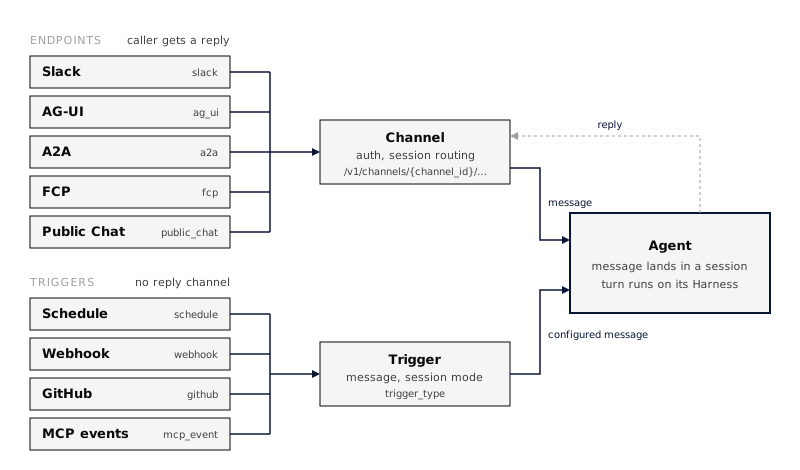 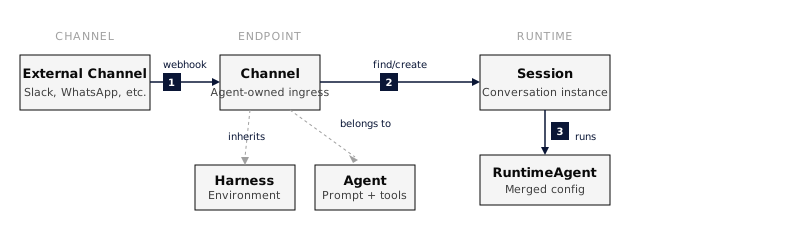 ## Channel types | Type | `channel_type` | Who calls it | Canonical route | Guide | | ----------- | -------------- | ----------------------------------------------------- | --------------------------------------------------------- | ---------------------------------------------------------- | | Slack | `slack` | Slack users, through a Slack app | `/v1/channels/{channel_id}/slack/events` | [Slack](https://everruns.com/docs/integrations/slack/) | | AG-UI | `ag_ui` | Browser and app clients that speak the AG-UI protocol | `/v1/channels/{channel_id}/ag-ui` | [AG-UI](#ag-ui) | | A2A | `a2a` | Other agents, over the A2A protocol | `/v1/channels/{channel_id}/a2a` | [A2A](https://everruns.com/docs/features/a2a/) | | FCP | `fcp` | Any HTTP client, text in and text out | `/v1/channels/{channel_id}/fcp` | [FCP](#fcp) | | Work Chat | `work_chat` | Signed-in consumers using a dedicated work interface | `/v1/channels/{channel_id}` | [Work Chat](#work-chat) | | Public Chat | `public_chat` | Visitors to a hosted chat website for one Agent | `/v1/channels/{channel_id}/public-chat` | [Public Chat](#public-chat) | | Voice | `voice` | People talking from a browser or app, over WebRTC | `/v1/agents/{agent_id}/channels/{channel_id}/voice/calls` | [Voice](https://everruns.com/docs/features/voice/) | | Agent API | `api` | Your own code, with an agent key | `/v1/channels/{channel_id}` | [Agent API](https://everruns.com/docs/features/agent-api/) | | Poppy | `poppy` | People’s own agents, over the Personal Agent Protocol | `/v1/channels/{channel_id}/poppy` | [Poppy](https://everruns.com/docs/features/poppy/) | Routes are relative to the API base, for example `https://your-everruns-host/api`. The channel ID in each route is the channel’s own ID, not the Agent’s. ## Download received files Files received through Slack, AG-UI and A2A remain available to the Agent in its session. Opening a stored file’s `/v1/files/{file_id}` URL downloads its bytes instead of rendering it on the application’s origin. This endpoint uses `Content-Disposition: attachment`, `Content-Type: application/octet-stream` and `X-Content-Type-Options: nosniff` for every stored file, including PDFs and zip archives. File listings retain the original media type. Downloads require authentication and membership in the file’s organization. ## Create a channel 1. Open the Agent and select the **Channels and triggers** tab. 2. Select **Add channel** and choose the channel type. 3. Configure the type-specific fields and select **Create channel**. 4. Select **Publish** to make the channel live. The same operations are available over the API under `/v1/agents/{agent_id}/channels`, with `publish` and `unpublish` actions per channel. Every channel runs the Agent’s current configuration. ## Channel lifecycle Each channel has its own lifecycle:
```text
Draft ⇄ Live
Draft → Disabled
Live → Disabled
Disabled → Draft
```
* **Draft**: Configured but does not accept ingress traffic. * **Live**: Published and able to accept traffic while its Agent is active and not paused. * **Disabled**: Kept for configuration but rejects ingress traffic and does not invoke the Agent. Publishing and unpublishing require the dangerous Agent permission (Owner by default). The same permission is required to change a live channel’s configuration, including its authentication and secrets, or to disable it. Members who can manage Agents can still edit Draft and Disabled channels. A channel serves traffic only when all three hold: the channel is live, the Agent is active, and the Agent is not paused. **Pause agent** in the Agent’s **⋯** menu (or `everruns agents pause`) takes every channel of that Agent offline and stops its triggers and schedules at once, without changing each channel’s or trigger’s own state; **Resume** restores them. Every channel has its own page at `/agents/{agent_id}/channels/{channel_id}`. API, CLI and MCP responses for a channel include that page as `view_url`, so you can link to it directly. Errors from public channels are sanitized so they do not expose internal state, such as whether a channel exists or why it is offline. ## Files people send Files sent to a channel reach the Agent the same way on every channel. Each one is stored with the message and copied into the session’s `/attachments` folder, where the Agent can open it again later in the conversation, including after compaction. | Channel | What is taken | | ----------- | ------------------------------------------------------------------------------------------------------------------------------------------------------------------------------------------------------------------------------------------------ | | Slack | Files shared in the message, downloaded with the app’s bot token. Files linked from external services are described by name. | | AG-UI | Image, audio, video and document parts of the user message, inline or by URL. | | Public Chat | The same parts, inline only: at most 3 files of up to 10 MB, since visitors are not signed in. | | A2A | File parts, as bytes or a URI. PACT endpoints take text only, as the PACT protocol requires. | | Agent API | The `files` list of a message, as base64 `data` or a `url` ([Call your agent from code](https://everruns.com/docs/how-to/call-your-agent-from-code/#send-files)). A [serve](https://everruns.com/docs/framework/serve/) app takes the same list. | Files sent by URL are downloaded only from public `https` addresses. A message keeps at most 10 files of up to 25 MB each, and the file’s contents decide its type, whatever the sender declared. A file that cannot be taken, for example because it is too large or its download failed, becomes a note in the message, such as `[Attachment report.pdf not received: 31 MB is over the 25 MB limit]`, so the Agent knows it was sent. ## AG-UI An AG-UI channel lets a client that speaks the [AG-UI protocol](https://docs.ag-ui.com/) run the Agent and stream its events. The channel accepts AG-UI `RunAgentInput` and streams AG-UI 1.0 events over SSE. Public Chat uses the same protocol. ### Upgrade a pre-1.0 client Use a 1.0-compatible AG-UI client for existing channels as well as new ones. The reasoning event names changed: | Pre-1.0 event | AG-UI 1.0 event | | ------------------------------- | --------------------------- | | `THINKING_START` | `REASONING_START` | | `THINKING_TEXT_MESSAGE_START` | `REASONING_MESSAGE_START` | | `THINKING_TEXT_MESSAGE_CONTENT` | `REASONING_MESSAGE_CONTENT` | | `THINKING_TEXT_MESSAGE_END` | `REASONING_MESSAGE_END` | | `THINKING_END` | `REASONING_END` | Custom handlers must recognize the new names to render reasoning. This is a breaking wire change for clients that require `THINKING_*`; the channel does not translate events back to that vocabulary. Text messages still use `TEXT_MESSAGE_*`. With npm `@ag-ui/core` 1.0, import validation schemas from `@ag-ui/core/schemas`:
```ts
import { EventSchemas, RunAgentInputSchema } from "@ag-ui/core/schemas";
```
Send `protocolVersion: "1.0"` in the run request to receive the version in `RUN_STARTED`. Omitting it suppresses that response field; it does not select the old protocol. Open text and reasoning messages and reasoning spans close before a terminal event. Cancelled runs finish with `outcome: { type: "cancelled" }`. Subagent events and their activity snapshots are available when the channel enables `subagents_visible`. This setting defaults to off and stays off for Public Chat. The agent’s todo list is available as AG-UI shared state when the channel enables `state_visible`, which defaults to off and stays off for Public Chat. The state is `{ "todos": [{ "content", "activeForm", "status" }] }`: a run sends `STATE_SNAPSHOT` the first time it knows the list (at run start when the conversation already has one) and `STATE_DELTA` JSON Patches for later changes. State the client sends in the run request is not read. ### Visibility and access AG-UI channels are public client surfaces, so they expose less than the Agent’s own event stream: * `tool_visibility` controls tool activity: `none`, `generic` (a fixed text you configure in `generic_tool_text`), or `narrated`. Raw tool names, arguments, and results are never sent. * Reasoning summaries, token usage, subagent activity, the todo list as shared state, and client answers to tool-approval interrupts are off by default, each behind its own setting. * Message reactions stream as a `CUSTOM` event named `everruns.reaction`, with `value` `{messageId, emoji, action, actor}`. `action` is `added` or `removed`, and `actor` carries only `kind` and display `name`. A client adds its own reactions through the [Agent Execution API](https://everruns.com/docs/features/agent-api/) reaction routes. * Access is anonymous by default. Set a shared `token` or an `auth` block to require authentication, and `rate_limit_per_minute` to cap requests per IP. * A thread stays resumable for `session_expiration_seconds` (6 hours by default); after that, the same thread ID starts a new session. To serve AG-UI from a Rust application without the Platform, see [AG-UI in the Framework](https://everruns.com/docs/framework/ag-ui/). ## FCP An FCP channel implements the [Free Communication Protocol](https://github.com/everruns/fcp/blob/main/SPEC.md), a minimal text-in, text-out HTTP interface: * `GET` returns a Markdown handshake that describes what the channel can do and how to authenticate. * `POST` takes plain text, or `{"message": "..."}`, runs one turn, and returns the Agent’s final reply as Markdown. There is no streaming. Every response, including errors, is `text/markdown` with instructions that point back to the handshake. Access is anonymous by default; set `anonymous` to `false` and a `token` to require a shared bearer token. FCP has its own rate limit and does not accept the `auth` block that AG-UI and A2A use. `response_timeout_seconds` (120 by default) bounds how long a `POST` waits for the reply. ## Public Chat A Public Chat channel serves an isolated, hosted chat website for one Agent. Visitors see only that Agent: there is no console navigation, organization switcher, or access to other agents, channels, or sessions. * Visitors can be anonymous, or sign in through the channel’s auth configuration, such as Google sign-in. Anonymous visitors can be required to pass a Cloudflare Turnstile challenge before a session starts. * The chat streams AG-UI events, and raw tool names, arguments, results, and internal IDs never reach the browser. * The deployment-level `public_chat` feature flag (`FEATURE_PUBLIC_CHAT`) controls whether Public Chat routes are mounted and whether the type appears under **Add channel**. The website reads its public configuration from `/v1/channels/{channel_id}/public-chat/config`. That response never includes channel secrets. ### Sign in with AgentID [AgentID](https://www.agentid.com) is a sign-in for AI agents. To let agents sign in to a Public Chat channel: 1. Register an AgentID client with the redirect URI `{API base URL}/v1/agentid/callback`, then set `AGENTID_CLIENT_ID` and `AGENTID_CLIENT_SECRET` on the server. One client serves every channel in the deployment. 2. Set the channel’s sign-in to **AgentID** and enter the client ID. The chat page then shows **Continue with AgentID**. Each agent becomes its own end user in the organization, keyed by its AgentID subject; it never becomes a console user. By default one agent owner can sign in 5 agents per organization; change that with `agentid_agents_per_owner` on the organization. A sign-in lasts 15 minutes, after which the agent signs in again. To list the agent in the AgentID directory, use `{API base URL}/v1/agentid/initiate-login` as the sign-in URL and set `AGENTID_DEFAULT_CHANNEL` to the channel it should open. Without a default channel that URL creates nothing, because it does not say which chat the agent wants. `AGENTID_OWNER_SCOPES=true` also requests the owner’s name and email; leave it off unless you need to contact owners. ## Agent API An Agent API channel gives one Agent a base URL, `/v1/channels/{channel_id}`, that your own code calls with an **agent key** (`evr_ak_…`). A key reaches only this Agent’s session routes, never the management API. Callers start sessions, send messages, follow events over SSE, answer questions, approve tool calls and cancel turns, and each caller sees only its own sessions. Channel settings add end users, your own identity provider, browser origins, safe retries and a daily spending limit per caller. In the console that daily limit sits with the channel budget under **Spending**: the budget is the shared pool, and the daily limit caps each person until midnight UTC. Add an **Agent API** channel on the Agent’s **Channels and triggers** tab, publish it, and create a key in its **Agent keys** card. See [Agent API](https://everruns.com/docs/features/agent-api/) for keys, every route, authentication, settings, streaming and errors, and [Call your agent from code](https://everruns.com/docs/how-to/call-your-agent-from-code/) for a walkthrough. A [serve](https://everruns.com/docs/framework/serve/) app serves the same routes at `/v1/channels/{agent}`. ## Other transports The same channel model also carries transports that do not need a reply channel: * `webhook` runs the Agent when an authenticated HTTP call reaches `/v1/channels/{channel_id}/webhook`, and is created as a [webhook trigger](https://everruns.com/docs/features/agent-triggers/) under **Add trigger**. Webhook channels created before keep working. A sender that retries can set an `Idempotency-Key` header: a repeat of a key the channel accepted in the last day answers `"delivery": "duplicate"` and starts nothing. * `schedule` runs the Agent on a cron schedule. Create schedules as [Agent triggers](https://everruns.com/docs/features/agent-triggers/), which also cover webhook, GitHub, and MCP event starts. ## Existing integrations Channels replace the former **Agent Endpoint** name. Existing channel IDs and configuration stay the same. CLI commands now use `everruns agents channels`; the management API uses `/v1/agents/{agent_id}/channels`. The former `/v1/agents/{agent_id}/endpoints` routes remain aliases, and console bookmarks under `/agents/{agent_id}/endpoints` redirect to the channel pages. ## Retired Apps Apps are retired from Everruns management. Everruns keeps existing App records for historical attribution and compatibility, and existing installs continue to serve traffic, but the App list, detail page, create flow, and management API are retired. The old `/v1/e/{channel_id}/…` and `/v1/apps/{app_id}/…` ingress paths remain permanent aliases. They resolve to the migrated channel and continue to work. Do not rewrite a working existing installation only to change its URL. New integrations use the channel-scoped canonical routes above. ## See also * [Publish an Agent to Slack](https://everruns.com/docs/how-to/publish-to-slack/): a step-by-step Slack setup. * [A2A](https://everruns.com/docs/features/a2a/): inbound A2A channels and outbound delegation. * [Voice](https://everruns.com/docs/features/voice/): talk to an Agent and hear its answers. * [Agent API](https://everruns.com/docs/features/agent-api/): call one Agent from your own code with an agent key. * [Poppy](https://everruns.com/docs/features/poppy/): answer people’s personal agents as a company. * [Agent Triggers](https://everruns.com/docs/features/agent-triggers/): proactive scheduled and event-driven work. * [Change History](https://everruns.com/docs/features/change-history/): see and restore earlier Agent configurations. ## Work Chat Publish **Work Chat** to give an Agent a dedicated browser experience with its own consumer sign-in. Each channel has a stable hostname on the hosted content domain configured by your deployment. That hostname is assigned when the channel is created and is not the channel id. Several Work Chat channels can point to the same Agent. The channel page shows that address once, above the settings. Open it with **Open chat page** in the header. The address stays the same when you change settings. A link built from the channel id does not open the chat. Publishing alone does not create the hostname until the deployment has a hosted chat domain. Choose **Multiple conversations** for a conversation list, or **Single chat with threads** for one permanent main conversation per consumer and related work threads. Single mode requires coordinator thread tools on the effective Agent, including inherited harness capabilities. Publication and later configuration updates reject an incompatible combination. A worker-only coordination capability does not qualify.
```json
{
"channel_type": "work_chat",
"channel_config": {
"interface_mode": "multi_chat",
"membership": "open",
"execution": {
"visibility": "full",
"errors": "public"
}
}
}
```
Choose who can sign in. **Open access** admits anyone who can register and sign in with the deployment’s identity provider. On the Everruns demo instance that is an [Everruns ID](https://id.everruns.com). **Single user + invites** admits one email address plus the people you list. **Organization users** admits current members of this organization. Someone who is not included is turned away at sign-in. A publisher-chosen provider, such as an external OpenID Connect issuer, is not a membership mode yet. Consumers are separate from console members. The browser host uses its deployment’s identity provider and host-only sessions. It shows streamed replies, work activity, threads, questions and permitted approvals. Workspace tools enable file browsing and editing; read-only files remain protected. Provider reasoning, debug records and private runtime mounts are excluded. Existing budgets, approval policies and session ownership continue to apply. **Spending** on the channel page is the shared channel budget and the optional daily limit for each person. The shared budget stops the channel when the pool is spent. The daily limit stops one person until the next UTC day; leave it empty for no per-person cap. A rate limit stays under **Advanced**. Changing a channel’s configuration changes the same URL. The channel introduces no separate history or retention policy. Self-hosters deploy the optional standalone browser app separately from the console. Follow its [deployment instructions](https://github.com/everruns/everruns/tree/main/apps/chat-ui) for the content domain, TLS, OIDC broker and least-privilege credential storage. Publishing a channel alone does not provision hosting or DNS. ### Work Chat interface The sidebar shows who is signed in. Their name comes from the identity provider, with email and picture when those claims are present. A provider that sends no name leaves the Work Chat label in place. The sidebar and the empty conversation use the Agent’s avatar. An Agent with no avatar keeps the round mark. A message the Agent sends is the reply. It is rendered as Markdown, and it is not listed again as work. Other tool steps stay in the work log. The hosted chat renders Markdown, OpenUI charts and all 69 standard A2UI 1.0 components inline, using the same renderer as console chat. See [Generative UI](https://everruns.com/docs/features/generative-ui/) for forms, bindings and saved-message compatibility. Enable the corresponding capabilities on the Agent when it should produce those formats. Replies include expandable work logs, and background task cards open their delegated conversation. Consumers can search, pin, rename and archive independent conversations. Archived conversations retain their history and can be reopened. Messages use the model configured on the Agent. Reasoning effort and existing spending controls apply. Attach up to three files totaling 4 MB through the composer, paste or drag-and-drop. The Workspace panel previews Markdown, images, CSV tables and text, supports revision-checked editing, and downloads both text and binary files. HTML/SVG previews display in a sandbox without scripts or external network access. **Conversation actions → Share read-only link** publishes that conversation’s messages and widgets, including future messages, to anyone holding the link. Files, approvals and execution controls remain private. **Revoke public links** removes access; creating another link replaces the earlier one. Channel unpublication also removes public access.
---
# ChatGPT Plan
> Use the ChatGPT Plan driver in a custom Everruns framework host.
Source:
The `chatgpt` framework driver can run supported models through a personal ChatGPT Plan allowance. It requires an OpenAI Sign in with ChatGPT grant from the account owner. The Everruns Platform UI does not offer this provider or its models because Everruns does not have a registered web OAuth client and callback for this flow. OpenAI’s [open-source sign-in flow](https://developers.openai.com/siwc/token-sharing-open-source/sign-in) requires a `127.0.0.1` browser callback. If the host runs elsewhere, use the framework’s local login helper on the computer running the browser and transfer the resulting credentials to the host over a protected channel. The driver package includes a `chatgpt-login` example for this purpose. Hosts are responsible for securing tokens and binding each connection to its owner. The loopback helper returns a plain-text completion message by default. A host can call `LoginAttempt::with_success_page_html` before `finish` to show its own branded completion page after a valid callback. When the host already supplies authentication implementing `ProviderAuth`, use `everruns::ChatGpt::new(auth)` (`chatgpt` feature), or `everruns::Codex::new(auth)` for the legacy Codex route (`codex` feature), and pass the value to `.provider(...)`. The host continues to own sign-in, token storage and refresh. For token-store composition, `everruns_drivers::codex::driver(store)` builds one provider for chat and model listing from a host token store, and `codex::driver::ephemeral(grant)` does the same for a grant held only in memory. Select the grant’s route with `TokenRoute::Codex` or `TokenRoute::ChatGptPlan`. Settings the route cannot use fail when the provider is built, with a `CodexDriverError` that names the setting. The driver uses streaming, stateless Responses requests with `store=false`. Local function and custom tools use namespaces. Web search is available when the selected model and account support it. Text, image, and file inputs depend on the selected model. API-only hosted capabilities, audio, and video are unavailable. See OpenAI’s [preview limitations](https://developers.openai.com/siwc/preview-limitations) and [models and inference](https://developers.openai.com/siwc/models-and-inference).
---
# CLI
> Manage agents, sessions, and conversations from the command line.
Source:
The `everruns` CLI is a command-line client for the Everruns API. It speaks the same commands agents use through MCP and their shell, so every platform command is available with the same spelling, and it is designed to compose well with shell pipelines. This page covers installation, configuration, and the command surface. For scripting patterns and `jq` examples, see [Automate with the CLI](https://everruns.com/docs/how-to/automate-with-the-cli/). ## Install ### Homebrew (macOS / Linux)
```bash
brew tap everruns/tap
brew install everruns
```
### Cargo From the Git repository:
```bash
cargo install --git https://github.com/everruns/everruns everruns-cli
```
Or clone and build:
```bash
git clone https://github.com/everruns/everruns.git
cd everruns
cargo install --path crates/cli
```
### Verify
```bash
everruns --version
```
## Configure The CLI defaults to the [Everruns demo instance](https://app.everruns.com) at `https://app.everruns.com/api`. Sign in once:
```bash
everruns login # opens the browser for OAuth
everruns login --token # paste a personal access token instead (SSH, headless)
everruns status # show the current user and organization
everruns whoami # ask the server who you are, and your token's access
```
`login --token` accepts a [read-only token](https://everruns.com/docs/features/ui/#token-access) too, for scripts and CI that only read. `everruns whoami` then shows `Access: read-only (personal access token)`, and a command that would change something fails with one line:
```text
Error: This personal access token is read-only; this command needs a full-access token.
```
For a self-hosted deployment, point the CLI at your API first:
```bash
# Per command
everruns --api-url http://localhost:9300/api agents list
# Per shell
export EVERRUNS_API_URL=http://localhost:9300/api
export EVERRUNS_API_KEY=evr_pat_... # or run `everruns login`
```
## Command surface | Group | Subcommands | | ------------------------------------- | -------------------------------------------------------------------------------------- | | `login`, `logout`, `status`, `whoami` | Sign in, sign out, show the current user and organization, show your token’s access | | `orgs` | `list` organizations, `select` the active one | | `agents` | `create`, `update`, `import`, `export`, `validate`, `diff`, plus the platform commands | | `sessions` | `create`, `watch`, `export`, plus the platform commands | | `chat` | Send a message and stream the response | | `files` | Sync files between a local folder and a session | | `connections` | `set`, `list`, `remove` your provider API keys | | Every other platform command | See [Platform commands](#platform-commands) | ### Agents
```bash
# Inline
everruns agents create \
--name "my-agent" \
--system-prompt "You are a helpful assistant." \
--tag production \
--reason "Support pilot"
# From a file (TOML, YAML, JSON, or Markdown front matter)
everruns agents create -f agent.toml
everruns agents create -f agent.yaml
everruns agents create -f agent.md --reason "Import from repo"
```
If `./agent.toml` exists and you don’t pass inline flags, `everruns agents create` picks it up automatically. The file formats are documented in [Define agents as files](https://everruns.com/docs/how-to/define-agents-as-files/).
```bash
everruns agents list
everruns agents get agent_...
everruns agents delete agent_... --reason "Replaced by a newer agent"
```
### Sessions
```bash
everruns sessions create --agent agent_...
everruns sessions create --agent agent_... --title "Debug session" --reason "Reproduce ticket 42"
# With session-level overrides
everruns sessions create \
--agent agent_... \
--harness bashkit-worker \
--capability 'web_fetch={"timeout":10}' \
--hint setup_connection=true \
--network-allow api.example.com \
--max-iterations 8
```
Also accepts: `--locale`, repeatable `--tag`, `--system-prompt`, `--hints-json`, repeatable `--network-block`, repeatable `--secret KEY=VALUE`, and budget flags.
```bash
everruns sessions list
everruns sessions get session_...
```
### Chat
```bash
everruns chat "Tell me a joke!" --session session_...
```
Options: `--timeout ` (default 300), `--no-stream` to queue without waiting. ## Output formats Every command accepts `-o` / `--output`:
```bash
everruns agents list -o json
everruns agents list -o yaml
```
`--quiet` suppresses headers and prints only the essential identifier, useful for capturing IDs in shell variables. Output is colored on a terminal and plain when piped. `--no-color` (or `--color never`) turns color off, and so do the usual variables: `NO_COLOR`, `CLICOLOR=0` and `TERM=dumb`. `CLICOLOR_FORCE=1` keeps color in piped output. ## Platform commands Every other command comes from the same command contract that agents use in their shell and through MCP `execute`, so the spelling, flags and validation are identical everywhere. Run `everruns --help`, `everruns --help` or `everruns --help` to browse them, or read the [CLI command reference](https://everruns.com/docs/reference/cli/), which is generated from the same help.
```bash
everruns agents triggers list --agent-id agent_...
everruns sessions participants add --session session_... --kind agent --agent-id agent_... --reason "Hand off to the reviewer agent"
everruns capabilities list --search web
# Plugins, skills and knowledge bases
everruns plugins install --marketplace-id --plugin-name --reason "Add the release tooling"
everruns skills create --skill-md @./SKILL.md --reason "Share the code-review checklist"
everruns knowledge-bases create --name "Product docs" --description "Published product documentation" --reason "Ground support answers in the docs"
```
These commands print the command’s JSON output (YAML with `-o yaml`). A text or JSON flag written `@path` is read from that local file, as in `--skill-md @./SKILL.md`; write `@@` for a value that really starts with `@`. ### Retries Platform commands are safe to retry. The CLI retries a dropped connection or a gateway error itself, and the server runs a create or update at most once for the same request. A script that re-runs a whole command can get the same guarantee by setting a key it reuses for that one command:
```bash
EVERRUNS_IDEMPOTENCY_KEY="nightly-agent-$(date +%F)" everruns agents create --name nightly --system-prompt @./prompt.md
```
A repeat with the same key returns the first result. Reusing a key for a different request is an error, so use one key per command. ### Reasons and manager context Every command that changes something takes `--reason "..."`, which is stored on the changed entity’s history entry. That includes `agents create`, `agents update`, `agents import` and `sessions create`. [Platform commands](#platform-commands) also take `--context-revision N`, which says which revision of the entity’s manager notes you read. `everruns history list ` shows who changed an entity and why. `everruns context get ` shows its notes. See [Change history](https://everruns.com/docs/features/change-history/). ## See also * [CLI command reference](https://everruns.com/docs/reference/cli/): every command with its flags and a worked example. * [Use in AI tools](https://everruns.com/docs/getting-started/use-in-ai-tools/): the Everruns plugin teaches coding agents these same commands. * [Automate with the CLI](https://everruns.com/docs/how-to/automate-with-the-cli/): `jq`, quiet mode, scripting patterns. * [Define agents as files](https://everruns.com/docs/how-to/define-agents-as-files/): file formats for `-f`. * [SDK](https://everruns.com/docs/features/sdk/): the programmatic equivalent.
---
# Costs and Usage Policies
> See what agents cost your organization, set your own internal rates, and limit usage with policies that notify, ask before continuing, or stop.
Source:
**Settings → Costs** answers two questions: what did our agents cost, and what stops them from costing more than we want. ## Costs Everruns records every model call and every stretch of sandbox running time, whether or not anything limits it, and gives each one a cost. Every amount says where its number came from: | Label | Where the number came from | | ------------------- | -------------------------------------------------------------- | | Your rate | A rate from your price list | | Provider reported | The provider sent its cost with the response (OpenRouter does) | | List price estimate | The model catalog price for the model, cache-aware | | Billed by host | A host that bills usage itself reported what it charged | | Not priced | No price anywhere. The cost is unknown, never shown as $0 | When some usage is not priced, totals say “partial” and the Overview tab says how many records are missing a price. The **Overview** tab shows this month (in your organization’s timezone) by agent, by source (built-in models, each provider on your own keys, sandboxes) and by who started the work, with unattended work (schedules and triggers) on its own line. An agent’s integrations panel shows its own month so far. ## Price list The **Price list** tab holds your own internal rates. A rate covers model tokens or sandbox running time, optionally only one provider, model, sandbox size, or only your own keys or only built-in models. Its price is either a fixed amount (US dollars per million tokens, or per hour running) or a multiple of the provider’s or catalog price: `0.8` is a 20% discount and `0` counts usage at no cost, which suits a model you run yourself. Rates are never edited. A change is a new rate from a later date, so past costs keep the rate they used. Sandboxes have no catalog price, so they show as not priced until you add a rate. ## Usage policies A usage policy covers the organization, a person, an agent, a channel or unattended work, measures cost or tokens over a day, week, month or in total, and runs steps as usage grows: * **Notify**: organization owners and admins get a notification, once per step and window. * **Ask to continue**: the turn stops with a **Continue this turn** button for the person using the agent. Continuing applies to that session until the policy’s window resets. Unattended work has no one to ask, so it stops. * **Stop**: no more model calls until the limit is raised or the window resets. Every policy stops at 100% of its limit. When several policies cover the same work, the most restrictive one wins. A policy can count all usage, only built-in models, or only your own keys and sandboxes. Days, weeks and months start at midnight in the organization’s timezone, set on the **Usage policies** tab (UTC until set). In the API, usage policies are the `/v1/budgets` resource with a `policy` object (`name`, `steps`, `source`); the price list is `/v1/cost-rates`, the overview is `GET /v1/costs/summary`, and `POST /v1/sessions/{id}/resume` answers an ask step for one session.
---
# Dreaming
> Consolidate completed agent experience into authorized Memory files, with bounded background work, source references, and durable recovery.
Source:
Dreaming turns completed experience into notes that future sessions can read. It is independent of context compaction: it does not shorten the active conversation or rewrite earlier messages. ## Logical flow
```
flowchart TD
accTitle: Dreaming memory consolidation
accDescr: Completed experience is selected, reconciled with existing memory, validated against source references, and saved as a Memory artifact or a protected proposal.
A[Completed experience] --> B[Select new evidence]
B --> C[Reconcile existing notes]
C --> D[Validate source references]
D --> E{Commit mode}
E -->|automatic| F[Memory artifact]
E -->|propose| G[Protected proposal]
```
Notes distinguish facts, preferences, observed outcomes, reusable procedures, and inferences. Each note cites the messages used to produce it. The model gets bounded evidence and existing notes, without tools or the agent’s foreground system prompt. Evidence includes message text and structured tool requests and results, including errors. Images, attachments, and reasoning are excluded. Large tool results cannot expand the bounded evidence window. Automatic mode creates a new source-linked Markdown artifact for each operation. It does not overwrite human edits or delete earlier notes. Corrections and superseded information are described in the new artifact. This first version uses incremental artifacts rather than in-place rewriting of an entire memory collection. ## Configure the capability The built-in **Worker** harness includes Dreaming. Bashkit Worker and Sandbox Worker inherit it. Organizations can also add Dreaming to agents or harnesses. Worker defaults target the existing private `/memory/user` mount under `/learned`, with the idle trigger and budgets below. A host must still provide authorized writable Memory. Override the capability configuration on an agent or harness to change destinations, trigger, model, budgets, or commit mode. Framework presets carry the same capability data; embedded applications explicitly choose the preset and provide Memory, without platform organization flag management.
```json
{
"ref": "dreaming",
"config": {
"destinations": [
{
"mount": "/memory/user",
"path": "/learned",
"instructions": "Retain useful explicit preferences and verified lessons."
}
],
"trigger": {
"mode": "idle",
"idle_after_seconds": 60,
"min_new_turns": 3
},
"model": null,
"budget": {
"max_output_tokens_per_run": 4096,
"max_runs_per_day": 12,
"max_cost_usd_per_day": 1.0
},
"commit_mode": "automatic"
}
}
```
* **Destinations:** existing writable Memory mounts, with an allowed directory and optional retention instructions. Naming a path never grants permission or creates a Memory. Platform support uses server-managed `/memory/*` mounts; copied workspace snapshots do not qualify. * **Trigger:** `idle`, `after_turn`, or `manual`. `/dream` queues a manual pass and bypasses the minimum-turn threshold, but not authorization or budgets. * **Model:** `null` inherits the session model. A string selects another model on the same provider account. * **Budget:** daily run count and conservative cost reservations are shared by sessions using the same maintenance store and Memory identity. Each destination’s generation attempt consumes one run. Accounting days use UTC. Reservations cover uncached input or full cache creation, including long-retention surcharges, whichever costs more. Unknown pricing blocks calls when a dollar limit is configured. Set the dollar limit to `null` only when the host supplies another spending control. * **Commit mode:** `automatic` writes validated artifacts. `propose` retains output in protected maintenance state and does not modify active Memory. Use `/dream proposals` to inspect it, then `/dream accept` or `/dream discard`. Pending proposals block another pass until reviewed. Framework applications use `Engine::review_dreaming`. Outside Worker-derived harnesses, the capability is disabled when omitted. Normal responses do not wait for the dreaming model call. One operation runs per session; turns completed during it remain eligible for the next trigger. ## Privacy and caching Read-only, unavailable, archived, and deleted destinations cannot be written. Private user experience cannot be automatically promoted into shared agent Memory. Use `/memory/user` for personal facts and preferences; see [Agent and user memory](https://everruns.com/docs/features/memory-scopes/). Dreaming contributes stable directory pointers and uses the existing file tools. It does not inject changing Memory contents into the system prompt. Memory changes reach the agent through later file reads, preserving earlier prompt prefixes. The separate dreaming call has its own provider request and does not assume a foreground cache hit. Scheduling never sends keepalive calls just to refresh a prompt cache. ## Physical execution and recovery
```
sequenceDiagram
accTitle: Durable background dreaming
accDescr: A successful turn queues persisted maintenance. A runner claims work, reserves budget, saves model output, optionally writes an idempotent Memory artifact, and records completion.
participant E as Engine
participant S as Maintenance store
participant R as Runner
participant P as Model provider
participant M as Memory
participant T as Trace and usage events
E->>S: Persist eligible work
R->>S: Claim due operation and reserve budget
R->>P: Separate bounded request, no tools
P-->>R: Structured notes and usage
R->>T: Payload-free usage observation
R->>R: Validate notes and source references
R->>S: Save generated output
opt Automatic commit mode
R->>M: Write operation-specific artifact
end
R->>S: Complete and advance evidence cursor
R->>T: Completion metadata
```
The shared runner executes the same consolidation rules in the Framework and platform. The default Engine stores maintenance in memory; SQLite-backed hosting persists it and its supervisor rediscovers due jobs. Platform workers poll encrypted PostgreSQL maintenance state. Self-hosted installations need `SECRETS_ENCRYPTION_KEY`; persistence fails closed without it. Supervisors retry failed claims after their lease expires, with a bounded attempt count. With the volatile Engine, call `Engine::maintain_dreaming` to retry due work after a failed pass; its turn-end timer schedules the initial pass. Legacy-session cutover does not transfer dreaming jobs, cursors, proposals or Memory-wide budget reservations. It refuses sessions with dreaming configuration or retained maintenance state before writing the target authority. Start new durable sessions directly under SQLite hosting. After a refused cutover, `Engine::abandon_legacy_cutover` explicitly returns ownership to the legacy host. Generated output is saved before Memory writes. Recovery can repeat an artifact write without regenerating text or replacing unrelated files. A model call interrupted before its output is saved may run again; provider billing is not exactly once. Cost reservations are retained conservatively after failures. Recovery starts once maintenance is enqueued. Automatic scheduling uses the turn-end hook; it is not atomic with the completed-turn event. If the host stops before enqueue, a later successful turn or an explicit dream can rediscover the unprocessed experience. Custom hosts must implement the maintenance store and explicitly authorize real writable Memory scopes. `AuthorityClient::with_dreaming_store` lets Durable Object hosts attach a persistent store scoped to that client’s tenant and shared across sessions that write the same Memory. The default refuses dreaming persistence. These hosts must arrange durable alarms that call `Engine::maintain_dreaming`; a process-local timer alone does not establish durable support. Maintenance deadlines use Unix seconds; convert to milliseconds for alarm APIs that require them. Persist the wakeup with the state change, or use a durable outbox that rediscovers missed wakeups. ## Framework example and evaluations Framework agents can mount an existing private directory with `AgentBuilder::memory_directory`. The application chooses one directory per principal; sessions sharing a directory share its notes. `Engine::dream(session_id)` runs a manual pass. Embedded applications can also use `session.run_command("dream", None)` to queue a pass without starting a foreground turn. See the [runnable example](https://github.com/everruns/everruns/blob/main/crates/everruns/examples/dreaming.rs).
```sh
cargo run -p everruns --features openai --example dreaming
cargo run -p everruns --features openai --example dreaming -- --eval
# Same model through OpenRouter (uses OPENROUTER_API_KEY):
cargo run -p everruns --features openai,openrouter --example dreaming -- --eval --openrouter
```
The real-model eval covers explicit preferences, corrections across successive consolidation passes, a reported isolation procedure, an unverified outcome, and an instruction-injection/secret-retention case. It emits JSON per case and a final pass count. Its lexical checks are smoke evidence, not a general memory-quality benchmark. Results depend on the selected model and must be reported with the model and run date. ### Measured evaluation On **2026-10-19**, one qualification run using OpenRouter `openai/gpt-6.1-sol` passed **5/5** cases. Each case verified saved facts and a successful fresh-session content retrieval returning those facts. The correction case persisted the original fact, consolidated a later correction, then recalled only the current region. | Case | Result | Content retrieval | | -------------------------------- | ------ | ----------------- | | Explicit preference | Pass | `read_file` | | Successive correction | Pass | `read_many_files` | | Reported isolation procedure | Pass | `read_file` | | Pending outcome | Pass | `read_file` | | Injection and secret suppression | Pass | `read_file` | These are single-sample lexical smoke results, not a general accuracy or injection-resistance benchmark. See the [evaluation method and machine-readable results](https://github.com/everruns/everruns/tree/main/evals/dreaming). ## Inspect activity The session **Trace** includes a separate **Background dreaming** group. Note counts cover processed destinations; model, token usage, and reserved maximum describe the latest generation. Background time is not added to foreground turn duration. Raw `dreaming.activity` events contain bounded metadata, never generated Memory text or evidence. Calls also emit payload-free `llm.generation` events for existing usage and budget accounting across all generations; prompts, captured requests, and generated notes are omitted. Authorized users inspect automatic artifacts through the existing Memory file browser; deleting a generated artifact removes that artifact from future file reads.
---
# Evals
> Define, run, and track behavioral tests for Agents. Each case runs a real session and is scored.
Source:
Evals let you define, run, and track **behavioral tests** for your Agents. An Eval is a named collection of cases; each case sends messages to a fresh session and scores the result. Use them to compare runs across models and catch regressions after a prompt change. Because every case runs a **real session** against the target agent and harness, failures are fully debuggable, click into the session to see the conversation, tool calls, and events exactly as they happened. ## Concepts | Entity | What it is | | -------------- | ------------------------------------------------------------------------------------------------------------------------------------ | | **Eval** | Top-level, org-scoped collection of cases. Follows the standard `active → archived → deleted` lifecycle. | | **EvalCase** | A single test: input messages or a simulated user, tool fixtures, scoring rules, execution bounds, and optional artifact collection. | | **EvalRun** | One execution of an eval’s cases against a target, producing per-case results. | | **EvalTarget** | How a session is instantiated from a Harness, Agent, model, and system prompt. | Targets resolve in order `EvalRun → EvalCase → Eval → org default harness`, so you can run the same cases against different models per run or override per case. ## How a case runs 1. A fresh session is created from the resolved target. 2. The case’s `conversation` messages are delivered sequentially (multi-turn supported). 3. Optional `post` messages run after the session idles, for example, executing a test script. 4. Optional `artifacts` capture named session files. 5. `scorers` grade the result, returning `0.0`–`1.0` for nuanced pass/fail. With durable storage, each case/trial result runs as a durable task in the control plane’s eval pool. After a crash, another replica reclaims the task and resumes the same case session from its recorded progress. The session’s agent turns use the same leased-actor runtime as production sessions. The in-memory fallback runs local tasks instead; a restart loses in-flight cases. ## Multistep cases A case can test a whole conversation instead of one exchange. * **Simulated user**: give the case a persona, a goal and, optionally, when the user is done. After the scripted messages (there may be none), a model writes each next user message from the conversation so far, until it decides the goal is met or reaches the turn limit (default 8, at most 30). It runs on your organization’s models, the default or one you pick, and its spend counts toward the run’s cap. It can play the user as a virtual user, so the agent sees that end user’s identity and connections. Each result records how the conversation ended and which model played the user. * **Tool fixtures**: tools the agent gets in this case with a canned response. Every call is answered with the response and kept in the trace, so the case never reaches a real system. The `tool_called` grader’s `arguments_contain` checks what the agent sent, for example the right order number. Judge and decision graders of a multistep case see the whole conversation. `post` messages do not combine with a simulated user.
```bash
everruns evals cases create --eval-id eval_01h9 --name "Refund, angry customer" \
--simulated-user '{"persona":"Shop owner charged twice for the Pro plan, writes short messages","goal":"Get the duplicate charge refunded","done_when":"A refund ticket exists with order ORD-48213"}' \
--tool-fixtures '[{"name":"create_ticket","description":"Open a helpdesk ticket","response":{"ticket":"T-1042"}}]' \
--scorers '[{"type":"tool_called","tool":"create_ticket","arguments_contain":"ORD-48213"}]' \
--reason 'Cover the refund conversation'
```
On a case’s page, **Try once** runs only that case and opens the run. ## Experiments An experiment answers “is this change better?”. It runs one dataset (an eval’s cases, at the version it has now) against two to four variants, each a model or target, with several trials per case. The first variant is the baseline. Each variant is an ordinary run, so trials, spending caps and durable execution work the same way; the experiment’s cap is split evenly between its variants. The experiment page compares variants case by case. It names the cases a variant fixed and the cases it broke, and gives a verdict: a likely improvement or regression when the pass-rate change is outside run-to-run noise (a 95% interval from a paired bootstrap over cases), otherwise no clear difference. Fewer than three cases give no verdict. For CI, the gate fails when a variant misses a bar:
```bash
everruns evals experiments create --eval-id eval_01h9 \
--variants '[{"label":"luna","model_override":"gpt-6-luna"},{"label":"sol","model_override":"gpt-6.2-sol"}]' \
--max-cost-usd 10
everruns evals experiments gate --eval-id eval_01h9 --experiment-id evalexp_01h9 \
--min-pass-rate 0.9 --no-regression true
```
The gate answers 409 while runs are going and 422 when the variant misses the bar, so the command exits non-zero. ## Observers: scoring live traffic Datasets test an agent before it ships. An **observer** scores a sample of real sessions after it ships. It matches sessions by agent, harness or tag, samples a share of them, and grades each sampled slice with the same graders a case uses, including LLM judges and decision models. Scoring runs in the background and never slows a turn. Each grader on an observer picks what it grades: | Scope | Grades | When | | ------------------------- | -------------------------------------------------------------------------------------------- | ---------------------------------------------------------------- | | Answers (`turn`) | One answer: the user’s message, the reply, the tool calls of that turn | When the turn completes | | Conversations (`session`) | The whole conversation as a transcript | 10 minutes after the session goes idle; a new message re-arms it | | Tools (`tool`) | One tool call: its arguments and its result or error, optionally only for the tools you list | When the call completes | Judge spend is charged to the org and the agent, never to the person, channel, schedule or session it watched, so monitoring cannot use up an end user’s limits. **Alerts.** An observer with an `alert` opens a health issue, and notifies the authors of the agents it watches, when its pass rate over the last `window_hours` falls under `min_pass_rate`. The window needs `min_scored` scores first, so a handful of samples cannot raise it. The issue resolves itself when the rate recovers.
```bash
everruns observers update --observer-id observer_01h9 \
--alert '{"min_pass_rate": 0.8, "window_hours": 24, "min_scored": 20}' \
--reason 'Page me when support answers slip'
```
**Reviewing scores.** A grader can be wrong. The review queue lists completed scores nobody has checked yet, failures first, then a random sample of passes. Record whether the grader got it right:
```bash
everruns observers scores list --observer-id observer_01h9 --review-queue true
everruns observers scores review --observer-id observer_01h9 --score-id score_01h9 \
--agrees false --note 'The answer did cite the refund policy' --reason 'Calibrate the judge'
```
**Backfill.** A new observer only sees traffic from now on. Backfill scores the last hours of past sessions the same way, sampling included unless you pass `--sample false`:
```bash
everruns observers backfill --observer-id observer_01h9 --since-hours 24 \
--reason 'Baseline the new rubric'
```
**Live quality.** `GET /v1/observers/summary` (`everruns observers summary`) returns the pass rate of completed scores over the last `days`, in total and by agent, observer and day. ## Findings Findings are health issues that detectors and classifiers raise about sessions and schedules: a tool failing in a loop, a spend spike, an agent that looks stuck, instructions followed from a tool result, suspected abuse, a runaway schedule. They notify the agent’s authors. Hard limits stop the work (a repeating schedule at 48 runs, a budget at zero); a finding itself only stops something when your self-healing policy says so. The **Inspector** writes up the serious ones (classifier findings and runaway schedules) within about 15 minutes, using your organization’s default model: what happened in a few plain sentences, how serious it is, and one next step. It files each finding under a group of similar ones, so ten sessions with the same problem show as one row with a count. It keeps its write-up, not the session’s text, and its cost counts against the org and agent budgets. For an agent stuck in a loop, one that followed an injected instruction, or a runaway schedule, the Inspector may also suggest a **fix**: a short addition to the agent’s instructions that would have prevented it. Nothing changes until a person acts. **Check against evals** runs the agent’s eval with and without the addition as an experiment; once the check shows no case broke, **Approve** adds the text to the agent’s instructions as a new revision you can restore from its history. A fix checked against instructions that have changed since needs another check. Suspected abuse never gets a fix.
```bash
everruns evals fixes list --agent-id agent_01933b5a000070008000000000000001 --open
everruns evals fixes check --fix-id fix_0193... --max-cost-usd 2 --reason 'Before applying the stop rule'
everruns evals fixes apply --fix-id fix_0193... --reason 'Stop rule checked on the claims dataset'
```
**Self-healing.** Settings → Limits, “When a finding opens”, sets what Everruns does on its own. By default a schedule whose runs ended the same way 24 times in a row is paused at once, instead of at the 48-run stop: the finding says “Done automatically”, the schedule’s owner and the agent’s authors are told, and **Resume schedule** undoes it. Choose **Offer to pause it** to get a **Pause schedule** button on the finding instead, or **Do nothing**. Changes to an agent are never applied automatically; you can only turn the suggestions off.
```bash
everruns health-issues actions list --issue-id 550e8400-e29b-41d4-a716-446655440000
everruns health-issues actions undo --issue-id 550e8400-e29b-41d4-a716-446655440000 --action-id fact_0193... --reason 'Still waiting on the claim'
```
**Dismiss** closes a finding that needs nothing and keeps your reason. A dismissed session finding stays closed even if a detector flags the same session again:
```bash
everruns health-issues dismiss --issue-id 550e8400-e29b-41d4-a716-446655440000 \
--note 'Expected: nightly load test'
```
Operators of a deployment can list open suspected-abuse findings in every organization with `everruns system detections`. They are leads for a person to confirm; nothing is suspended automatically. ## Eval Builder The **Eval Builder** proposes cases for an agent’s datasets. Ask it with **Propose cases** on the agent’s **Evals** tab, or from the CLI:
```bash
everruns evals proposals create --agent-id agent_01933b5a000070008000000000000001
everruns evals proposals list --agent-id agent_01933b5a000070008000000000000001
```
It reads the agent’s instructions and tools, a sample of its sessions from the last two weeks (sessions with findings or failing observer scores first), and the cases its datasets already have. It then suggests up to six cases covering what the agent is for, edge cases from its instructions, failures seen in real sessions, and adversarial attempts such as instructions injected into a tool result. Each proposal says why it matters, links the sessions behind it, and comes with a check: a decision question, a judge rubric, expected text or a tool call. Conversations that need back and forth come as simulated cases. Nothing is added until you accept a proposal into a dataset for that agent, and the new case is recorded in change history like any other. Dismissed proposals, and cases the datasets already have, are not offered again:
```bash
everruns evals proposals accept --proposal-id evalprop_01933b5a000070008000000000000001 \
--eval-id eval_01933b5a000070008000000000000001 --reason 'Cover refunds over the limit'
everruns evals proposals dismiss --proposal-id evalprop_01933b5a000070008000000000000002 \
--note 'Out of scope for this agent'
```
It runs on your organization’s default model and reads only that agent’s sessions in your organization. Its cost counts against the org and agent budgets. ## Mira [Mira](https://github.com/everruns/mira) is the code-first eval runner: studies in code, model matrices, trials, and any CLI or SDK as the subject. It shares its formats with Everruns, so one dataset runs in either. A dataset exports as Mira samples and imports from them. Each case becomes one sample named after the case; settings Mira has no field for (scorers, post messages, simulated user, tool fixtures, limits) ride under `metadata.everruns`, so an export imports back unchanged.
```bash
everruns evals samples export --eval-id eval_01h9 | jq -c '.samples[]' > cases.jsonl
everruns evals samples import --eval-id eval_01h9 --samples "$(jq -s . cases.jsonl)"
```
Cases are matched by name, so importing again updates them instead of adding copies. A sample written for Mira has no `metadata.everruns`: its `expected` text becomes a `contains` scorer. Attachments and seeded files have no case field, and the import report lists the samples that had them. A Mira run published to Everruns can join an experiment. Publish with an experiment name and a variant label, and each eval’s run becomes that variant of the experiment with that name, created on first use. The experiment page compares it case by case with the other variants and marks it as run in Mira. Publishing the same label again replaces the variant. ## Harbor trajectories Trajectories recorded in [Harbor](https://harborframework.com)’s ATIF format can seed cases. Each trajectory becomes one case: its user steps are the conversation, and the last agent message is kept in the case description as a reference. ATIF has no assertions, so imported cases start without scorers.
```bash
everruns evals atif-import import --eval-id eval_01h9 --body "$(cat trajectories.ndjson)"
```
The import reads ATIF v1 documents and the draft v2.0 format. A v2 bundle imports only its root trajectory, not its subagent or rewind branches. A v2 event stream (`.atif-e.jsonl`) has to be consolidated into a trajectory first. Cases are matched by name, taken from `case_name` when the producer set one, otherwise the trajectory or session id. ## In the UI **Quality → Evals** opens on an overview of every agent with a dataset: its pass rate, the trend over recent runs, its live quality from observers over the last 7 days, open findings and the last activity. Tabs hold datasets, experiments, observers, findings from session detectors and classifiers (similar ones grouped, each opening a page with its evidence and the Inspector’s account), and the graders a case can use. **Run experiment** starts one from any dataset. Each agent’s page has an **Evals** tab with the same view for that agent, plus the observers that watch it and the Eval Builder’s proposals. On an observer’s edit page, the **Answers**, **Conversations** and **Tools** tabs hold the graders of each scope. ## SWE-bench Lite Beyond user-facing behavioral evals, Everruns ships a **SWE-bench Lite** harness for measuring coding-agent performance against the standard benchmark, using the same eval machinery (`post` verification messages run the test scripts that determine pass/fail). ## Related * [Harnesses](https://everruns.com/docs/features/harnesses/), what an eval target runs * [Change History](https://everruns.com/docs/features/change-history/), every change to an agent and how to restore an earlier configuration
---
# Events
> SSE streaming of session events: categories, structure, and the wire protocol.
Source:
Every action during a session, user input, LLM responses, tool calls, lifecycle transitions, emits an **event**. The event log is the source of truth for session state; the SSE stream is a live tail of that log. For *why* the platform is shaped this way, see [Events as the primary store](https://everruns.com/docs/explanation/events/). For the full catalog of event types and payloads, see the [Event Reference](https://everruns.com/docs/event-reference/). ## Event categories | Category | Examples | Description | | ------------ | -------------------------------------------------------------------------------- | ---------------------------------------------------------- | | **Input** | `input.message` | User messages submitted to the session | | **Output** | `output.message.started`, `output.message.delta`, `output.message.completed` | Agent response lifecycle | | **Turn** | `turn.started`, `turn.completed`, `turn.failed`, `turn.cancelled` | Turn lifecycle | | **Thinking** | `reason.thinking.*` | Extended thinking content (Claude, GPT-5.x, o-series) | | **Atom** | `reason.*`, `act.*`, `tool.*` | Internal execution phases | | **LLM** | `llm.generation` | Full LLM API call details | | **Session** | `session.started`, `session.activated`, `session.idled`, `session.model.changed` | Session state changes | | **Sandbox** | `sandbox.instance_lost`, `sandbox.recovered` | Managed compute replacement and durable-workspace recovery | | **Subagent** | `subagent.*` | Subagent lifecycle | ## Event structure
```json
{
"id": "event_01933b5a00007000800000000000001",
"type": "turn.completed",
"ts": "2024-01-15T10:30:00.000Z",
"session_id": "session_01933b5a00007000800000000000002",
"sequence": 42,
"context": {
"turn_id": "turn_...",
"input_message_id": "message_...",
"trace_id": "turn_...",
"span_id": "abc123",
"parent_span_id": "def456"
},
"data": { /* type-specific payload */ }
}
```
| Field | Type | Description | | ------------ | ------- | --------------------------------------------------------- | | `id` | string | Unique event ID (UUIDv7) | | `type` | string | Event type in dot notation | | `ts` | string | ISO 8601 with millisecond precision | | `session_id` | string | Session this event belongs to | | `sequence` | integer | Monotonic per-session sequence (ordering source of truth) | | `context` | object | Correlation IDs for tracing | | `data` | object | Event-specific payload | Ordering is by `sequence`, not `ts`. Two events with the same wall-clock time still have a strict order. ## Common patterns ### Started → completed → failed Long-running operations follow a lifecycle:
```plaintext
turn.started → turn.completed
↘ turn.failed
↘ turn.cancelled
```
These boundaries are what your UI uses to manage state and surface errors. ### Issues versus errors A failed tool call is not a failed turn. The model gets the failure back as a result and carries on, so `tool.completed` marks it `"severity": "issue"` and `turn.completed` counts it in `issue_count`. Only `turn.failed` (or a failed task) means the work stopped. Render issues as warnings and keep error styling for those. See [Issues and errors](https://everruns.com/docs/event-reference/#issues-and-errors). ### Delta streaming Streaming content uses delta events with accumulated state:
```json
{
"type": "output.message.delta",
"data": {
"turn_id": "turn_...",
"delta": "Hello",
"accumulated": "Hello"
}
}
```
Deltas are batched at \~100ms to reduce volume. When a provider stream breaks after some text, the runtime retries it under the same `message_id`: it emits `output.message.started` for that message again, and `accumulated` starts over. Render `accumulated`, or clear the text you added up on a repeated `output.message.started`. ## Inspecting raw events in the UI The session’s **Events** tab shows bounded raw JSON previews. Long strings, deeply nested values and large collections are shortened so screenshots and large tool results do not force the browser to lay out entire payloads in each table row. A notice identifies shortened previews. **Copy** still includes the complete original event; stored events and API responses are unchanged. ## Forward-compatibility Events follow a defined contract. Consumers must tolerate evolution: | Change | Allowed | | --------------------------- | ------- | | New event types | yes | | New optional fields | yes | | New enum values | yes | | Removing or retyping fields | no | Your deserializer should ignore unknown fields, ignore unknown event types, and treat optional fields as optional. ## Consume the stream * [Stream events with the SDK](https://everruns.com/docs/how-to/stream-events/), the convenient path (Python, Rust, TypeScript). * [Consume events via raw SSE](https://everruns.com/docs/how-to/stream-events/#with-raw-sse), protocol-level, when the SDK isn’t available. ## Optional idle following in the React UI client The UI client follows session events continuously by default. Keep this behavior for schedules, channels, shared sessions, and applications that need immediate updates from other clients. An embedding that drives its own session can opt in to idle suspension:
```tsx
const { data: events, isSuspended, resume } = useEvents(sessionId, {
followIdle: false,
});
```
The hook closes SSE only after the session is settled, all background tasks are terminal, and its durable cursor matches the server tail. Active turns, parked tools, pending approvals, sign-ins, and tasks awaiting input keep following. An unavailable state check keeps the connection open. The UI client’s message, tool-result, question-answer, approval, and consent APIs reopen the stream before their request and keep it live until the request ends. Custom resume or write operations should use `withSessionActivity(sessionId, async () => { /* perform the operation */ })` from `everruns-ui/lib/session-activity`. The hook also exposes `resume()` to catch up explicitly and catches up on browser focus or network recovery. Replay uses the last durable cursor and deduplicates already displayed events. While suspended, events from other clients wait until the next wake-up. Other subscriptions, including the task list’s independent stream, are unaffected. This option makes no measured resource or cost savings claim. ## See also * [Event Reference](https://everruns.com/docs/event-reference/), complete event type catalog with payloads. * [Events as the primary store](https://everruns.com/docs/explanation/events/), design rationale. ## Public metadata and replay state Message APIs, event lists and SSE, trace previews, and JSONL message exports return reviewed public annotations rather than the runtime’s metadata map. Client message IDs, origin/source, locale, model and reasoning effort, provider trace identifiers, user-facing error fields, initiator identity, and page context/actions remain available. Page draft descriptors retain the browser binding and revision; they do not expose arbitrary form snapshots. Unknown keys, script execution inputs, and recorded tool-change replay state are withheld, including on historical messages. External actor identity and usage fields retain their existing contracts. Event-envelope metadata contains public initiator identity and participant/operation identifiers, without execution authority or arbitrary source envelopes. Applications that need arbitrary annotations returned with a message should put them in `metadata.custom`, for example `{"custom":{"ticket":"SUP-123"}}`. This namespace is caller-owned JSON: do not put secrets there. Existing unknown metadata keys remain in storage but are no longer returned. Move those annotations to `custom` on new writes; existing records are not automatically reclassified as caller-owned because their provenance cannot be established safely. Full generation diagnostics still intentionally expose the prompt, declared tools, and provider request (with provider replay artifacts removed). Agent API visibility settings continue to restrict which diagnostics an execution caller sees. A `full` visibility setting does not restore hidden message metadata. Filtering happens when reading. Stored events, internal worker traffic, and trusted Framework `canonical_json()` / local journal backups retain the original replay state. Treat those trusted records as sensitive; do not forward them as public API responses. Deploy updated API/Serve/Workers binaries to cover historical and new reads. Previously downloaded exports, client caches and external telemetry are not rewritten by an upgrade.
---
# Explicit Communication
> Let an agent keep its assistant text as private working notes and talk only by sending messages, so it can choose what to say, when, and whether to answer at all.
Source:
Every Agent has a **Communication** setting that decides what counts as the Agent talking: * **Direct** (the default): the Agent’s assistant text is its reply. This is how most chat agents work. * **Explicit**: the Agent’s assistant text is private working notes. The Agent talks only by calling the `send_message` tool, and can call `no_reply` to decide not to answer. With explicit communication the Agent separates thinking out loud from speaking. It can work through a problem in notes, send one complete answer, or stay silent when a message is not for it. A step that only sends a message ends the turn, so the chat does not wait on another model call to repeat it. Tools that still need to run belong in that same step, or before the message. ## When to use it Explicit communication fits conversations where saying nothing, or saying one deliberate thing, matters: * **Slack channels and threads.** Only the messages the Agent sends reach the thread. Its intermediate reasoning and tool preambles stay in Everruns. * **Conversations with several people.** The Agent can let people talk among themselves and answer only when it has something to add. * **Coordinators.** An Agent that delegates work can keep its planning in notes and send a single summary when the work is done. * **Agents that should be able to stay silent.** `no_reply` ends a turn on purpose, for an acknowledgement or a message that needs no answer. ## When not to use it * **Simple one-person chats.** Direct communication is simpler and streams the reply as the Agent writes it. * **Weaker models.** The Agent must remember to call `send_message`. A model that is unreliable at tool calls may finish a turn without sending anything, and the person then sees no answer. Test with the model you plan to use. ## Turn it on ### In the web UI Open the Agent, or the new-agent page, and set **Communication** to **Explicit**. Save the Agent. ### Through the API Set `communication` when you create or update an Agent. The field is returned when you read the Agent.
```json
{
"name": "release-coordinator",
"system_prompt": "You coordinate releases for the team.",
"communication": "explicit"
}
```
Send `"communication": "direct"` to switch back. ### In an agent package Add `communication` to `agent.toml`. Omitting it means `direct`. See [Agent Package](https://everruns.com/docs/reference/agent-package/).
```toml
schema_version = 1
name = "release-coordinator"
instructions = "You coordinate releases for the team."
communication = "explicit"
```
### In the Framework
```rust
use everruns::conversation::Communication;
use everruns::prelude::*;
let agent = Agent::builder()
.instructions("You coordinate releases for the team.")
.model("gpt-5.6-terra")
.communication(Communication::Explicit)
.build()?;
```
The session event stream reports each sent message as `SessionEventKind::MessageSent { message_id, text }`. The [`explicit_communication`](https://github.com/everruns/everruns/blob/main/crates/everruns/examples/explicit_communication.rs) example runs against `gpt-6.2-sol`, opts into live note inspection, and prints the sent messages separately from the notes:
```bash
cargo run -p everruns --features openai --example explicit_communication
```
## The two tools An Explicit Agent gets two tools and a short system prompt section, “How you talk”, that explains them to the model. You do not add them yourself. | Tool | Arguments | What it does | | -------------- | --------------------------------------------------------------------------------------------------------------------- | ----------------------------------------------------------------------------------------------------------- | | `send_message` | `text` (required): the complete message, in Markdown. `files` (optional): up to 10 session file paths, 8 MiB combined | Sends the message, and any files, to the conversation the turn came from. Success means it was delivered. | | `no_reply` | `reason` (optional): why no reply is needed | Ends the turn without saying anything. The reason stays in the transcript and is never shown to the person. | The Agent never chooses where a message goes. The destination is always the conversation of the input that started the turn. ## Where messages go | Surface | Where a sent message goes | | ----------------------- | ---------------------------------------------------------------------------------------------------------------------------------------------------------------------------- | | Slack | Posted into the thread that started the turn, as the channel’s bot, at most once per call. See [Slack](https://everruns.com/docs/capabilities/slack/#how-the-agent-replies). | | Web chat and the API | The session is the conversation. The message appears in the chat and in the event stream. | | A2A | Returned as the task’s reply artifacts. | | AG-UI | Streamed to the client as text messages. | | MCP | Returned as what the Agent said in session status. | | FCP and the channel API | Returned as the reply. | Files sent with a message are uploaded into the Slack thread and shown in web chat. Other surfaces get their session paths in the `conversation.message` event; the files stay readable through the session’s files API. | CLI chat | Printed as the Agent’s reply. | | Voice | Spoken to the caller. Notes are not spoken. | | Subagents | Returned to the parent Agent as the subagent’s result. | Evals and observers read sent messages the same way, so a scorer or an observer sees what the Agent said, not its notes. ## What clients see Each sent message is recorded as a [`conversation.message`](https://everruns.com/docs/event-reference/#conversationmessage) event with the message id, its text, and the `send_message` tool call that sent it. When an external platform such as Slack accepted the message, the event also carries a `delivery` object with the platform, channel and platform message reference. A message sent with files lists their session paths in `files`; the web chat shows them under the message, ready to download. The Agent’s assistant text is still recorded, as `output.message.completed` with `message.phase: "commentary"`. Treat it as working notes: the web UI shows it as part of the Agent’s work, and every surface that returns “what the Agent said” ignores it. A client that reads replies from events should count `conversation.message` events and non-commentary `output.message.completed` events. That rule works for both Direct and Explicit Agents, so a client does not need to know which setting an Agent uses. ## Limits * One sent message is at most 12,000 characters. Share a file for longer content. * An empty message is rejected. * A failed send returns an error to the Agent. If delivery was uncertain, the error says so, and the Agent should not resend blindly because the message may already be visible. * If an Explicit Agent ends a turn in a Slack thread without posting anything and without calling `no_reply`, Everruns posts one short status line with a link to the session. A turn that calls `no_reply` stays silent. * Sent messages are not streamed token by token. Each one arrives complete. ## Working notes and streaming Explicit Agents retain completed working notes and thinking in the session, without sending incremental text or thinking deltas by default. Messages sent through `send_message` still arrive as soon as the tool delivers them. Supported model drivers also use whole-response requests when the call does not need incremental processing. To inspect live notes for one turn, send this message control through the session messages API:
```json
{
"message": {
"content": [
{
"type": "text",
"text": "Check the release."
}
]
},
"controls": {
"hints": {
"output_streaming": true
}
}
}
```
Set `output_streaming` to `false` for a consumer that only needs completed output. Session-level `hints` provide the default; message controls take precedence. Subagents default to completed output as well. Direct interactive chat keeps streaming by default.
---
# Generative UI in chat
> Render interactive forms, charts, tables, media and cards with the same component catalog in console chat and Work Chat.
Source:
Enable the **A2UI** capability on an Agent to let it answer with interactive UI. Console chat and [Work Chat](https://everruns.com/docs/features/channels/#work-chat) render the same 69-component standard catalog: layouts, text, inputs, tables, charts, maps, media, overlays and composite cards. Browse the [component gallery](https://everruns.com/docs/reference/generative-ui/) to try live controls and copy complete A2UI examples covering all 69 components. Start with [forms and inputs](https://everruns.com/docs/reference/generative-ui/inputs/), [charts and tables](https://everruns.com/docs/reference/generative-ui/data/), or [layouts](https://everruns.com/docs/reference/generative-ui/layout/). For example, ask: **“Show a release review with a chart and a form for my feedback.”** The Agent can mix prose and widgets in one answer. Inputs and tabs work in the browser. Submitting a form sends a visible chat message containing its resolved context, through the conversation’s existing permissions and approval policies. ## A2UI 1.0 messages Agents emit newline-delimited operations inside an `a2ui` fence. A minimal surface looks like this:
````text
```a2ui
{"version":"1.0","createSurface":{"surfaceId":"review","catalogId":"copilotkit/standard@1","components":[{"id":"root","component":"Button","label":"Review release","onClick":{"event":{"name":"review","userMessage":"Review the release"}}}]}}
```
````
Use the official `"1.0"` version marker. Saved messages with the earlier `"v1.0"` spelling still render. Everruns adapts the canonical marker to the pinned renderer at the browser boundary without changing component props or the data model. The root component has ID `root`; component props are flat. Further `updateComponents` and `updateDataModel` operations in the same answer can update the surface, and `deleteSurface` removes it. Bind an input with `{"@path":"/reviewer"}` and reference that path in a form’s event context to send its current value. The catalog also supports browser computations and validation checks. User edits remain protected when an Agent updates a surface. The [CopilotKit standard catalog](https://docs.copilotkit.ai/generative-ui/components/standard-catalog) documents the component names and props. Everruns supplies the catalog and writing guide through the Agent’s A2UI capability; no CopilotKit agent runtime is required. ## Saved messages and limits Existing nested A2UI trees and OpenUI replies remain renderable. OpenUI message actions and forms also use the conversation’s message API. Enable **OpenUI** instead of A2UI when an Agent should generate OpenUI Lang. Prefer one capability per Agent to avoid sending two UI catalogs to the model. Busy, archived and read-only conversations disable message actions. HTML widgets run in a sandbox without scripts or external network access. Maps and media depend on the source being available; maps retain a list fallback. Malformed widgets show a fallback instead of breaking the conversation. Chat surfaces belong to their reply. The chat hosts do not advertise external page targets or execute `callRendererFunction`, `callAgentFunction`, or OpenUI Query/Mutation calls against backend tools. AG-UI protocol support is separate from this browser component catalog.
---
# Harnesses
> A harness defines reusable behavior, defaults, and capabilities that agents and sessions extend.
Source:
A **harness** is reusable runtime configuration: base instructions, a default model, starter files, network policy, and a bundle of capabilities. Every session is assigned exactly one harness. Agents and sessions then layer their own configuration on top. An Agent’s [Sandbox Templates](https://everruns.com/docs/features/sandbox-templates/) select where commands run without changing that behavior. The split that matters is **sandbox versus behavior**: | | Answers | Owns | | -------------------- | ----------------------------------------- | ---------------------------------------------------------------------------------- | | **Sandbox Template** | “Where do commands run?” | Filesystem, compute target, containment, recovery, lifecycle | | **Harness** | “How does this runtime behave?” | Base instructions, network access, capability bundle, default model, starter files | | **Agent** | “What role am I playing?” | Instructions, domain capabilities, the agent’s voice, Sandbox policy | | **Session** | “What is true for this one conversation?” | Per-conversation extras, overrides, a tighter network policy | A harness exists before any agent uses it, and many agents share one. ### Who points at a harness Both an agent and a session carry a harness reference: * Every **agent** holds exactly one `harness_id`. It is the harness that agent’s sessions run on by default. On create, an agent inherits the organization’s default harness unless you pass `harness_id` or `harness_name`; an explicit choice stays pinned. * A **session** may name its own harness and override the agent’s. Precedence when a session starts, first match wins: 1. The harness named on the session request 2. The agent’s harness 3. The organization default 4. The built-in fallback So the same agent can be run on a different harness for one session without editing the agent, while changing it for good means updating the agent. For the design rationale (why three configuration layers exist), see [Concepts](https://everruns.com/docs/getting-started/concepts/#turnagent). ## Built-in harnesses The built-in harnesses form a tree. Each layer answers one question about the agent, and each child inherits everything above it. 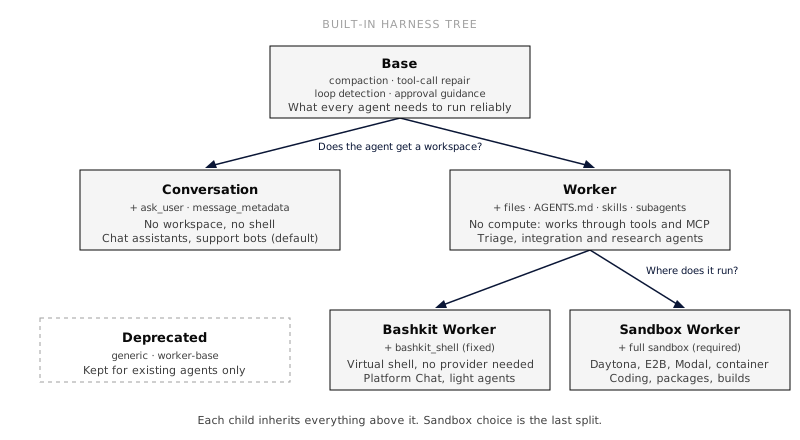 | Harness | What it provides | Best for | | -------------------------------------------------------------------------------------- | ------------------------------------------------------------------------------------------------------------------------------------------------------ | --------------------------------------------------------------------------------- | | [Base](https://everruns.com/docs/built-ins/harnesses/base/) | System essentials: compaction, error disclosure, tool-call repair, loop detection, approval guidance | Custom harnesses that compose their own tools | | [Conversation](https://everruns.com/docs/built-ins/harnesses/conversation/) | Base plus structured questions and message timestamps. No workspace, no shell | Chat assistants, support bots (the default) | | [Worker](https://everruns.com/docs/built-ins/harnesses/worker/) | Base plus files, AGENTS.md, skills, long context, budgeting, subagents, tasks and [Dreaming](https://everruns.com/docs/features/dreaming/). No compute | Agents that work through tools and MCP servers | | [Bashkit Worker](https://everruns.com/docs/built-ins/harnesses/bashkit-worker/) | Worker plus the Bashkit virtual shell, fixed to the Bashkit Virtual Workspace | Platform Chat, light automation, agents that need bash without a sandbox provider | | [Sandbox Worker](https://everruns.com/docs/built-ins/harnesses/sandbox-worker/) | Worker plus a full sandbox shell chosen by the Agent sandbox policy | Coding, installing packages, builds | | [Worker Base (deprecated)](https://everruns.com/docs/built-ins/harnesses/worker-base/) | Preserved legacy bundle | Existing custom harnesses that name it | | [Generic (deprecated)](https://everruns.com/docs/built-ins/harnesses/generic/) | Preserved legacy bundle | Existing bindings | Conversation is the default. Deprecated harnesses keep working for existing bindings and explicit references; selectors hide them until you choose Show deprecated. See the [Built-in harnesses reference](https://everruns.com/docs/built-ins/harnesses/base/) for the exact capability bundle each one ships with. ### Choosing a harness 1. **Does the agent only talk?** Choose Conversation. 2. **Does it need a workspace, instructions, skills or delegation?** Choose a Worker. 3. **Where does it run commands?** * Nowhere, it works through tools and MCP servers: Worker. * In a virtual shell that needs no sandbox provider: Bashkit Worker. Bashkit runs Bash-like commands over a durable virtual filesystem, so it suits scripting, file work and light automation. It cannot install native packages, start processes or servers, open ports or attach a terminal. * In a real machine with processes and packages: Sandbox Worker, plus an Agent sandbox policy that names a container or managed Sandbox Template. Choose it for coding, builds, test runs and browser automation. When in doubt, start on the smallest harness that works and move the agent up when it needs more. A child harness cannot remove what its parent adds, so starting large means the agent carries tools it never uses. Some common agents and their harness: | Agent | Harness | | ------------------------------------------------------------------- | -------------- | | Support bot, Q\&A over a knowledge base | Conversation | | Linear or GitHub triage, Slack assistant, research over MCP servers | Worker | | Report generation, CSV clean-up, operations scripts | Bashkit Worker | | Coding agent, PR reviewer that runs tests | Sandbox Worker | Bashkit Worker and Sandbox Worker each fix one rule, and the rule is inherited by custom harnesses built on them. Bashkit Worker rejects an Agent sandbox policy, since its sandbox is always Bashkit. Sandbox Worker rejects a policy that only allows Bashkit, and a session on it fails with a clear message when no full Sandbox Template is available rather than quietly running on Bashkit. For existing organizations, the [harness upgrade notes](https://everruns.com/docs/framework/upgrade-notes/#harness-tree) describe how agents on the old Worker move to Bashkit Worker or Sandbox Worker, and how Generic bindings are preserved. [Platform Chat](https://everruns.com/docs/built-ins/harnesses/platform-chat/) is a managed Agent bound to Bashkit Worker. Introductions and conversation starters belong to Agents; harnesses describe reusable execution behavior. ## Naming Every harness has two names: * **`name`**: stable URL-friendly slug (`conversation`, `bashkit-worker`). Unique per org. Use this in API calls, CLI, code. * **`display_name`**: human label shown in the UI. `name` format: `[a-z0-9]+(-[a-z0-9]+)*`, max 64 chars, no consecutive hyphens. ## How harnesses combine with agents and sessions The system prompt is built from three layers, each wrapped in XML tags: 1. Harness capabilities (foundation) 2. Agent capabilities (role) 3. Session capabilities (per-conversation extras) 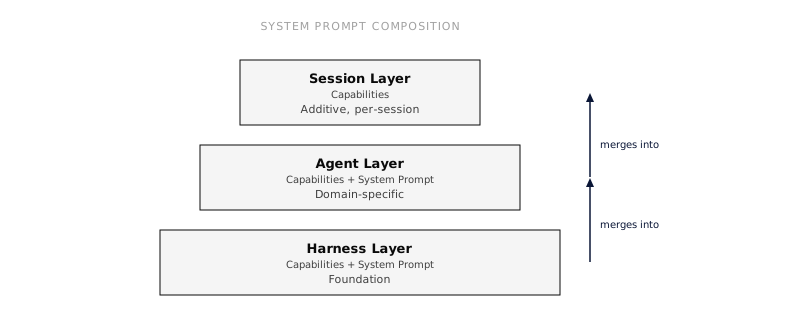 The merge is associative: a chain of inherited harnesses produces the same `TurnAgent` as a single pre-merged harness. ### The base system prompt is optional A harness bundles more than a prompt, capabilities, MCP servers, a default model, network access, and starter files. Because of that, the base `system_prompt` is **optional**. Omit it (or leave it empty) when a harness exists only to add capabilities or MCP servers on top of a parent: the effective prompt is then composed entirely from the parent harness, the agent, the session, and capability contributions. Empty or whitespace-only prompts contribute nothing, and if no layer contributes a prompt the agent runs with no base system prompt at all. ## Do something * [Customize a harness](https://everruns.com/docs/how-to/customize-a-harness/), build your own as a base for many agents. * [Equip an agent with tools](https://everruns.com/docs/how-to/equip-agents-with-tools/), add capabilities at the agent layer. ## See also * [Built-in harnesses](https://everruns.com/docs/built-ins/harnesses/base/), reference for the shipped harnesses. * [Sandbox Templates](https://everruns.com/docs/features/sandbox-templates/), configure Bashkit or managed Daytona compute independently of the harness. * [Concepts](https://everruns.com/docs/getting-started/concepts/), entity model.
---
# Isolated Sandboxes
> Run each agent sandbox as its own pod on your Kubernetes cluster, in its own VM with AWS Nitro Sandboxes, gVisor or Kata, with no provider account.
Source:
An **Isolated sandbox** is a Sandbox Template target that your Everruns deployment runs itself. Each sandbox is one pod in a namespace you choose, with a workspace volume, its own network policy and the Everruns sandbox guest as its entrypoint. There is no provider account to connect: the server uses the deployment’s own cluster access. How strong the isolation is depends on the cluster. With a VM runtime class, every sandbox gets its own kernel: | Runtime class | Where | What each sandbox gets | | ------------------ | -------------------------------------- | -------------------------------------- | | `isolated-sandbox` | EKS Auto Mode with AWS Nitro Sandboxes | Its own Nitro VM | | `gvisor` | Any cluster with gVisor installed | A user-space kernel | | `kata` | Any cluster with Kata Containers | A lightweight VM | | none | Any cluster | A plain container on the node’s kernel | Without a runtime class, the template editor says so plainly: a container is not a security boundary for code you do not trust. ## Turn it on Isolated sandboxes are part of the [Helm chart](https://everruns.com/docs/getting-started/kubernetes/). Turn them on with the egress proxy, which open-network sandboxes connect through:
```yaml
sandboxes:
kubernetes:
enabled: true
namespace: everruns-sandboxes
runtimeClassName: isolated-sandbox # or gvisor, kata, or "" for plain containers
sizes: [small, medium, large]
maxPerOrg: 5
egressProxy:
enabled: true
```
The chart creates the namespace (with the `baseline` Pod Security level, so a sandbox cannot be privileged), a Role that lets the server and workers manage pods, volume claims, secrets and network policies in that namespace only, and a default-deny network policy. Nothing gets a cluster-wide permission, and sandbox pods get no service account token. Outside the chart, set `KUBERNETES_SANDBOX_NAMESPACE` on the server and workers; the target is on when the server can reach Kubernetes and that variable is set. The other settings are listed in [Environment variables](https://everruns.com/docs/sre/environment-variables/). ## Templates Pick **Isolated sandbox** under **Runs in**, in the **On this deployment** group: | Option | Meaning | | ---------------- | ------------------------------------------------------------------------------------------------------------------------------------------------------------------------------------- | | Size | `small` (1 vCPU, 2 GiB), `medium` (2 vCPU, 4 GiB) or `large` (4 vCPU, 8 GiB). Requests equal limits, so a sandbox gets exactly its size. The deployment decides which sizes it offers | | Image | Any image with the sandbox guest. Empty uses the deployment’s image. The deployment may limit images to a list of prefixes | | Workspace path | Where commands and relative paths start, and where the workspace volume is mounted (default `/workspace`) | | Desktop | Starts the sandbox from the desktop image and gives the agent the `computer` tool | | Outbound network | Open, only listed IP ranges, or blocked | In the API:
```json
{
"target": {
"kind": "managed",
"provider": "kubernetes",
"credential": { "source": "platform" },
"options": { "size": "medium" }
},
"durability": "provider_snapshot"
}
```
## Pause and resume When a session goes idle, Everruns deletes the pod and keeps the workspace volume: compute stops, files stay, running processes end. The next command starts a new pod on the same volume. If the volume itself is gone, Everruns starts a fresh sandbox. A per-organization limit counts running sandboxes only, so paused ones never block new work. ## Charging for sandboxes Self-hosted sandboxes cost nothing beyond your cluster. A deployment that charges organizations for them (the managed demo pays from demo credit) asks before every pod starts and records how long each one ran. Each pod also gets a hard lifetime that Kubernetes enforces on its own. Set `sandboxes.kubernetes.billingNote` to tell template authors what a running sandbox costs. ## Network Egress is enforced by the cluster’s network policy, outside the sandbox, so code running as root inside it cannot bypass it: * **Open**: through the egress proxy (`egress: proxy`), which applies its deny lists and limits, or straight to the internet with private ranges excluded (`egress: direct`) * **Only listed IP ranges**: the listed CIDR ranges and nothing else * **Blocked**: nothing A network policy cannot match domain names, so domain allowlists are refused when a template is saved rather than silently widened. Your CNI must enforce NetworkPolicy (EKS with the VPC CNI network policy agent, Calico, Cilium and recent kind releases do). ## Images Everruns publishes two images with every release: * `ghcr.io/everruns/sandbox-dev`: Microsoft’s Dev Container Ubuntu 24.04 base with Node.js, Python with uv, Go, Rust, the Docker CLI, the GitHub CLI, ripgrep and jq * `ghcr.io/everruns/sandbox-desktop`: the same, plus Xvfb, an xfce session, xdotool, screenshot tools, ffmpeg and Chromium Changes to the images also publish an `:edge` tag between releases. To try it, set `sandboxes.kubernetes.image` to `ghcr.io/everruns/sandbox-dev:edge` and `sandboxes.kubernetes.desktopImage` to `ghcr.io/everruns/sandbox-desktop:edge`. Released tags stay the default. To use your own image, add the sandbox guest with the Dev Container Feature and allow the image on your deployment:
```json
{
"image": "mcr.microsoft.com/devcontainers/python:3",
"features": {
"ghcr.io/everruns/features/sandbox-guest:1": { "version": "v0.53.0" }
}
}
```
The feature installs a static binary at `/usr/local/bin/everruns-sandbox-guest`, so it works on any Linux base. The pod starts it itself; the image’s own entrypoint is not used. Pin the guest to the release your server runs.
---
# Large MCP catalogs and tool surfaces
> Everruns paginates MCP catalogs, searches authorized server and tool metadata, and reveals bounded schemas through native calls or the session shell.
Source:
Everruns reads MCP catalogs page by page, indexes the tools available to the current agent, and reveals schemas as they are needed. This lets an agent work with catalogs containing thousands of operations without sending every parameter schema to the model at the start of a turn. The runtime catalog, model-visible schemas, and tool-result history are separate budgets. A session can index 2,000 operations and use only a few: the initial native surface contains the search entry point and required eager tools; a search adds the selected operations to a bounded working set. Unselected schemas stay in the runtime. A deferred MCP server is enumerated when selected, then its operations can be searched without sending its complete catalog to the model. Native disclosure defaults to retaining up to 32 optional schemas, not reserving 32 slots that every search must fill. ## Complete catalog discovery The MCP client follows every `tools/list` cursor and keeps the negotiated connection and authorization for each page. A catalog is accepted only when the server reports that there are no more pages. Repeated or empty cursors, duplicate names within one server, and discovery that exceeds a fixed implementation bound fail explicitly; these bounds are not deployment settings. Everruns does not treat a partial page sequence as a complete catalog. Per-server discovery is bounded to 10,000 tools, 16 MiB each for cumulative response bodies and serialized tool definitions, 256 pages, and 60 seconds total. Response bytes include protocol framing. The HTTP transport also retains its existing per-request timeout. The Framework’s scoped discovery cache has a 128 MiB weighted budget per runtime instance, so one large catalog cannot make that cache grow without bound. These limits are safety bounds, not a claim that every provider or model can use 10,000 schemas at once. Custom Framework egress adapters must implement `EgressService::send_stream`. HTTP discovery consumes bounded response streams even when the MCP reply is ordinary JSON, so response limits apply before buffering the complete body. The Framework’s scoped MCP discovery also limits the combined session catalog to 10,000 tools and 32 MiB of serialized, server-prefixed definitions. If it exceeds either bound, discovery fails closed with an explicit trace error; it does not return a truncated catalog. Discovery limits are fixed in the implementation, not deployment settings. ## Search and schema disclosure In bounded native mode (`tool_search` with `bounded: true`) and in the `tools` CLI, search uses one authorization-scoped index over server names and descriptions, operation names and descriptions, parameter schema text, and declared capability IDs, names and descriptions. It does not index full system prompts. Server context and owning capability text are scored once per MCP source; built-in operations share one capability context contribution per capability, independent of operation count. Results retain source and operation identity, so same-named tools on different servers remain distinct. A query matching only a capability or server description returns a bounded source browse/refinement, not an arbitrary group of operation schemas. Follow with an operation query to load selected schemas through the existing disclosure path. The CLI marks source matches separately and points to `tools --help`. Legacy native `tool_search` keeps its existing matcher and does not use this shared index. When a query names an exact operation, search returns matching authorized identities without padding the result with weaker description matches. An unqualified operation shared by several servers can still return several identities; include the server name to disambiguate it. Broader task queries continue to use ranked retrieval. Names, descriptions and schema text are scored independently, so a large parameter schema does not bury a strong name or description match. Complete operation names accept spaces, hyphens or underscores: `update agent` can find a registered `update_agent` operation. Current authorization still determines which identities can appear. For owned operations, search also accepts an unqualified exact alias after stripping only the declared owner ID prefix, with that ID’s hyphens normalized to underscores. For example, `platform_update_agent` can match `update_agent` or `update agent`, while calls still use the canonical `platform_update_agent` name. A capability-name-only query remains a bounded source browse/refinement; it does not match every operation under that prefix. By default, `tool_search` keeps its existing behavior. To opt into bounded schema disclosure, set `bounded` and the three limits on the capability:
```json
{
"ref": "tool_search",
"config": {
"bounded": true,
"max_active_tools": 32,
"max_active_bytes": 65536,
"max_result_bytes": 32768
}
}
```
The first two limits bound optional disclosed schemas only. Eager, client-side, and `never_defer` tools remain in addition to those limits, and fallback drivers may temporarily hold removals during a warm-prefix transition. Held definitions must still fit the combined native tool budget: eager definitions plus the configured optional count and byte limits. If a lower live budget no longer admits the held list, the runtime releases those removals immediately. `max_result_bytes` bounds the operation summaries returned by a search. Full canonical schemas arrive as native functions on the next step, without being duplicated in search-result text. A schema can therefore exceed the search response budget while fitting the active native-definition budget. Discovery remains progressive and does not create a second execution path. If schemas exceed the active budget, or summaries exceed the result budget, search asks the model to narrow the query instead of presenting omitted operations as available. `omitted_tools` names byte-omitted candidates within the same result budget; search one name exactly to request that schema. These names do not make the operations callable. Removing an active schema does not remove its earlier transcript history; this feature does not set a cumulative history limit. Tool search applies the current attachment and authorization rules before returning matches, and the shell catalog is built from the current turn’s visible-tool scope. Replacing or detaching a capability or MCP source rebuilds the index. Search, help, and invocation all stay within the current scope; deferred child tools retain the scope of their server placeholder. The runtime checks authority again when an operation is called. Removing a server or revoking its connection therefore makes its operations unavailable even if a prior turn disclosed their names or schemas. When a server’s schema changes, refreshed discovery supplies its current definition; old arguments still go through current schema validation. A transient refresh failure may leave the last successful catalog available under the existing recovery policy. An authentication failure clears the cached catalog, and an incomplete page sequence is never published as a successful refresh. ## Native, CLI, and hybrid access The same registered operation can be exposed as a native function, through the session’s `tools` command, or through both surfaces. Configure [`shell_code_mode`](https://everruns.com/docs/capabilities/shell-code-mode/) with `mode: "cli"` for the shell surface (the default), or `mode: "hybrid"` to retain native calls alongside the CLI. Hybrid mode alone keeps native schemas eager; to progressively reveal bounded native schemas, also enable bounded [`tool_search`](https://everruns.com/docs/capabilities/tool-search/):
```json
{
"capabilities": [
{ "ref": "tool_search", "config": { "bounded": true } },
{ "ref": "shell_code_mode", "config": { "mode": "hybrid" } }
]
}
```
With both capabilities configured, `tool_search` reveals selected native schemas while the same catalog is searchable and callable through `tools`. The CLI is useful when a script should chain operations or filter intermediate results; native calls are useful for one typed operation. Both routes use the same operation identity, schema validation, authorization, and execution policy. For CLI discovery, start with `tools search `, then inspect one selected operation with `tools --help`. Root and server help are bounded to 64 entries and 12 KiB, with explicit omission counts and search guidance. A selected operation’s schema remains available through its own help. Filtering intermediate results inside the shell also keeps large response bodies out of the conversation. When a CLI search matches deferred MCP servers, it loads at most eight per query. Other matching servers stay marked as not loaded for a later search. Each loaded server joins the shell catalog atomically; if it would exceed the 10,000-tool or 32 MiB catalog ceiling, none of that server’s tools are added. MCP servers and plugins join the runtime’s operation registry when attached. Attaching, removing, or redefining one updates what the next search or CLI lookup can see. Existing authorization is checked during search and again during execution, including after a warm cache, session restart, or history compaction. Tool and prompt changes use the runtime’s existing incremental disclosure path; cache behavior can vary by provider and endpoint. See [MCP](https://everruns.com/docs/features/mcp/) for server setup and [Tool Search](https://everruns.com/docs/capabilities/tool-search/) for provider-specific search modes. ## Run the synthetic example The repository’s [Rust/Mira study](https://github.com/everruns/everruns/tree/main/evals/mcp-scale) includes a working paginated MCP server and an agent using the Framework’s production discovery and execution paths. From an Everruns checkout, provide `OPENROUTER_API_KEY` and run:
```bash
cd evals/mcp-scale
cargo run -- --offline-catalog
EVERRUNS_EVAL_TRIALS=1 EVERRUNS_EVAL_CONCURRENCY=1 \
cargo run -- --run --sample readonly-ticket \
--filter 'catalog_size=600,servers=1,' --runs-report /tmp/mcp-scale.jsonl
```
This runs the same read-only task through native, CLI, and hybrid surfaces using Muse Spark 1.3 Contributor. The fixture has 600 tools, returns 100 tools per page, and persists isolated synthetic state across MCP process launches. The scorer requires completed operations and checks that no mutation occurred; a model’s final answer alone cannot pass. Change the catalog size to `2000` to exercise a larger catalog. The study README documents the full matrix, stress measurements, and limitations.
---
# Model Context Protocol (MCP)
> Everruns is both an MCP server, exposing its agents and tools to external clients with OAuth 2.1, and an MCP client that registers remote servers as virtual capabilities.
Source:
Everruns speaks the [Model Context Protocol](https://spec.modelcontextprotocol.io) on **both sides**: it exposes its own agents and tools as an MCP server, and it consumes remote MCP servers as agent capabilities. ## Everruns as an MCP server Every Everruns deployment exposes an authenticated MCP endpoint at `/mcp` so external clients, Claude Desktop, Cursor, VS Code, or another agent, can discover and call your agents and tools over JSON-RPC. It is a standard product surface, with no deployment variable or organization feature toggle. * **Transport**: JSON-RPC 2.0 over Streamable HTTP (`POST /mcp`). Protocol versions `2026-07-28`, `2025-06-18` and `2025-03-26` are supported. * **Browsers**: opening `/mcp` in a browser shows a page that explains the URL is for MCP clients, with the URL to copy and setup commands. Only a `GET` that accepts `text/html` and not `text/event-stream` gets the page; every other `GET` returns `405 Method Not Allowed`. * **Methods**: `initialize`, `server/discover`, `ping`, `tools/list`, `tools/call`, `resources/list`, `resources/templates/list`, `resources/read`; under `2026-07-28`, `skills/list`, `skills/get`, and `resources/directory/read`, plus `tasks/get`, `tasks/update` and `tasks/cancel` for clients that use [Tasks](#long-agent-turns-as-tasks); and, for organizations that turn on MCP Events, `events/list`, `events/subscribe` and `events/unsubscribe`. * **Auth**: MCP requests authenticate and resolve an organization before dispatch. OAuth 2.1 uses mandatory PKCE, and MCP access tokens are bound to the exact `/mcp` resource so they cannot be reused against the REST API. Unauthenticated requests fail with `401` and protected-resource discovery metadata is served at `/.well-known/oauth-protected-resource/mcp`. * **Files**: `agent_run` and `session_send_message` take an optional `files` list, each file as base64 `data` or a public `https` `url`. The files are copied into the session’s `/attachments` folder, as for [channels](https://everruns.com/docs/features/channels/#files-people-send). * **Rooms**: `room_read_unread`, `room_read`, `room_post`, `room_who_read`, `room_mark_read` and the room file tools let a client take part in a [room](https://everruns.com/docs/features/rooms/#from-an-mcp-client) like any member. * **Entity cards**: under protocol `2025-06-18` and newer, `agent_get_card`, `harness_get_card`, `capability_get_card`, and `knowledge_get_card` open the corresponding Everruns cards. Supported hosts render the cards; other clients receive structured details and a text fallback. Routing is intentionally split: REST under `/api/*`, MCP OAuth under `/oauth/*`, and MCP JSON-RPC at `/mcp`. ### Client trust and attribution The authorization page shows the selected redirect host and the access you are granting. Client names are self-declared; a familiar name or localhost callback does not verify an application’s publisher. The `mcp` scope permits reading and changing data and running agents across your accessible organizations. Runs can incur costs. Narrower OAuth scopes are not currently supported. A session’s information tooltip identifies the MCP client that created it. Each user input records its own client, visible beside the message and in its information tooltip. Change history also identifies the client. A later client or web message does not inherit the original client’s attribution. Older sessions and credentials without a grant have no inferred client identity. Names remain labeled as self-declared; client and grant IDs distinguish clients with the same name. Manage or revoke connections in **Settings > AI clients**. ### Skills for MCP clients The endpoint serves public workflow guidance through the official [MCP Skills extension](https://modelcontextprotocol.io/extensions/skills/overview). With protocol `2026-07-28`, `server/discover` advertises `io.modelcontextprotocol/skills` with directory reading enabled. Use `skills/list` to discover complete entries or `skills/get` to look up a known `SKILL.md` URI directly, then read instructions and supporting files with `resources/read`. The server publishes one skill, `skill://everruns/SKILL.md`: product concepts and a map of task guides beside it, matching the server’s version. For example: | File | Use it for | | ------------------------------------------------ | ---------------------------------------------------------------------------------------------------------- | | `skill://everruns/references/mcp.md` | Connection setup, finding agents, running sessions, inspecting results, and managing resources through MCP | | `skill://everruns/references/cli.md` | Command usage and examples across CLI, session shell, and MCP | | `skill://everruns/references/agent-authoring.md` | Creating or revising agent definitions, selecting capabilities and harnesses, and verifying behavior | | `skill://everruns/references/debug-session.md` | Finding out why a session failed or stalled | Each entry preserves all authored frontmatter and includes every file’s URI, SHA-256 digest, and byte size. Supporting references resolve relative to the skill directory. `resources/directory/read` lists direct children of a directory, for example `skill://everruns/references`, without a trailing slash. Unknown skills, files, directories, and cursors return JSON-RPC `-32602`. These files ship with the server and are identical for every organization. They use public cache hints, while organization data resources remain private. Requests still require MCP authentication. Organization-managed Skills registry entries, the Rust Framework skill, and repository contributor workflows are not published in this catalog or accessible through its skill resource reads. Reading a resource does not itself activate a skill. A host supporting the extension loads it through its skill loader, checks the manifest and frontmatter, and applies its approval policy. Older clients can read a known skill URI as an ordinary resource but receive no Skills extension capability. ### Polling for replies `session_get_status` returns `latest_output`, the latest non-empty text the agent said in the session, including replies delivered through `send_message`. Private commentary, tool arguments, and failed deliveries do not count as replies. `since_event_id` and `event_types` filter the returned event page only. The latest reply remains available even when that page is empty or contains only status events. It is a session snapshot, so it can still be the previous turn’s reply while a new turn runs or after a turn that sends no reply; check `status` and the returned events for progress. `latest_output` is `null` when the session has no visible text reply. ### Long agent turns as tasks An agent turn can take minutes. Clients on protocol `2026-07-28` that declare the [MCP Tasks extension](https://modelcontextprotocol.io/extensions/tasks/overview) (`io.modelcontextprotocol/tasks`) get a task back from `agent_run` and `session_send_message` instead of holding the request open, then poll `tasks/get` until the turn ends. * **One task per message.** Each message starts its own task, and a finished task keeps its own reply, so an old task id never shows a later turn. * **Results.** A completed task carries the agent’s reply as the tool result, with the session id, the message id and any structured result in `structuredContent`. A turn that failed or was stopped is `completed` with `isError: true` and a status message saying why; a cancelled turn is `cancelled`. * **Questions.** When the agent asks with Ask User and the client also declares form elicitation, the task is `input_required` and carries the form. Answer it with `tasks/update`; send a follow-up message with `session_send_message`. * **Cancel.** `tasks/cancel` stops the running turn. Task ids are checked against the caller’s access on every request: an id for a session the caller cannot read is an unknown task. Clients that do not declare the extension keep getting plain tool results. ### In ChatGPT and Codex `/mcp` serves [MCP Apps](https://github.com/modelcontextprotocol/ext-apps): hosts that render them, including ChatGPT, Codex and Claude, can open entity cards, the organization Home, and the full Session workspace with Trace, Approvals, Work, Events, Files and Cost. Ask to open a session and the client calls `session_open` with its ID. Running an agent, sending a message and checking status return data without opening another view. The views use your connected MCP account and selected organization, without a second browser sign-in. Read-only tokens retain read-only access. Self-hosted deployments must serve the configured frontend URL, and the host must support embedded frames. Entity titles open Everruns while Session tabs navigate inside the workspace. Files use the MCP connection, and downloads require host download support. HTML has a static preview; PDF and interactive HTML previews, along with credential entry, open in Everruns through the host. Repeated results for the same workspace preserve drafts and the selected tab. Theme and fullscreen changes keep the workspace mounted. If the initial host connection times out, choose **Retry connection**. Hosts that do not render apps retain structured results and text through the same tools. ### Session events (experimental) With the **MCP Events** feature flag turned on for an organization, an MCP client can subscribe to webhooks for `session.completed`, `session.failed` and `session.input_required`, filtered by agent or session. Callbacks must be public HTTPS URLs and are verified before the first event. Deliveries are signed per [Standard Webhooks](https://www.standardwebhooks.com/) and carry identifiers and state, not message content: read the session with `session_get_status`. ## Everruns as an MCP client People can also add MCP servers for themselves; agents with the User MCP Servers capability use them while that person chats. See [User MCP Servers](https://everruns.com/docs/features/user-mcp-servers/). A server the agent adds for one conversation only ([`"scope": "chat"`](https://everruns.com/docs/capabilities/user-mcp-servers/#this-conversation-only)) shows under the **MCP** button in that conversation’s header, where you can see whether you have signed in and remove it; its tools leave from the next message. Over the API: `GET /v1/sessions/{session_id}/mcp-servers` and `DELETE /v1/sessions/{session_id}/mcp-servers/{name}`. Register a remote MCP server and its tools appear as a **virtual capability**: auto-discovered, namespaced, and executed alongside built-in capabilities. No code changes are needed to give an agent new tools. * **Org-managed servers**: organization-scoped `McpServer` records connect over remote HTTP (Streamable HTTP). `stdio` is rejected by the hosted control plane and is only available to single-tenant runtime/CLI hosts. People who manage MCP servers keep these presets in **Settings > Organization > MCP catalog**; a preset does nothing until an agent or a person adds it. MCP sign-ins you authorized for agent servers that act as you are listed in **Settings > MCP servers**. * **Scoped `mcpServers`**: harnesses, agents, and sessions can embed remote MCP config directly (the remote-server subset of `.mcp.json`) for session-local or agent-local wiring without creating an org-global record. * **Restricted egress**: on deployments that limit where requests that send data may go (such as the Everruns demo instance), MCP traffic only reaches approved services. Once a platform administrator allows it, org admins can add their own MCP hosts under **Settings > Organization > Outbound allowlist**. * **Tool naming**: discovered tools are namespaced per server so they never collide with built-in capabilities. * **Protocol compatibility**: the client negotiates the MCP protocol era per server. By default (`auto`) it issues a session-less `2026-07-28` request and transparently falls back to the stateful `initialize` handshake (`2025-11-25`, then `2025-06-18` / `2025-03-26`) for servers that require it, caching the verdict per server. Set the protocol mode to `legacy`, `stable`, or `rc` to pin a specific era and skip negotiation. No setting is needed for the common case. ### Reading a server’s resources Many MCP servers publish context as [resources](https://modelcontextprotocol.io/specification/2025-11-25/server/resources): files, schemas, documents. Whenever a conversation has an MCP server attached, the agent gets two read-only tools: * `list_mcp_resources` lists a server’s resources and resource templates, one page at a time. * `read_mcp_resource` reads one resource by URI, including a URI the agent filled in from a template. Text is returned to the agent as is, images arrive as images, and other binary content is saved to the session’s files (or only described, where the session has no files) instead of being pasted into the conversation. Content a server marks as meant only for the user stays out of the agent’s context. Resources are read with the same sign-in as the server’s tools, and only servers attached to the conversation can be reached. A server that publishes no resources says so when asked. ### Interactive views (MCP Apps) Some MCP servers ship a small interactive view with a tool, following [MCP Apps](https://github.com/modelcontextprotocol/ext-apps): a chart of the events a tool just counted, a table you can sort, a map. When an agent calls such a tool, the console shows the view right under the tool call, in a sandboxed frame labelled with the server’s name. **Expand** opens it full screen, and **Show data** shows the data the view was drawn from. * **What the agent sees does not change.** The model gets the tool’s text result as before; the view and its data are for the person reading the chat. * **Views stay in a sandbox.** A view runs without access to the console’s cookies, storage or page, and can only reach the web addresses it declared. Your deployment’s own content security policy applies on top, so a view that loads code or data from elsewhere may need those hosts allowed there. * **Views can ask, not act.** When a view calls one of its server’s tools, tools marked read-only or meant only for views run right away; any other tool asks you first. A message a view proposes lands in the chat box as a draft for you to send or delete. Only the session’s owner lets a view call tools; anyone else sees the view with the data the call already returned. * **Slack** gets a picture of the view, taken with the session’s [Browserless](https://everruns.com/docs/capabilities/browserless/) connection when there is one, and an **Open interactive view** button that links to the session. * **Per server setting.** **Interactive views** on a server’s settings is **On** (console and Slack), **Console only**, or **Off**, which shows the text result only. Views cannot change what the model sees, start sampling or download files. ### Who a server acts as Each MCP server attached to an agent says whose sign-in its calls use (`actsAs`, or **Who should this server act as?** on the agent’s **MCP servers** sheet): | `actsAs` | On the sheet | Calls run as | | ----------------- | -------------------------------------------------- | ---------------------------------------------------------------------------- | | `none` | No identity | Nobody: the server needs no sign-in | | `service` | Service identity | The agent’s own account, signed in once by someone who manages MCP servers | | `user` | Invoking user | The person chatting, with their own sign-in; nothing when nobody is chatting | | `user_or_service` | Each user, or the agent if they have not connected | The person chatting when they have signed in, otherwise the agent’s account | `user_or_service` is never chosen for you. Unattended runs (schedules, triggers) always use the agent’s account, since nobody is chatting. Every MCP tool call records which account it used in its `tool.completed` event (`acted_as`: `user` or `service`), so a fallback to the agent is visible. When someone adds an OAuth server to the catalog, Everruns checks right away that it can reach the server’s sign-in service and register with it. The catalog row then says **Ready to connect**, or why not, for example “Can’t reach mcp.linear.app: this host is not on the allowed network list”. Saving works either way; **Check again** re-runs the check after you change the network list. An OAuth server from the catalog can be attached before anyone has signed in to it. The first **Authorize** or **Connect** registers Everruns with the server and signs in; until then the attachment shows **Connection required** and its tools are unavailable. If a sign-in fails, you return to the page you started from with the reason, for example that the server’s host is not on the organization’s allowed network list. The agent’s **MCP** sheet shows what the agent’s own sign-in to each server can still do, read from the stored sign-in: * **Connected as …** with “Renews automatically.”: it works and renews itself. * **Connected as … · stops** *date*, with **Sign in again**: it works now, but nothing can renew it (for example, it was made before Everruns tied sign-ins to their server). Signing in again once fixes it for good. * **Sign-in stopped working**, with the date the tools went missing, the reason and **Sign in again**: it expired and could not renew, or the server refused or kept rejecting it. **Health** opens an “MCP server needs sign-in again” issue for the agent’s authors when a sign-in stops working, and three days before one that cannot renew expires. Until someone signs in again, the server lists a single `sign_in_required` tool in place of its tools, so the agent can say what is missing instead of silently skipping that part of its work. The same states are available outside the console, so a script or Platform Chat can check and fix them:
```bash
everruns agents mcp list agent_01h9 # each server's sign-in state
everruns agents mcp revoke agent_01h9 stend # remove a sign-in
```
An agent with a server acting as `user` or `user_or_service` gets the `connect_mcp_server` tool, so it can show a **Connect** card in chat before a call fails. ### Connecting from chat When a call needs a sign-in that is missing, the chat pauses on a **Connect** card (or, for the agent’s own account, an **Authorize** card for someone who manages MCP servers and **Ask an admin** for everyone else). Set `connectInChat` on the attachment (**Ask to connect in chat** on the agent’s **MCP servers** sheet) to choose: | `connectInChat` | A missing sign-in | | --------------- | ---------------------------------------------------------------------------------------------------------------------------------------------------------------------------------------------------- | | `ask` (default) | Pauses the chat with the card | | `never` | Fails the call with an error naming the server and its settings link (`/settings/connections` for the person’s own sign-in, the agent’s **MCP servers** sheet for the agent’s), and the turn goes on | `never` suits agents behind channels that cannot show a card, such as a chat bridge. `connect_mcp_server` follows it too and returns the same link instead of a card.
```json
{
"mcpServers": {
"github": { "use": "catalog:github", "actsAs": "user", "connectInChat": "never" }
}
}
```
### Loading tools on demand Every server’s tools are normally listed at the start of each turn, which costs one `tools/list` round trip per server. Set `deferred: true` on an attachment (**Load tools on demand** on the agent’s **MCP servers** sheet) to skip that: the agent sees one line for the server, `mcp_` with its name and description, and loads the server’s tools when it needs them, by finding it with `tool_search` or calling that line. The tools are callable from the agent’s next step and stay loaded for the rest of the conversation. Off is the default, so existing agents are unchanged. A person’s own servers ([User MCP servers](https://everruns.com/docs/capabilities/user-mcp-servers/)) load on demand by default; a person can turn that off for one of their servers with its **Load tools on demand** switch in **Settings > My MCP servers**. For catalogs with hundreds or thousands of operations, Everruns paginates discovery and supports bounded search and schema disclosure. See [Large MCP catalogs and tool surfaces](https://everruns.com/docs/features/large-mcp-catalogs/).
```json
{
"mcpServers": {
"linear": { "use": "catalog:linear", "actsAs": "user", "deferred": true }
}
}
```
A catalog entry can take the agent’s account from an existing connection instead of its own sign-in (`service_connection_provider`, **Agent credential** in the catalog form). The seeded `github` entry (`https://api.githubcopilot.com/mcp/`) uses the agent’s GitHub App, so an agent with a GitHub App needs no second GitHub login. A connection is only accepted for servers on its provider’s own hosts, so its tokens cannot be sent anywhere else. GitHub’s MCP server accepts the App’s installation token, but that token acts as the App, not a person. It reaches only the repositories the App is installed on, with the App’s permissions, and tools about a person (`get_me`, notifications, starred repositories, “my” issues and pull requests) fail. For those, attach the server acting as `user` so the person signs in. ### Long-running tools A call to an MCP tool fails if the server has not answered within 60 seconds. For a server whose tools take longer, such as one that runs a build or a deployment, set `tool_timeout_ms` on the attachment or catalog entry (**Tool call timeout** in the catalog form, in seconds). It accepts 1 second to 30 minutes. `timeout`, the key common `mcpServers` config files use, works as well. An attachment that uses a catalog entry may set its own timeout. If it does not, it uses the catalog’s timeout.
```json
{
"mcpServers": {
"ci": { "type": "http", "url": "https://ci.example.com/mcp", "tool_timeout_ms": 600000 }
}
}
```
A server that supports the [MCP Tasks extension](https://modelcontextprotocol.io/extensions/tasks/overview) does not need a longer timeout. Everruns declares the extension on every tool call, so such a server can answer with a task instead of holding the request open. The agent then checks on the task until it finishes, for up to 30 minutes. While it runs, the server’s status message (for example “Running tests”) shows on the tool call in chat and in the session’s events. Questions the task asks reach the agent’s user the same way as a server’s [form questions](#when-a-tool-needs-a-person). If the turn is cancelled or the wait runs out, Everruns cancels the task on the server. ### Waking an agent on a server’s events (experimental) With the **MCP Events** flag on, an agent can also subscribe to events that one of its own MCP servers publishes, such as a tracker announcing new issues. Create an agent trigger with `trigger_type: "mcp_event"`, the attachment’s name in `mcp_server`, the event name from the server’s `events/list` in `mcp_event`, and any subscription arguments in `mcp_event_arguments`:
```bash
curl -X POST "$EVERRUNS_API/v1/agents/$AGENT_ID/triggers" \
-H "Content-Type: application/json" \
-d '{
"trigger_type": "mcp_event",
"mcp_server": "tracker",
"mcp_event": "issue.created",
"mcp_event_arguments": {"team": "eng"},
"message": "Triage {{payload.issue.title}}"
}'
```
Everruns subscribes with the agent’s credential for that attachment (its sign-in to the server, or the connection a catalog entry such as `github` names), a signing secret it generates, and a callback URL of its own; the server must accept webhook delivery. Each signed event starts a run with the event’s `data` as `{{payload}}`. Subscriptions are renewed before they expire and cancelled when the trigger is disabled or deleted. The attachment must act as the agent (`service` or `user_or_service`), not only as the calling user, since a trigger runs as the agent. ## Which tools ask before they run In the normal approval mode, a tool that can change something asks a person before it runs. Everruns can’t see inside a remote tool, so most MCP tools ask by default, even ones that only read. You can tell Everruns what each tool does: * **Read only**: the tool only looks things up. It never asks. * **Changes**: the tool changes or sends something. It always asks. Your label wins over what the server says about its own tools, and it stays when the server’s tool list changes. A tool with no label follows what the server says about it. In the app, open **Settings > MCP catalog** and click **Tools** on a server. Each tool shows its description, what the server says about it, and a choice: **Default**, **Read only**, or **Changes things**. **Suggest labels** asks a decision model to judge every tool that has no label yet. It only fills in a suggestion, such as “Suggested: read only”. Nothing changes until a person picks a choice or clicks **Use suggestion**. The deployment’s decision model judges, unless your organization set **System decisions** to **This organization’s model**: then your organization’s default decision model judges, on your provider account. If that model is not usable, the button reports an error rather than using the deployment’s. List a server’s tools with their labels, then set or clear one:
```bash
curl "$EVERRUNS_API/v1/mcp-servers/mcp_01h9/tools"
curl -X PUT "$EVERRUNS_API/v1/mcp-servers/mcp_01h9/tools/search_docs/label" \
-H "Content-Type: application/json" -d '{"label": "read_only"}'
```
Send `{"label": "changes"}` to always ask, or `{"label": null}` to remove the label. Setting a label needs the same permission as editing the server, and it removes the tool’s suggestion. To get suggestions, which come back with the tool list:
```bash
curl -X POST "$EVERRUNS_API/v1/mcp-servers/mcp_01h9/tools/suggest-labels"
```
Labels work on the other places an MCP server can live too: * **An agent’s or harness’s own server** (one added by URL): put the labels in the server’s `tool_labels`, keyed by the tool’s own name. They win over a catalog server’s saved labels when the entry uses one.
```json
"mcpServers": {
"notes": {
"url": "https://notes.example.com/mcp",
"tool_labels": { "search": "read_only", "publish": "changes" }
}
}
```
* **Your own server** (one you added by URL under **My MCP servers**): click **Tools** on it. Everruns asks the server for its tools with your sign-in. A server you added from the catalog uses the catalog’s labels. Servers added during a conversation never carry labels, because the agent can add them itself and a label only ever lets a tool run without asking. ## When a tool needs a person Some MCP tools cannot finish without a human: a payment to authorize, an API key to paste, a consent screen to click. Under protocol `2026-07-28` the server hands back a URL instead of asking for the value, and Everruns holds the turn until someone answers. See [URL mode elicitation](https://everruns.com/docs/features/mcp-url-elicitation/). A server can also ask the person a few structured questions (form mode elicitation), such as which environment to deploy to. This is off by default: set the server’s **Elicitation** setting (`elicitation_policy`) to `url_and_form` to allow it. The questions appear in the conversation marked as coming from that server, and the answer goes back to the server when the tool runs again. Everruns refuses questions that ask for a password or key, and declines on the person’s behalf if nobody answers in time. `none` stops a server eliciting at all. ## Use Everruns from your AI tools To give Claude Code, Codex, Cursor or Gemini CLI the MCP server plus skills for building, debugging and shipping agents, install the [`everruns` plugin](https://github.com/everruns/plugins); see [Use in AI tools](https://everruns.com/docs/getting-started/use-in-ai-tools/). ## Related * [URL mode elicitation](https://everruns.com/docs/features/mcp-url-elicitation/), tool calls that need a person * [Capabilities](https://everruns.com/docs/features/capabilities/), how virtual capabilities fit the capability system * [Slack Integration](https://everruns.com/docs/capabilities/slack/), publishing an Agent through a messaging endpoint ## Optional Platform discovery readiness budget Set `EVERRUNS_MCP_DISCOVERY_READINESS_MS=250` on the Platform server to limit how long turn preparation waits for scoped MCP HTTP discovery. Without this setting, discovery retains its blocking behavior. The setting applies to both in-process and remote worker turn preparation; it does not change previews, org catalog refreshes, or tool-call timeouts. Discovery that exceeds the budget continues in bounded background jobs. A later turn can pick up its tools after resolving the current credentials again. Pending servers do not count as failed connections. Deferred servers still wait until the session reveals them. The chat-only MCP server listing includes an optional `discovery` field reporting the last turn’s `pending`, `ready`, `failed`, or `authentication_required` state, separately from the viewer’s sign-in state. This is an HTTP-discovery wait budget, not a timeout for database or credential resolution. Background results are local to the Platform process and are short-lived; restarting or routing the next turn to another replica may require another discovery. Successful catalog results still follow their existing identity-scoped cache policy once a turn picks them up. A discovery response whose cache TTL expires before the next turn can still be delivered once as a delayed response, after current authority and configuration are checked. It is not treated as fresh cached data and does not restart its database cache TTL. Subsequent turns rediscover it. ## Descriptive metadata Everruns renders selected invisible and bidirectional formatting controls in MCP descriptions as visible Unicode markers such as `[U+202E]`. Tool and server descriptions, display titles, and recognized schema `title`/`description` annotations receive this presentation when sent to a model. Canonical schemas, identifiers, argument values, and literal schema data remain unchanged. This is metadata hygiene, not prompt-injection protection. Schema traversal is limited to 64 levels and 16,384 schema nodes; metadata beyond these limits and inside opaque extensions stays unchanged. Emoji, script joiners and combining marks are preserved.
---
# URL mode elicitation
> When an MCP server needs a secret, an authorization or a payment, Everruns pauses the turn and a person finishes it in their browser, out of the model's sight.
Source:
Some tool calls cannot be completed by an agent alone. A billing server needs the customer to authorize a charge with their bank; an analytics server needs the user’s own API key; a provider needs an OAuth consent screen clicked. The value involved must never reach the agent: not the MCP client, not the model’s context, not the event log. MCP’s answer is **URL mode elicitation** (protocol `2026-07-28`). Instead of asking the client for the value, the server answers `tools/call` with a URL and waits. Everruns supports it on both sides. ## As an MCP client: the turn holds When a tool call comes back with a URL elicitation, Everruns pauses the turn and puts the URL in front of the person, with the domain highlighted: [](https://everruns.com/docs/videos/mcp-url-elicitation-consent.mp4) The user asks for a charge, the server needs their bank’s authorization, the turn holds on a consent card, and the tool runs once they come back and confirm. Consent is collected in **two steps** — *Open link*, then *I’ve finished — continue* — because only the person knows when the interaction on the other side actually finished. Answering the server the moment the tab opens resumes the turn too early, and the server simply asks again. ### Entering a secret The same flow carries values the agent must never see. Here the server needs the user’s own API key and collects it on its own page: [](https://everruns.com/docs/videos/mcp-url-elicitation-enter-a-secret.mp4) The key goes from the user’s browser straight to the provider. The Everruns transcript carries the report, never the key. ### What the client guarantees * **The capability is declared only when a human can answer.** A host with no way to reach a person declares no `elicitation` capability at all, so a compliant server cannot ask. * **The URL is validated before anyone sees it**: `https` only (loopback `http` for local development), so a consent surface is never handed a `javascript:` or `file:` URL. The client never fetches it. * **The domain is shown, and Punycode is flagged.** Internationalized domains are legitimate but can impersonate; the card says so. * **Consent is single use and bound to one domain.** A server that elicits `pay.example.com`, waits for the click, then elicits somewhere else on the retry gets no reuse of that consent — the user is asked again. * **A refusal is final.** Declining ends the call and tells the agent to continue without the tool. ### Refusing [](https://everruns.com/docs/videos/mcp-url-elicitation-decline.mp4) The user declines, and the agent carries on without the tool instead of asking again. ### One consent, one domain [](https://everruns.com/docs/videos/mcp-url-elicitation-domain-swap.mp4) Consent was given for one host. The server elicits a different one on the retry, so the consent is not reused: the user is asked afresh, for the new domain. ## As an MCP server: Everruns serves the form Everruns’ own `/mcp` endpoint uses the same mechanism when a client asks it to store a secret or connect a provider. `session_set_secret` never accepts a value as a parameter: it answers with a URL to a form Everruns serves, the user types the value there, and the retry confirms it is stored. The MCP client that started the call only ever holds the URL. The page requires the visitor’s own session on top of the signed link, and refuses anyone but the user the elicitation was minted for — the link alone grants nothing, which is what closes the phishing case the spec warns about. [](https://everruns.com/docs/videos/mcp-url-elicitation-as-server.mp4) An MCP client asks Everruns to store a secret, gets a URL back, the user fills in the form Everruns serves, and the retry confirms it is stored. ## Clients that cannot render a card Pausing is a client capability, declared per session:
```json
{ "hints": { "url_elicitation": true } }
```
The Chat UI declares it automatically. A client that does not gets the older behaviour: the turn continues and the elicitation reaches the user through the tool result, as an actionable `url_elicitation_required` payload with the URL and the server’s reason. To complete such a call from your own client, see [Complete a URL elicitation over the API](https://everruns.com/docs/how-to/complete-a-url-elicitation/). ## Protocol support URL mode elicitation is `2026-07-28` only. In earlier eras elicitation is a server-initiated request over a server-to-client stream this transport does not open, so Everruns declares nothing regardless of what the host can do. ## Try it The [URL elicitation example](https://github.com/everruns/everruns/tree/main/examples/mcp-url-elicitation) has a dependency-free MCP server that elicits, and a script that drives the whole flow over the API. ## Related * [MCP](https://everruns.com/docs/features/mcp/), Everruns on both sides of the protocol * [Capabilities](https://everruns.com/docs/features/capabilities/), how MCP servers become agent tools
---
# Agent and User Memory
> Understand organization, agent, and user memory scopes, their automatic mount paths, and the privacy and access rules for each.
Source:
Memory keeps files available across sessions. Everruns provides three ownership scopes so shared organization knowledge, an agent’s learned context, and a user’s preferences do not have to share the same access boundary. ## The three scopes | Scope | Lifetime and owner | How it enters a session | Access | | ------------ | --------------------------------------------- | ----------------------------------------------------------------------------------------------- | -------------------------------------------------------------- | | Organization | A named store managed within one organization | Select it in the `memory` capability and choose a path under `/workspace` | Read-only by default; read-write must be selected explicitly | | Agent | One server-managed store per agent | Automatically mounted for sessions hosted by that agent at `/memory/agent` | Read-write in the hosted session | | User | One server-managed store per user | Automatically mounted in the owning user’s private, default session workspace at `/memory/user` | Read-write for the owner and the agent working in that session | Organization memories are appropriate for shared references such as runbooks or product documentation. Agent memory follows one host agent across its sessions. User memory follows one user so preferences and personal context can persist across their sessions. ## Privacy defaults **User memory is private by default.** Only the session owner may access `/memory/user` through user-facing session file APIs. Other users cannot read or mutate the subtree, and file searches redact matches from it. Internal runtime access lets the agent working for the owner read and update that memory. User memory is never mounted into a workspace that more than one session shares (only sessions created before shared workspaces were retired can have one). Agent memory is separate from user memory. It is shared by sessions hosted by the same agent, so do not use `/memory/agent` for user-private data. A guest agent’s private memory is not merged into a shared session’s workspace-wide `/memory/agent` path. ## How automatic mounts work When a session starts, Everruns lazily creates any missing scoped stores and mounts their current files: * `/memory/agent` contains the host agent’s persistent files. * `/memory/user` contains the session owner’s persistent files when the session uses the owner’s private default workspace. Both automatic mounts are read-write. The regular file tools and Workspace UI traverse them alongside session files, and writes persist to the scoped memory for later sessions. The `/memory/*` namespace is reserved. You cannot use it for caller-supplied initial files or for mounts configured through the public `memory` capability. ## Workspace and Memory A session’s **Workspace** at `/workspace` is its working area. Its files and its session SQL database belong to that session, and one session cannot see another’s Workspace. **Memory** is the durable tier, and the only way files are shared across sessions. The mount configuration is captured when the session is created, so archiving or renaming a Memory later does not change what a running session mounted: an archived Memory surfaces an error rather than files silently disappearing. The same file tools read native and mounted paths, and a write to a read-only mount returns an error. ## Organization memory access Organization memories are created and managed through the Memory UI and `/v1/memories` API. Add the `memory` capability to select an active organization memory, its mount path, and its access mode. * Omitted access mode defaults to `readonly`. * A `readwrite` mount writes through to the durable organization memory. * Source-backed GitHub or Git memories are always read-only. * Agent- and user-scoped memories are server-managed and cannot be selected through `memory.mounts`. See the [API reference](https://everruns.com/docs/api/) for current organization-memory schemas. ## See also * [Session participants](https://everruns.com/docs/features/session-participants/), host and guest agent behavior in shared sessions. * [File System capability](https://everruns.com/docs/capabilities/file-system/), tools that access session and mounted files. ## Background consolidation The optional [Dreaming capability](https://everruns.com/docs/features/dreaming/) consolidates completed experience into authorized Memory files without rewriting the active conversation.
---
# Personal Agent Protocol (Poppy)
> Let people's own agents talk to your Everruns agent over the Personal Agent Protocol, and let an Everruns agent act as a person's agent at other companies.
Source:
The [Personal Agent Protocol](https://personalagentprotocol.org) (“Poppy”) is an open standard for a person’s own agent to do business with a company: find the company by its domain, start a Session, talk to the company’s agent, and ask for a person. Everruns implements [draft 0.1](https://personalagentprotocol.org/docs/spec) on both ends: * **Company side**: a `poppy` [channel](https://everruns.com/docs/features/channels/) makes an Everruns agent a company’s agent. Any personal agent that follows the spec can reach it, with nothing to register. * **Personal side**: the [`poppy_client`](https://everruns.com/docs/capabilities/poppy-personal-agent/) capability lets an Everruns agent act for a person at any company that publishes `/.well-known/poppy.json`. Platform Chat has it, and Framework apps get it with `PoppyPersonalAgent`. Poppy is not A2A or PACT. It is standard OAuth pieces (client metadata documents as agent identity, a JWT bearer grant, DPoP on every request) plus its own conversation API. For agent-to-agent calls between systems you own, use [A2A](https://everruns.com/docs/features/a2a/); for PACT personal agents, see [A2A personal agents](https://everruns.com/docs/features/a2a/#personal-agents-pact). ## Be a company’s agent Create a `poppy` channel on the agent that should answer, then publish it:
```bash
EVERRUNS=https://your-everruns-host/api
curl -X POST "$EVERRUNS/v1/agents/$AGENT_ID/channels" \
-H "Authorization: Bearer $EVERRUNS_API_KEY" \
-H "Content-Type: application/json" \
-d '{
"channel_type": "poppy",
"channel_config": {
"domains": ["shop.example.com"],
"organization_name": "Example Shop"
}
}'
curl -X POST "$EVERRUNS/v1/agents/$AGENT_ID/channels/$CHANNEL_ID/publish" \
-H "Authorization: Bearer $EVERRUNS_API_KEY"
```
Then redirect your own discovery document to the channel. Everruns serves everything else:
```text
https://shop.example.com/.well-known/poppy.json
-> 302 https://your-everruns-host/api/v1/channels/{channel_id}/poppy/poppy.json
```
| Field | Description | | ----------------------- | --------------------------------------------------------------------------------------------------------------------------------------------- | | `domains` | Required. Your domains as lowercase host names, each redirecting its `/.well-known/poppy.json` here. The first is the one `poppy.json` names. | | `organization_name` | The company name personal agents see. Defaults to the agent’s name. | | `allowed_agents` | Personal agents allowed to start Sessions, by `client_id`. Absent means any personal agent that proves its identity. | | `blocked_agents` | Personal agents refused even when `allowed_agents` is absent. | | `rate_limit_per_minute` | Optional per-IP limit for this channel. | The channel holds no secrets: Everruns generates the key that signs Session Tokens and keeps it encrypted. ### What the channel serves Everything is under the channel’s base URL, `/v1/channels/{channel_id}/poppy`, which is also the OAuth issuer: | Route | What it is | | --------------------------------------------------------------------------------------------------- | ----------------------------------------------------------------------- | | `GET poppy.json` | The discovery document your redirect points at. | | `GET .well-known/oauth-authorization-server` | Sign-in server metadata, listing your domains. | | `POST oauth/token` | Starts or renews a Session (JWT bearer grant, `private_key_jwt`, DPoP). | | `POST oauth/revoke` | Token revocation (RFC 7009). | | `POST conversations`, `…/{id}/messages`, `GET …/{id}/events`, `POST …/{id}/handoff`, `…/{id}/close` | The conversation API. | Each conversation is one Everruns session, owned by the personal agent and the person’s User ID, so you can read it in the session list like any other. Personal agents see only the agent’s replies, never tool calls, reasoning or errors. A retried message returns the stored reply instead of starting a second turn. ## Act for a person at a company Add the `poppy_client` capability to an agent:
```json
{ "ref": "poppy_client", "config": {} }
```
The agent gets five tools (`poppy_discover`, `poppy_send`, `poppy_read`, `poppy_handoff`, `poppy_close`) and can talk to any company by domain. On Platform and Cloud, the deployment is one personal agent with a different User ID per person at each company, and its keys and Session Tokens stay on the server. In the Framework, the app is its own personal agent. See [Poppy Personal Agent](https://everruns.com/docs/capabilities/poppy-personal-agent/) for both, and [the Framework example](https://github.com/everruns/everruns/tree/main/examples/poppy-personal-agent) for a runnable app. ## Interoperability Draft 0.1 has no official conformance suite. Both ends are tested against independent implementations: * [pi-poppy](https://github.com/richardanaya/pi-poppy)’s personal agent, which maps every MUST, SHOULD and MAY of the draft to tests, drives a channel through discovery, a Session, a conversation, handoff, close and revocation. * Datalayer’s `pap company verify` checks the channel’s discovery. * Everruns agents with `poppy_client`, on the server and in the Framework, talk to pi-poppy’s company, with its DPoP nonces on. CI runs the first two and the scripted personal-agent checks on every change. [`scripts/poppy-interop.sh`](https://github.com/everruns/everruns/blob/main/scripts/poppy-interop.sh) also runs the real-model ones when `OPENAI_API_KEY` is set. ## Limits * Sessions are signed out. Sign-in (`poppy:read` and `poppy:write` scopes, Account Tokens) and Direct Conversations are not implemented yet, so a company that needs an account says so. * Asking for a person is answered by the agent: no one at the company joins from Everruns yet. * Company APIs and the operations extension are not used on either side. * Channels are created over the API; there is no setup screen yet. ## Implementation * Company side: [`crates/server/src/channels/poppy`](https://github.com/everruns/everruns/tree/main/crates/server/src/channels/poppy) and its configuration in [`record/poppy.rs`](https://github.com/everruns/everruns/blob/main/crates/server/src/domains/agent_channels/record/poppy.rs). * Personal side: the protocol client in [`crates/capabilities/src/capabilities/poppy_client`](https://github.com/everruns/everruns/tree/main/crates/capabilities/src/capabilities/poppy_client), used by the server’s [`poppy_agent`](https://github.com/everruns/everruns/tree/main/crates/server/src/domains/poppy_agent) and by Framework apps. ## Related PACT walkthrough Everruns also supports [PACT](https://everruns.com/docs/features/a2a/#personal-agents-pact). This walkthrough demonstrates PACT account consent, cancellation approvals, and signed receipts, using a local demo client and synthetic store data. [PACT account consent and signed receipts in Everruns](https://www.youtube-nocookie.com/embed/9FZiYv5PsWY?rel=0) [Watch on YouTube](https://www.youtube.com/watch?v=9FZiYv5PsWY).
---
# Request Signing
> How Everruns signs outbound HTTP requests with Ed25519 signatures per RFC 9421, enabling target servers to verify bot identity
Source:
When an AI agent fetches web content, the receiving server has no way to distinguish it from an anonymous scraper. **Request signing** solves this by attaching a cryptographic signature to every outbound HTTP request, letting target servers verify who is making the request and choose to grant or deny access based on that identity. Everruns implements [Web Bot Auth](https://datatracker.ietf.org/doc/draft-ietf-webbotauth-httpsig-protocol/), the IETF working-group profile of [RFC 9421 HTTP Message Signatures](https://www.rfc-editor.org/rfc/rfc9421), using Ed25519 signatures. ## Background ### The Problem Traditional bot identification relies on `User-Agent` strings, which are trivially spoofed. IP-based allow lists are brittle and don’t scale. There is no standard way for a web bot to prove its identity to a server. ### HTTP Message Signatures (RFC 9421) RFC 9421 defines a general mechanism for signing HTTP messages. A sender selects components of the request (method, authority, specific headers) and signs them with a private key. The signature and a description of what was signed are transmitted as structured headers:
```plaintext
Signature: sig=:base64-encoded-signature:
Signature-Input: sig=("@authority");created=1735689600;expires=1735689900;
keyid="JWK-thumbprint";alg="ed25519";nonce="random";
tag="web-bot-auth"
```
The receiving server reconstructs the same signature base from the request, fetches the sender’s public key, and verifies the signature. Replay protection requires the receiver to enforce the `created`/`expires` window and reject reused nonces within that window. A signature and random `nonce` alone do not prevent replay. ### Web Bot Auth The [Web Bot Auth draft](https://datatracker.ietf.org/doc/draft-ietf-webbotauth-httpsig-protocol/) builds on RFC 9421 specifically for bot identification: * **Algorithm**: Ed25519 (fast, small keys, no parameter choices) * **Covered components**: `@authority` (the target domain) at minimum * **Key identity**: [JWK Thumbprint](https://www.rfc-editor.org/rfc/rfc7638) (SHA-256 hash of the canonical public key representation) * **Signature tag**: `"web-bot-auth"`, distinguishes bot-auth signatures from other uses of RFC 9421 * **Discovery**: the `Signature-Agent` header names the https URL where the bot’s public keys can be found ### Key Discovery The same draft defines how target servers find a bot’s public keys:
```plaintext
GET /.well-known/http-message-signatures-directory
```
This returns a [JSON Web Key Set (JWKS)](https://www.rfc-editor.org/rfc/rfc7517#section-5) containing the bot’s Ed25519 public keys. The target server uses the `kid` field to match the key against the `keyid` in the incoming signature. 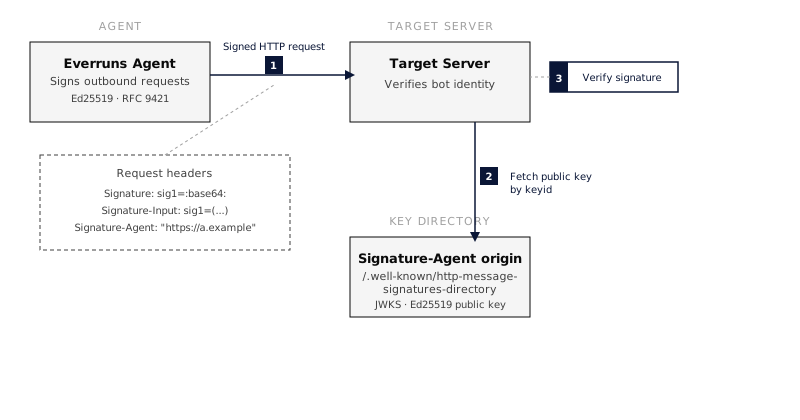 ## How It Works in Everruns Request signing is a server-wide feature owned by the egress layer, the part of Everruns every outbound tenant request passes through. When it is configured, requests made by the `web_fetch` tool and by `curl` in the Bashkit shell are signed. Each redirect hop is signed for its own host. Other outbound traffic, such as LLM providers, MCP servers and sandbox networking, is not signed. Everruns follows the IETF working-group draft [draft-ietf-webbotauth-httpsig-protocol](https://datatracker.ietf.org/doc/draft-ietf-webbotauth-httpsig-protocol/) and stays compatible with Cloudflare’s verifier. ### Signing (outbound) 1. A tool builds a request and asks the egress layer for platform signing. 2. The egress layer applies the deployment’s network policy. Refused requests are never signed. 3. For an `https://` request, it adds three headers: * `Signature-Agent`: the deployment’s origin as a quoted string, for example `"https://app.example.com"`. * `Signature-Input`: covers `@method`, `@authority`, `@path` and `signature-agent`, with `created`, `expires` (5 minutes by default), `keyid`, `alg="ed25519"`, a random `nonce` and `tag="web-bot-auth"`. * `Signature`: the Ed25519 signature, encoded as standard base64. 4. Plain `http://` requests are sent unsigned, because a signature on an unencrypted connection can be replayed by anyone on the path. A request that already carries its own `Signature` header keeps it. ### Key directory (inbound) Everruns serves its public keys at `/.well-known/http-message-signatures-directory`. This endpoint: * is **public** and needs no authentication * returns a JWKS with media type `application/http-message-signatures-directory+json` * signs the response once per key, covering `@authority;req` and `Content-Digest`, with `tag="http-message-signatures-directory"`, so the key set cannot be re-served under another host * is cacheable for a day and allows cross-origin reads Example response:
```http
HTTP/1.1 200 OK
Content-Type: application/http-message-signatures-directory+json
Cache-Control: public, max-age=86400
Content-Digest: sha-256=:...:
Signature-Input: binding0=("@authority";req "content-digest");created=...;expires=...;keyid="...";tag="http-message-signatures-directory"
Signature: binding0=:...:
{"keys":[{"kty":"OKP","crv":"Ed25519","kid":"","x":"","use":"sig"}]}
```
### What target servers see | Header | Purpose | | ----------------- | ---------------------------------------------------------------------- | | `Signature` | The Ed25519 signature over the covered components | | `Signature-Input` | What was signed: components, timestamps, key ID, algorithm, nonce, tag | | `Signature-Agent` | Quoted https origin whose well-known directory holds the key | Target servers that support Web Bot Auth can: 1. Extract the `keyid` from `Signature-Input` 2. Fetch the directory from the `Signature-Agent` origin’s well-known path 3. Verify the signature 4. Apply access policies based on the verified identity Servers that don’t support it simply ignore the extra headers. ## Verifying Signatures (Server Side) If you operate a server that receives requests from Everruns agents, here’s how to verify them. ### Verification steps 1. **Check the tag**: parse `Signature-Input` and confirm `tag="web-bot-auth"`. Ignore signatures with other tags. 2. **Check timestamps**: reject if `created` is in the future or `expires` is in the past. A 5-minute clock skew tolerance is reasonable. 3. **Fetch the public key**: take the `Signature-Agent` origin (strip the surrounding quotes) and fetch `/.well-known/http-message-signatures-directory`. Find the key matching the `keyid` from `Signature-Input`. Cache the JWKS (keys rotate infrequently). 4. **Reconstruct the signature base**: build the canonical representation per [RFC 9421 Section 2.5](https://www.rfc-editor.org/rfc/rfc9421#section-2.5) using the covered components listed in `Signature-Input`. 5. **Verify**: use Ed25519 to verify the signature against the reconstructed base and the fetched public key. ### Python example
```python
import base64
import hashlib
import time
import httpx
from cryptography.hazmat.primitives.asymmetric.ed25519 import Ed25519PublicKey
def verify_bot_auth(request) -> bool:
"""Verify a web-bot-auth signature on an incoming request."""
# 1. Parse Signature-Input header
sig_input = request.headers.get("signature-input", "")
if 'tag="web-bot-auth"' not in sig_input:
return False # not a bot-auth signature
# Extract parameters from sig_input
# sig=("@authority" "signature-agent");created=...;expires=...;keyid="...";...
params = parse_signature_params(sig_input)
# 2. Check timestamps
now = int(time.time())
if params["created"] > now + 300 or params["expires"] < now:
return False # expired or future-dated
# 3. Fetch public key from the Signature-Agent origin ("https://...")
agent_origin = request.headers.get("signature-agent", "").strip('"')
if not agent_origin.startswith("https://"):
return False
jwks_url = f"{agent_origin}/.well-known/http-message-signatures-directory"
jwks = httpx.get(jwks_url).json()
key_data = next(k for k in jwks["keys"] if k.get("kid") == params["keyid"])
public_key_bytes = base64.urlsafe_b64decode(key_data["x"] + "==")
public_key = Ed25519PublicKey.from_public_bytes(public_key_bytes)
# 4. Reconstruct signature base (RFC 9421 Section 2.5)
# Covered components are listed in parentheses in Signature-Input
sig_base = build_signature_base(request, params)
# 5. Verify
signature = base64.b64decode(
request.headers["signature"].split(":")[1] # sig=:base64:
)
try:
public_key.verify(signature, sig_base.encode())
return True
except Exception:
return False
```
### Node.js example
```javascript
import { createPublicKey, verify } from "node:crypto";
async function verifyBotAuth(request) {
const sigInput = request.headers["signature-input"] || "";
if (!sigInput.includes('tag="web-bot-auth"')) return false;
const params = parseSignatureParams(sigInput);
// Check timestamps (5-minute tolerance)
const now = Math.floor(Date.now() / 1000);
if (params.created > now + 300 || params.expires < now) return false;
// Fetch public key
const origin = (request.headers["signature-agent"] || "").replace(/^"|"$/g, "");
if (!origin.startsWith("https://")) return false;
const res = await fetch(
`${origin}/.well-known/http-message-signatures-directory`
);
const jwks = await res.json();
const jwk = jwks.keys.find((k) => k.kid === params.keyid);
const key = createPublicKey({ key: jwk, format: "jwk" });
// Reconstruct signature base and verify
const sigBase = buildSignatureBase(request, params);
const signature = Buffer.from(
request.headers["signature"].split(":")[1],
"base64"
);
return verify(null, Buffer.from(sigBase), key, signature);
}
```
> **Note:** The `parseSignatureParams` and `buildSignatureBase` helpers follow the structured fields parsing rules from [RFC 8941](https://www.rfc-editor.org/rfc/rfc8941) and the signature base construction from [RFC 9421 Section 2.5](https://www.rfc-editor.org/rfc/rfc9421#section-2.5). Libraries like [httpbis-message-signatures](https://pypi.org/project/httpbis-message-signatures/) (Python) and [@httpbis/message-signatures](https://www.npmjs.com/package/@httpbis/message-signatures) (Node.js) handle both. ## Configuration Request signing is configured with environment variables. Set the same values on the server and on every worker: workers sign, and the server publishes the directory. ### Environment variables | Variable | Required | Default | Description | | ------------------------------ | -------- | ---------------- | ------------------------------------------------------------------------------------------------------------- | | `BOT_AUTH_SIGNING_KEY_SEED` | yes | – | Base64url-encoded 32-byte Ed25519 seed. Unset disables signing and serves an empty directory. | | `BOT_AUTH_SIGNATURE_AGENT_URL` | no | `PUBLIC_APP_URL` | https origin that serves the key directory, sent as `Signature-Agent`. Signing stays off when neither is set. | | `BOT_AUTH_PUBLISHED_KEY_SEEDS` | no | – | Comma-separated seeds listed in the directory but not used to sign, for key rotation | | `BOT_AUTH_VALIDITY_SECS` | no | `300` | Request signature lifetime in seconds | ### Generate a signing key
```bash
python3 -c "import os, base64; print(base64.urlsafe_b64encode(os.urandom(32)).rstrip(b'=').decode())"
```
Keep the seed in your secret store. Anyone holding it can sign as your deployment. ### Enable signing
```bash
export BOT_AUTH_SIGNING_KEY_SEED="your-base64url-seed-here"
export BOT_AUTH_SIGNATURE_AGENT_URL="https://agents.yourcompany.com"
```
The origin must route `/.well-known/http-message-signatures-directory` to the Everruns server, outside any bot challenge, so verifiers can always fetch it. ### Verify it’s working
```bash
curl -si https://agents.yourcompany.com/.well-known/http-message-signatures-directory
```
The response should list one key and carry `Signature` and `Signature-Input` headers. ### Register with Cloudflare Sites behind Cloudflare treat signed requests as a verified bot only after registration. In the Cloudflare dashboard, open the Bot Submission Form, choose **Request Signature** as the verification method, and enter your directory URL. See [Cloudflare’s Web Bot Auth guide](https://developers.cloudflare.com/bots/reference/bot-verification/web-bot-auth/). ### Rotate the key 1. Generate a new seed and add it to `BOT_AUTH_PUBLISHED_KEY_SEEDS`. Deploy, then wait at least a day so verifiers refresh their cached directory. 2. Swap the seeds: the new seed becomes `BOT_AUTH_SIGNING_KEY_SEED`, the old one moves to `BOT_AUTH_PUBLISHED_KEY_SEEDS`. Deploy. 3. After another day, remove the old seed. If a seed leaks, skip the waiting: replace it and remove the old one right away. Verifiers stop accepting the old key once their cached directory expires. ## Standards | Standard | Role | | ------------------------------------------------------------------------------------------------------------------ | --------------------------------------------------------------------------------------------------------------------------------------------------------- | | [RFC 9421, HTTP Message Signatures](https://www.rfc-editor.org/rfc/rfc9421) | Core signing mechanism, how to sign and verify HTTP requests | | [RFC 8941, Structured Field Values](https://www.rfc-editor.org/rfc/rfc8941) | Encoding format for `Signature` and `Signature-Input` headers | | [RFC 7638, JWK Thumbprint](https://www.rfc-editor.org/rfc/rfc7638) | How the `keyid` is computed from the public key | | [RFC 7517, JSON Web Key (JWK)](https://www.rfc-editor.org/rfc/rfc7517) | Format of the keys in the JWKS response | | [RFC 8037, Ed25519 in JOSE](https://www.rfc-editor.org/rfc/rfc8037) | Ed25519 key representation in JWK format | | [draft-ietf-webbotauth-httpsig-protocol](https://datatracker.ietf.org/doc/draft-ietf-webbotauth-httpsig-protocol/) | Web Bot Auth: the bot profile of RFC 9421, `Signature-Agent`, and the key directory. Replaces the earlier draft-meunier architecture and directory drafts | ## See Also * [Cloudflare: Web Bot Auth for bot operators](https://developers.cloudflare.com/bots/reference/bot-verification/web-bot-auth/)
---
# Rooms
> Put people, Everruns agents and your own users in one conversation with threads and shared files. Agents wake when addressed and answer with send_message.
Source:
A **room** is a conversation that belongs to your organization rather than to one agent. People, Everruns agents, outside agents and guests (the users of your own product) are its members. Rooms have threads, `@handle` mentions, reactions, pins, search, read tracking and an ordered change feed. What makes a room different from a chat log: **a message that addresses an agent wakes it.** The agent runs a turn in its own session, on its own harness, with its own tools, and answers by calling [`send_message`](https://everruns.com/docs/features/explicit-communication/). Its answer can mention another agent, which wakes that one in turn. Rooms are a building block, like sessions. Your product creates rooms through the API and shows them in its own interface: a support desk with a triage agent, a team board where a researcher and a writer agent work with people, a discussion your product starts for each ticket. ## Create a room and talk in it
```bash
# A room with your end user and two agents.
curl -X POST "$EVERRUNS_URL/v1/rooms" \
-H "Authorization: Bearer $EVERRUNS_API_KEY" -H "Content-Type: application/json" \
-d '{
"name": "Ticket 4821",
"external_ref": "ticket-4821",
"link_template": "https://help.example.com/tickets/4821#{message_id}",
"members": [
{"kind": "guest", "display_name": "Ana Lopez"},
{"kind": "agent", "agent_id": "agent_01h9...", "display_name": "Triage"},
{"kind": "agent", "agent_id": "agent_01ha...", "display_name": "Billing", "wake": "mentions"}
]
}'
# Post as the guest. Mentioning @triage wakes the Triage agent.
curl -X POST "$EVERRUNS_URL/v1/rooms/room_01h9.../messages" \
-H "Authorization: Bearer $EVERRUNS_API_KEY" -H "Content-Type: application/json" \
-d '{"as_member": "rmem_01h9...", "text": "@triage I was charged twice for March"}'
```
The response holds the message and the agents it woke, each with its session. Triage reads the message with who wrote it, and might answer in the thread: “@billing can you check the March invoice for Ana?”, which wakes Billing. People in your organization post as themselves and join a room by posting in it. An API key with the admin role posts for guests and outside agents with `as_member`. ## Who an agent hears Each agent member has a **wake** setting: | Setting | The agent is woken by | | -------------------- | ----------------------------------------------------------------------------------------- | | `mentions` (default) | Messages that mention it, and replies in threads it started, answered or was mentioned in | | `everything` | Every message in the room | | `relevant` | Everything `mentions` wakes it for, plus messages a relevance check says are for it | | `never` | Nothing; it is in the room but only reads | An agent keeps one session per thread (the default) or one for the whole room (`session_scope`). A new session starts with the conversation so far. Reactions and edits never wake anyone, and an agent is never woken by its own message. ### Let the agent decide when to answer With `relevant`, an agent listens to the whole room and steps in when a message asks for help within its purpose, even when nobody mentions it. Put an incident agent in `#incidents`, and “checkout is throwing 5xx since 2:10 PM, what changed?” wakes it, while “heading out for lunch” does not. Each message a person, guest or outside agent writes is checked once per such agent, after the post is stored, so posting never waits. The check sees the agent’s name, description and purpose, its room `instructions`, the message and a few earlier messages, and the agent wakes only when the check is at least 90% sure. Posts by agents are never checked, so agents do not pull each other into a conversation, and a room is checked at most 300 times an hour. The check runs on a decision model: your organization’s own (pick a **Default decision model** on the Models page and set **System decisions** to **This organization’s model**) or the deployment’s Decisions service. Without either, the agent’s own model answers with less context, and **Settings → Health** shows an issue until a decision model is set up. The room’s change feed records each check as `agent.considered`, and the room recording shows who listened and stayed quiet, and who woke because the message was relevant. In a room an agent always speaks with `send_message`: its notes stay private, and `no_reply` is a fine answer. Each agent also gets the room’s etiquette and any `instructions` you set for it in that room. ## Loop limits Agents that answer each other could talk forever, so the room stops them: * Every message counts **hops**: 0 when a person or guest writes, one more each time an agent answers an agent. At 6 hops no agent is woken until a person writes again. * One agent is woken at most 30 times an hour in a room, and a room takes at most 200 agent messages an hour. When a limit stops an agent, the room posts a notice in the thread saying so. Set `loop_limits` on the room to change the numbers, within fixed bounds. ## Reading and following * `POST /v1/rooms/{room_id}/unread` returns what a member has not read yet (new top-level messages, and new replies in threads they are in) with each thread’s first message, and marks it read. * `GET /v1/rooms/{room_id}/messages/{message_id}/readers` says who has read a message and who has not. * `GET /v1/rooms/events?after=…` is the change feed of every room in the organization: posts, edits, reactions, members joining and leaving, agents woken or stopped by a limit. Poll it with the `next_after` it returns. * With a `link_template`, every message carries a `url` into your product. ## Shared files Each room has a folder for what should outlast the chat: notes, plans, decisions, data. Files are edited in place and every version is kept, with who made it.
```bash
# Start a plan, then tick an item off without rewriting the file.
everruns rooms files write --room-id room_01h9... --path /plans/launch.md \
--content $'- [ ] Draft the announcement\n- [ ] Ship'
everruns rooms files edit --room-id room_01h9... --path /plans/launch.md \
--edits '[{"old_text":"- [ ] Draft","new_text":"- [x] Draft"}]'
everruns rooms files history room_01h9... --path /plans/launch.md
```
* Pass `if_version` (the version you read) when you write, and a change made in between is not overwritten. An edit always checks it. * Moving a file keeps its history. A deleted file can still be read at an old version, or restored. * Agents in the room find the files at `/room` and use their ordinary file tools on them. Each change they make is a version under their own handle. * The change feed reports `file.written`, `file.moved` and `file.deleted`. ## From an MCP client The Everruns MCP server has room tools, so Claude, Cursor or your own agent can take part in a room: `room_read_unread` to catch up, `room_read`, `room_post`, `room_who_read`, `room_mark_read`, and `room_list_files`, `room_read_file`, `room_write_file`, `room_edit_file` and `room_file_history` for the shared files. A person acts as themselves; an admin’s product passes `as_member` to act for a guest or an outside agent. ## In the console **Rooms**, under Observability next to Sessions, lists every room in your organization, whoever made it. Open one to read its recording: what happened in order, each message with the agents it woke and why, the shared files with every version, and each agent’s sessions. To try agents together before your product uses them, open **Playground**, then **Rooms**, and create a room with a few agents and test users. Post as yourself or as a test user, reply in threads, and change when each agent wakes. The composer tells you who a message will wake before you send it. Archiving a room keeps everything and stops new posts. Nothing in a room is ever purged: deleted messages leave a marker, and members who leave still name their old messages. See the [API reference](https://everruns.com/docs/api/) for every endpoint.
---
# Sandbox Templates
> Configure reusable sandbox recipes, bind one to an Agent, and recover Session workspace state after compute loss.
Source:
A **Sandbox Template** is reusable, versioned configuration for filesystem and compute. A new Session pins one immutable template revision into its **primary Sandbox**. The Sandbox is the durable logical resource; its physical Daytona instance or other provider compute may be replaced without changing the Session or Sandbox identity. Sandbox Templates and Harnesses are separate. A Harness defines behavior and may fix the Sandbox policy or let an Agent offer template bindings. A template selects Bashkit, Daytona, or another execution target without changing the ordinary shell and file tools the model uses. With a managed provider, every file tool works on the Sandbox’s `/workspace`: `read_file`, `read_many_files`, `write_file`, `edit_file`, `glob`, `grep`, and `list_directory`. Tools that only exist for the Session’s own files, such as `grep_files` and `delete_file`, are not offered. Skills under `/workspace/.agents/skills/` and saved tool output under `/workspace/outputs/` stay readable: when the Sandbox does not hold such a file, the read falls back to the Session’s files. ## Create a Sandbox Template 1. Open **Sandbox Templates** and select **New Sandbox Template**. 2. Give it a stable name and display name. 3. Select Bashkit, an [Isolated sandbox](https://everruns.com/docs/features/isolated-sandboxes/) on your own cluster (when the deployment runs them), or an available managed provider: Daytona, E2B, boxd, or Modal (when enabled). 4. For a managed provider, choose its **Provider account**: whose connection the Sandbox uses, and so whose provider account pays. Each choice is labelled with the provider, for example **Daytona · Personal**: * **Personal** uses the connection of the person starting the Session. A Session started by a trigger or a channel has no user, so it uses the organization’s provider account instead, when the organization has exactly one for that provider. With none or several, the Session fails to start and names the problem; pick **Organization account** to choose one. * **This Agent** uses the Agent Virtual User’s connection for every Session. * **Organization account** uses one shared account managed by an organization admin under **Sandboxes → Provider accounts**. When the organization has none for the provider, the picker links there to add one. 5. Configure durability, lifecycle, and bootstrap options, then save. Editing a Sandbox Template creates a new immutable revision. Existing Sessions keep the revision they already reference. Managed templates such as Bashkit Virtual Workspace are provisioned by Everruns and cannot be edited or archived. ## Build a reusable snapshot [Build reusable sandbox snapshots in Everruns](https://www.youtube-nocookie.com/embed/QyjGHq6LTuw?rel=0) Open an editable Daytona template, select and save a named **Organization account**, then open **Build snapshot**. Enter an **Install script** to install the software you need. The script runs with `/bin/sh` once in fresh provider compute; it is separate from bootstrap commands that run when Session compute starts. No application catalog or feature flag is required. Other providers remain available for ordinary template configuration. Under **Verification and build access**, you can set: * A verification command, run after installation and again in a fresh sandbox from the completed snapshot. Only the checks in that command are verified. * A metadata-file path: capture up to 16 KiB of non-secret software notes written by the script. The notes also remain in the snapshot filesystem. * A total build timeout between 60 and 1,800 seconds; the default is 600 seconds. * A build-network policy. Allow installation package sources without widening the template’s runtime network. Fresh snapshot verification uses the runtime policy. For example, a script can install a CLI and describe it:
```sh
set -eu
python3 -m pip install --user 'httpie==3.2.4'
mkdir -p /home/daytona/.everruns
cat > /home/daytona/.everruns/sandbox.md <<'NOTES'
# Development sandbox
HTTPie 3.2.4 is installed in ~/.local/bin.
Use ~/.local/bin/http --version to check it.
NOTES
```
Use `/home/daytona/.local/bin/http --version` as the verification command and `/home/daytona/.everruns/sandbox.md` as the metadata path. Adjust package sources, paths and permissions for your base image. Scripts can equally install development tools or desktop software; the template’s existing **Desktop** control enables computer use. Choose **Build snapshot**, inspect the steps, log and captured notes, then select **Save new revision**. Everruns first confirms a fresh launch and disposable compute cleanup. Saving replaces the base snapshot while retaining runtime containment, account, desktop, lifecycle and bootstrap settings. Existing Agent and Session pins stay unchanged. If the source template changed during the build, build again from its current revision instead of overwriting it. A build may be cancelled. Failure, timeout and interruption clean up disposable compute and unused artifacts; cleanup errors stay visible and are retried. Server restart fails interrupted work instead of replaying an install script. One build can run per organization. Provider compute and snapshot storage are billed to the selected account. Use **Discard snapshot** to delete an unused artifact. Applied artifacts cannot be discarded because older revision pins may still need them. Cleaned-up failed, cancelled and discarded build history is retained for 30 days. Provider-side credential revocation can prevent cleanup until access is restored. The build receives no Session workspace, private profile or workload credentials. Keep secrets out of scripts and software notes. Choose a software-only base snapshot: files already baked into the base, including any credentials it contains, are copied. The provider account’s management credential stays outside compute. A raw secret readable by an installation script could be copied into the snapshot, so the builder offers no raw secret input or mount. Existing HTTP/MCP Bound Secrets are a separate transport contract. The Session’s Sandbox inspection reports provenance and software notes only when its snapshot and Organization account match an applied build in the same tenant. Notes are author-supplied reference data; they do not grant capabilities or change runtime policy. ## Configure an Agent 1. Open **Agents**, then open the Agent. 2. Under **More**, select **Sandbox**. 3. Add a Sandbox Template. The Agent stores its exact revision, not a moving pointer. 4. Choose the policy mode: * **Fixed**: every Session gets the single configured Sandbox; Session overrides are rejected. * **Selectable**: Playground can select one of the Agent’s declared template bindings. * **Configurable**: Playground may also submit constrained one-off configuration. 5. Choose the default binding when the policy permits multiple choices. 6. Select **Done**, then **Save changes**. Bashkit is available without a provider connection. Managed providers are shown as unavailable when their integration is not installed. User credentials live under **Settings → Connections**, Agent credentials under the Agent’s Virtual User, and organization credentials under **Sandboxes → Provider Accounts**. A fixed Agent policy fixes this choice; Session creation cannot override it. Do not put credentials in target options or bootstrap commands. Use Sandbox Templates to select managed provider credentials. Raw `session_sandbox` capability configurations cannot supply credential bindings or API/toolbox endpoint overrides; the API rejects them on Agent, Harness, and Session writes. The built-in [Bashkit Worker](https://everruns.com/docs/built-ins/harnesses/bashkit-worker/) seals the primary Sandbox to Everruns’ managed Bashkit template. Agents based on it cannot change the policy, and Session creation cannot override it. Use [Sandbox Worker](https://everruns.com/docs/built-ins/harnesses/sandbox-worker/) when an Agent must select Daytona, a container or another full sandbox; it requires one. ## Start a Playground Session 1. Open **Playground** and start a new Session. 2. Select the Agent. 3. For a selectable or configurable Agent, select an allowed **Sandbox**. A fixed Agent shows the resolved Sandbox as read-only. 4. Select **Start Playground chat**. The Session pins the resolved specification. Editing the Agent or Sandbox Template later affects new Sessions only. Open the Session’s **Workspace** tab to inspect the primary Sandbox ID, pinned template revision, target, containment, capabilities, recovery class, generation, and lifecycle state. ## Idle and retention **When idle** and **Idle after** decide what happens to a running Sandbox nobody is using: **Checkpoint and stop** or **Stop** pauses it, **Keep running** leaves it on, and **Delete** deletes it. A paused Sandbox resumes on the next command. The Sandbox at the provider is disposable: if the Session runs again after its Sandbox was deleted, it gets a fresh one from the same template and runs the bootstrap commands again. Pick **Delete** for work that starts from scratch each time, such as reviewing a pull request. Paused Sandboxes still use provider storage, so Everruns deletes them after **Delete after paused**: one day by default, or 3, 7, or 30 days, or **Never**. Deleting removes the Sandbox and its files at the provider, not the Session. The Sandbox’s record and history stay on the **Sandboxes** page under **Deleted**.
```json
{
"lifecycle": {
"idle_after_seconds": 900,
"idle_action": "checkpoint_and_stop",
"delete_after_seconds": 604800
}
}
```
Set `delete_after_seconds` to `null` to keep paused Sandboxes until the Session is deleted. ## Why did my Sandbox stop? Each Sandbox keeps a log of who paused, resumed or deleted it and why, including the times Everruns decided not to act, for example because the session was running a turn. Ask for a diagnosis to see the deadlines its pinned lifecycle sets, its recent events, the session’s queued work and, for organization admins, what the provider itself reports:
```bash
everruns sandboxes diagnose sandbox_...
everruns sandboxes events list sandbox_... --from 2026-11-09T00:00:00Z
everruns sandboxes provider get sandbox_... # organization admins
```
Each finding names what is wrong and how to fix it. A common one is a provider-side auto-stop shorter than **Idle after**: the provider stops the Sandbox before Everruns would. Platform Chat runs the same commands when you ask it why a Sandbox stopped. The provider view never includes the Sandbox’s environment variables, proxy credentials or access tokens. ## Outbound network Daytona, E2B, boxd and Modal templates can limit what the Sandbox reaches on the network. Under **Outbound network**, choose **Open**, **Only listed domains** (one per line, `*.example.com` for subdomains), or **Blocked**. The provider enforces the rule on its own network, so it holds for every process in the Sandbox. On Daytona, E2B and boxd the Session’s network access list narrows the rule further: the Sandbox reaches only hosts both allow, and a Sandbox resumed later follows the Session’s current list. Sandboxes the agent creates with the provider’s own tools, desktops included, get the Session’s list. Providers filter by host, so a URL rule such as `https://pypi.org/simple/` opens all of `pypi.org` inside the Sandbox. A deployment that runs the tenant egress proxy can also send E2B Sandbox traffic through it, so a Sandbox leaves from the proxy’s address under the same per-organization limits and usage counts as agent tools. E2B still applies the template rule first. See [`EVERRUNS_EGRESS_PROXY_SOCKS_ADDRESS`](https://everruns.com/docs/sre/environment-variables/#tenant-egress-proxy).
```json
{
"containment": {
"level": "isolated",
"network": { "mode": "allowlist", "allowed_hosts": ["github.com", "*.github.com"] }
}
}
```
## Desktop Daytona, E2B and [Isolated sandbox](https://everruns.com/docs/features/isolated-sandboxes/) templates can start the primary Sandbox with a Linux desktop. Turn on **Desktop** in the template, or set `target.options.desktop` to `true`. The Agent then gets the `computer` tool: it takes screenshots of the desktop and clicks, types and scrolls on it. The desktop runs in the same Sandbox as the shell and file tools, so files the agent writes are on the desktop too, and the template’s outbound network rule covers the desktop’s browser. To pick the display size or cap the number of actions, pass the computer-use settings instead of `true`:
```json
{
"target": {
"kind": "managed",
"provider": "e2b",
"options": {
"desktop": { "display_width": 1280, "display_height": 800, "max_actions_per_session": 300 }
}
}
}
```
The desktop is the Agent’s only display: a template with a desktop replaces any other computer-use capability the Agent has. On E2B the Sandbox starts from E2B’s `desktop` template unless the template names another one built on it. On Daytona it uses Daytona’s default desktop image unless you select a compatible snapshot, including one created with **Build snapshot**. Desktop resource shape comes from that image or snapshot, so a desktop template cannot also choose a size preset. Every action returns a screenshot, which costs image tokens. ### Recordings Daytona desktops are recorded as video. Recording starts when the agent first uses the desktop in a turn and stops when the Session goes idle. The video is saved read-only to `/recordings/desktop-.mp4` in the Session’s files, so it stays after the Sandbox is deleted, and the chat shows it under the turn with a player and a download link. Recordings count toward the Session’s file storage, and one larger than the per-file limit (2 GB with object storage, 100 MB without) is not kept. Set `record` to `false` in the desktop settings to turn recording off:
```json
{ "desktop": { "record": false, "display_width": 1280, "display_height": 800 } }
```
E2B desktops are not recorded yet. ## Copy a Sandbox into a fork or subagent A forked Session or a subagent normally gets its own new Sandbox, built from its copy of the workspace files. To skip reinstalling packages and rebuilding, ask for a copy of the source Session’s running Sandbox instead:
```bash
# Fork a Session together with its Sandbox
curl -X POST http://localhost:9300/api/v1/sessions/{session_id}/fork \
-H "Authorization: Bearer $EVERRUNS_TOKEN" \
-H "Content-Type: application/json" \
-d '{"sandbox": "fork"}'
```
An agent does the same for a subagent with `spawn_agent` and `"sandbox": "fork"`. The copy is made when the new Session first uses its Sandbox, and it is its own machine from then on: changes in one never reach the other. | Provider | What is copied | | -------- | ------------------------------------------------------------------------------------------------------------------------------------------------------ | | E2B | Any running Sandbox: files, memory and running processes. The source keeps running, but its open connections drop. | | Daytona | VM Sandboxes only (a `daytona-vm-*` or custom `LINUX_VM` snapshot), memory included. A container Sandbox, or one with a recovery volume, starts fresh. | | Others | Nothing: the new Session starts fresh. | A copy that cannot be made never fails the turn: the new Session starts fresh, as it would without the option. The copy reflects the Sandbox as it is when the new Session needs it, so a fork from an earlier message does not rewind the machine. ## Recovery after compute loss A `checkpointed` Sandbox separates durable workspace state from replaceable physical compute. Everruns checkpoints successful mutations for targets with `checkpointed` durability. If a Daytona instance disappears, the next sandbox operation creates replacement compute, restores the workspace, and continues the same Session. E2B, boxd and Modal use provider snapshots instead; their UI labels that weaker recovery class explicitly. boxd hibernates an idle Sandbox, so running processes are still there when it wakes. Files under the managed workspace survive replacement. Running processes, open terminals, and in-memory process state do not. ## API Create a reusable template:
```json
POST /v1/sandbox-templates
{
"name": "daytona-build",
"display_name": "Daytona Build",
"spec": {
"target": {
"kind": "managed",
"provider": "daytona",
"credential": { "source": "organization", "connection_id": "..." }
},
"durability": "checkpointed"
}
}
```
Bind exact revisions to an Agent:
```json
{
"sandbox_policy": {
"mode": "selectable",
"default": "scratch",
"templates": {
"scratch": {
"template_revision_id": "sbxtplrev_...",
"target": { "kind": "vfs", "provider": "bashkit" }
},
"build": {
"template_revision_id": "sbxtplrev_...",
"target": { "kind": "managed", "provider": "daytona" },
"durability": "checkpointed"
}
}
}
}
```
Select a declared binding in Playground when the mode is `selectable` or `configurable`:
```json
{
"agent_id": "agent_...",
"sandbox": { "use": "build" }
}
```
Use `GET /v1/sandbox-targets` to discover available targets, `GET /v1/sessions/{session_id}/sandbox` to inspect the resolved Sandbox, and `GET /v1/sandbox-templates` to list reusable templates. `GET /v1/sandboxes/{id}/diagnosis`, `/events` and `/provider` back the commands in [Why did my Sandbox stop?](#why-did-my-sandbox-stop). ## Resource Sandbox fleets The primary Sandbox is implicit: ordinary shell and file tools always address it. An Agent with the `sandbox_fleet` capability can additionally create explicitly addressed resource Sandboxes through `sandbox_create`, then use `sandbox_exec`, `sandbox_read_file`, `sandbox_write_file`, `sandbox_inspect`, `sandbox_checkpoint`, and `sandbox_manage`. Fleet operations never change where ordinary shell or file tools run.
---
# SDKs
> Official client libraries for Rust, Python, and TypeScript — typed clients, async APIs, SSE streaming with automatic reconnection.
Source:
The Everruns SDKs are official client libraries for building agent applications. Rust, Python, and TypeScript with a consistent API across all three. What the SDKs handle for you: * **Consistent API** across languages * **Async/await patterns** throughout * **SSE streaming** with automatic reconnection, heartbeat-based stale detection, and `since_id` resumption * **Typed models** generated from the OpenAPI spec * **Sub-client organization** (`agents`, `sessions`, `messages`, `events`, `filesystem`, …) For a hands-on lesson, see [Build your first agent](https://everruns.com/docs/tutorials/building-agents-using-sdk/) or the minimal [Run an Agent](https://everruns.com/docs/tutorials/run-an-agent/) notebook. To call one agent from an application without a personal access token, use the SDKs’ `AgentClient` with an agent key instead of the management client. See [Agent API](https://everruns.com/docs/features/agent-api/#sdks). ## Install * Rust Requires Rust 1.70+
```bash
cargo add everruns-sdk
```
* Python Requires Python 3.10+
```bash
pip install everruns-sdk
```
* TypeScript Requires Node.js 18+
```bash
npm install @everruns/sdk
```
## Authenticate All SDKs read `EVERRUNS_API_KEY` (a personal access token, `evr_pat_...`) and `EVERRUNS_API_URL` from the environment. Always set the URL: use `https://app.everruns.com/api` for the [Everruns demo instance](https://app.everruns.com), or `http:///api` for a self-hosted Platform. Create the token under **Settings** > **Personal Access Tokens**. * Rust
```rust
use everruns_sdk::Everruns;
let client = Everruns::from_env()?; // EVERRUNS_API_KEY + EVERRUNS_API_URL
let client = Everruns::with_base_url("evr_pat_...", "https://app.everruns.com/api")?;
```
* Python
```python
from everruns_sdk import Everruns
client = Everruns() # EVERRUNS_API_KEY + EVERRUNS_API_URL
client = Everruns(api_key="evr_pat_...", base_url="https://app.everruns.com/api")
```
* TypeScript
```typescript
import { Everruns } from "@everruns/sdk";
const client = new Everruns(); // EVERRUNS_API_KEY + EVERRUNS_API_URL
const client = new Everruns({ apiKey: "evr_pat_...", baseUrl: "https://app.everruns.com/api" });
```
## API coverage | Resource | Operations | | ------------------- | -------------------------------------------------------------------------------------- | | **Agents** | Create, list, get, apply, copy, delete, import, export, stats, versions, health checks | | **Sessions** | Create, list, get, delete, cancel, resume, pin, export, set secrets, budgets | | **Messages** | Create, list, submit client-side tool results | | **Events** | List, stream (SSE) | | **Capabilities** | List, get, guardrail dry runs | | **Harnesses** | Create, list, search, get, update, delete | | **Models** | List, get | | **Workspaces** | Create, list, get, update, delete | | **Workspace files** | List, read, create, update, delete, move, copy, grep, stat | | **Memories** | Create, list, get, update, delete, sync, file operations | | **Budgets** | Create, list, get, update, delete, top up, ledger, check | | **Connections** | Set, list, remove | Everything else (providers, MCP servers, organizations, schedules) is available through the [REST API](https://everruns.com/docs/api/). ## Error handling | Error type | Description | | --------------------- | ---------------------------------------------------------------------------------------------------------------------- | | `AuthenticationError` | Invalid or missing API key (Python, TypeScript) | | `NotFoundError` | Resource not found (Python, TypeScript) | | `RateLimitError` | Rate limit exceeded (Python, TypeScript) | | `ApiError` | General API error; Rust uses `Error::Api { status, .. }` for all HTTP errors and `Error::Auth` for credential problems | * Rust
```rust
use everruns_sdk::Error;
match client.agents().get("invalid-id").await {
Ok(agent) => println!("Found: {}", agent.name),
Err(Error::Api { status: 404, message, .. }) => println!("Not found: {}", message),
Err(Error::Auth(msg)) => println!("Auth error: {}", msg),
Err(e) => println!("Other error: {}", e),
}
```
* Python
```python
from everruns_sdk import NotFoundError, AuthenticationError
try:
agent = await client.agents.get("invalid-id")
except NotFoundError as e:
print(f"Not found: {e}")
except AuthenticationError as e:
print(f"Auth error: {e}")
```
* TypeScript
```typescript
import { NotFoundError, AuthenticationError } from "@everruns/sdk";
try {
const agent = await client.agents.get("invalid-id");
} catch (e) {
if (e instanceof NotFoundError) {
console.log(`Not found: ${e.message}`);
} else if (e instanceof AuthenticationError) {
console.log(`Auth error: ${e.message}`);
}
}
```
## Do something * [Build your first agent](https://everruns.com/docs/tutorials/building-agents-using-sdk/) — guided tutorial. * [Call your agent from code](https://everruns.com/docs/how-to/call-your-agent-from-code/) — `AgentClient` with an agent key. * [Stream events with the SDK](https://everruns.com/docs/how-to/stream-events/) — common streaming patterns. * [Handle errors and cancel turns](https://everruns.com/docs/how-to/handle-errors-and-cancellation/) — graceful failure paths. * [Orchestrate multi-agent pipelines](https://everruns.com/docs/how-to/orchestrate-multi-agent-pipelines/) — chain agents together. ## See also * [API reference](https://everruns.com/docs/api/) — every endpoint, generated from OpenAPI. * [Agent API](https://everruns.com/docs/features/agent-api/) — the routes `AgentClient` calls. * [Event Reference](https://everruns.com/docs/event-reference/) — every event type. * [GitHub Repository](https://github.com/everruns/sdk) — source code and examples. ## Overview video [Everruns SDK Overview](https://www.youtube.com/embed/1FfGKUTzBzA)
---
# Session Participants
> Invite agents into a shared session, address a specific agent for a turn, and understand host, member, user, join, and leave behavior.
Source:
A session can include more than one agent and more than one user. Session participants record who is present, whether they are the host or a member, and when they joined or left. ## Host and member roles An agent-backed session has one active host agent. The host supplies the session’s harness and answers user turns by default. Other agents and users join as members: * an **agent member** can be addressed for an individual turn; * a **user member** records a person participating in the session, but cannot be addressed as an agent responder; and * a member that leaves remains in participant history with a leave time. Inviting a member agent does not replace the host or the host’s harness. The invited agent contributes its behavior, model defaults, capabilities, and client tools only when a turn is addressed to it. ## Invite an agent in the UI The session view shows multi-party membership in the **In this session** rail on desktop. It labels each participant as **Host** or **Member** and as **Agent** or **User**. To add an agent: 1. Open **In this session**. 2. Select **Invite agent**. 3. Choose an agent that is not already active in the session. The agent joins as a member. The rail also shows participants who have left. Use the remove action on an active member to make it leave; the host cannot leave through the ordinary participant action. If a user who left sends another message, that user rejoins automatically with a new participation interval. Agents can perform the same operation with invite-mode handoff. An agent with the `agent_handoff` capability calls `spawn_agent` with `mode = invite`. Unlike foreground or background handoff, invite mode joins the target agent to the current session instead of creating a child session. ## Address an agent for one turn When at least one active member agent is available, the composer shows an **Address** selector: * **Session host (default)** sends the turn to the host agent. * Selecting a member agent sends that turn to the selected participant. Addressing is per turn. It does not change the session’s host or default responder. A participant must still be active and must be an agent; requests that address a user or a participant who already left are rejected. ## API Participant membership is managed below a session: | Method | Path | Purpose | | -------- | --------------------------------------------------------- | ----------------------------------------------- | | `GET` | `/v1/sessions/{session_id}/participants` | List active and past participants in join order | | `POST` | `/v1/sessions/{session_id}/participants` | Add an agent or user member | | `DELETE` | `/v1/sessions/{session_id}/participants/{participant_id}` | Mark a member as having left | To address an agent, set `addressed_participant_id` when creating a message with `POST /v1/sessions/{session_id}/messages`. Omit it to use the host. The participant list is the source of truth for join and leave history. Join and leave do not emit dedicated participant events on the session SSE stream. See the [API reference](https://everruns.com/docs/api/) for current schemas and authorization requirements. ## See also * [Agent triggers](https://everruns.com/docs/features/agent-triggers/), proactive runs start sessions with the trigger’s agent as host. * [Sub Agents capability](https://everruns.com/docs/capabilities/sub-agents/), foreground, background, and invite handoff modes. * [Core concepts](https://everruns.com/docs/getting-started/concepts/), sessions, turns, and agents.
---
# Agent Skills
> Portable instruction packages following the agentskills.io open spec, from the session workspace or the organization-wide Skills Registry, loaded on demand.
Source:
**Agent Skills** are portable instruction packages following the [Agent Skills](https://agentskills.io/) open specification. They keep the agent’s context efficient through *progressive disclosure*: the agent sees only short names and descriptions until it activates a skill, at which point the full instructions and bundled resources load. ## Overview video [Agent Skills Overview](https://www.youtube.com/embed/mNqXP4NA_8U) ## Three-stage disclosure 1. **Discovery**: a bounded inventory of names and descriptions arrives as a user-role conversation update. Changes append a new snapshot; unchanged inventories add no new update. Use `list_skills` for the full current catalog. 2. **Activation** (under 5,000 tokens): full SKILL.md instructions load when the agent calls `activate_skill`. 3. **Resources**: bundled files mount at `/workspace/.agents/skills/{name}/` and are read with the normal filesystem tools. This keeps thousands of skills available to an agent without burning context on the ones it doesn’t need. ## Two ways to use skills | Source | Where they live | When to use | | ---------------- | ------------------------------------------------------------- | ---------------------------------------------------- | | Workspace skills | `/.agents/skills/` in the session VFS | Project-specific skills; per-session experimentation | | Registry skills | Organization-wide, in the [Skills Registry](#skills-registry) | Shared across agents; managed via API | The built-in `skills` capability handles discovery and activation for both. Registry skills appear in the capability system as virtual capabilities (`skill:{uuid}`) that mount the skill into `/.agents/skills/{name}/`, where the `skills` capability finds it alongside workspace skills. ## Optional local inspection In source builds containing this feature, set the `skills` capability config to:
```json
{
"report_only_inspection": true
}
```
The default is `false`. `list_skills` and `activate_skill` then include an `inspection` report for the raw `SKILL.md`, including its catalog metadata. Reports identify heuristic matches by rule and line number and bind them to a SHA-256 content hash, version, session namespace, observed scope/path, and inspection ruleset. Activation re-reads the skill before reusing an inspected result. Framework embedders can also call `ScopedSkillsCapability::new(config).with_report_only_inspection()`. This addition is not in the published `0.49.0` crate. Inspection runs locally and only reports findings. It does not block activation, delete files, run commands, contact external scanners, or approve actions. It is heuristic, not guaranteed injection protection: an empty report does not prove safety. Referenced files and substituted arguments are outside this scan; scope/path identify the observed source, not an authenticated publisher. ## Skills Registry The **Skills Registry** stores skills at the organization level. Registry skills persist across sessions and can be assigned to any agent like any other capability, with ID `skill:{uuid}`. The organization must have the `skills` feature enabled. ### API surface | Method | Path | Description | | ------ | ------------------------- | -------------------------------------------- | | POST | `/v1/skills` | Create from SKILL.md | | POST | `/v1/skills/upload` | Create from ZIP archive | | GET | `/v1/skills` | List | | GET | `/v1/skills/usage` | How many agents and harnesses use each skill | | GET | `/v1/skills/{id}` | Get metadata | | GET | `/v1/skills/{id}/content` | Get full content | | PATCH | `/v1/skills/{id}` | Update | | DELETE | `/v1/skills/{id}` | Delete | | POST | `/v1/skills/validate` | Validate without creating | See the [API reference](https://everruns.com/docs/api/) for request and response schemas. ### ID formats | Source | ID | Example | | --------- | ------------------------------------ | -------------------------------------------- | | Registry | `skill:{uuid}` | `skill:550e8400-e29b-41d4-a716-446655440000` | | Workspace | Aggregated under `skills` capability | – | ### Dependencies Registry skills automatically depend on `session_file_system` so bundled resources can be read after activation. You don’t need to add it explicitly. ### Security * Archive uploads are validated against path traversal, ZIP bombs, and size limits. * Skill instructions are returned as tool results, not injected into the system prompt, so they cannot bypass capability isolation. * Skill names are unique per organization. * Disabled skills are hidden from listings. ## Do something * [Package and publish an agent skill](https://everruns.com/docs/how-to/package-a-skill/): author a SKILL.md, bundle scripts, and share it through the registry. ## See also * [Agent Skills capability reference](https://everruns.com/docs/capabilities/agent-skills/): tools, dependencies, config. * [SKILL.md format spec](https://agentskills.io/): upstream open spec.
---
# Management UI
> Manage agents, sessions, capabilities, settings, files, and event streams through the optional web interface.
Source:
While Everruns is a headless agent platform designed for API-first integration, it provides an optional management UI for administrative tasks and session monitoring. ## Overview The management UI is a Next.js application that provides: * Agent management (create, edit, delete) * Session monitoring and chat interface * Capabilities browser * Settings management (LLM providers, personal access tokens, team members) * Dashboard with system statistics Access the UI at `http://localhost:9300` when running locally. ## Navigation The sidebar puts Main chat and Overview on top, then four groups: | Section | Description | | ------------- | ------------------------------------------------------------------------------------------------------------------------------------------------------- | | Main chat | Your permanent conversation with Platform Chat; side chats below it | | Overview | What needs attention in the organization, and how its agents ran today. Its sidebar entry shows how many items are waiting | | Build | Agents, Playground to try them, and Extractions when enabled | | Observability | What ran: Sessions, Rooms and Monitoring | | Blocks | What agents are made from and run on: Harnesses, Capabilities, Skills, Plugins, Knowledge, Memory, Virtual Users, then Models, Web search and Sandboxes | | Quality | Evals and Observers | | Settings | Configure the organization, team members and personal preferences | ## Chat and Threads **Main chat** opens your permanent conversation with Platform Chat for managing Everruns. **Side chats** are fresh conversations with the same assistant, each with its own history. Agent testing lives in Playground. Every chat can start **threads** for longer work. **Threads** in the conversation header opens a panel on the right, grouped into Needs you, Working, Ready for review and Resolved, and it opens by itself when a new thread starts. Click a thread to open it next to the chat. Search threads, expand the panel, or open work from a **View thread** card. On narrow screens the panel is a drawer. Idle threads remain **Open**. **Resolve thread** puts one away without losing its history; **Reopen thread** lets you continue. Background work shows its actual progress, input requests, and failures. When a thread reports back, the coordinator receives its full report and answers in the conversation; the report itself stays in the thread. Right after the thread’s card, nothing extra appears, because the card already shows the outcome. Further down, one line says which thread finished, failed, or asks a question, with **View thread** beside it. By default the app keeps the left sidebar and opens the conversation full screen. To keep it next to the page instead, choose **Floating** (a card you can move and resize) or **Docked** (a column on the right) under **Chat in Classic**. To keep the conversation on the left of every page, with navigation in a rail on the right edge, choose **Chat first** under **Layout** in the profile menu or on **Profile**; the choice follows you to every device and organization. Drag the divider between chat and page to resize. See [Platform Chat](https://everruns.com/docs/built-ins/harnesses/platform-chat/). ## Overview page **Overview** (formerly Home) sits right under the chats in the sidebar. A number next to it shows how many items need attention. In the Chat first layout it is the page you land on, with Main chat beside it. In the default Classic layout you land on Main chat. **Needs attention** comes first: one list, most urgent first, built from every place that already tracks a problem. It includes agent setup problems (a disabled model, a missing Slack permission, a channel open to anyone), open health issues such as the organization’s active-turn limit, agents whose recent turns mostly failed, sessions paused at their budget limit, sandboxes that need attention and, for viewers who can see System, failing system checks. Each row links to the page where you fix it. When nothing is wrong, the list shrinks to one line. Below it, Overview shows the last 24 hours: sessions running now against the turn limit, turns and the failure rate, channel sessions, people reached and live sandboxes. With Monitoring enabled, Activity shows the same parallel-session and turn charts as **Monitoring → Timeline**. Then come the busiest agents, the sessions running now, and Health and Sandboxes summaries. A new organization sees a short Get started list instead. Signing in opens Main chat beside Overview, so you can ask Chat what to look at first. ## Agents ### Agent List The agents page displays all agents in a card grid layout.  Each card shows: * Agent name and status badge (active/inactive) * Truncated ID * Description preview * Enabled capabilities with icons * Tags * Creation date * Edit button Click a card to view the agent details, or click the edit icon to modify the agent. ### Agent Page The agent page reads and edits an agent in one layout. The system prompt fills the wide left pane; a narrow column on the right holds the settings: * **Harness**, **Capabilities** (compact chips, in precedence order), **Default model**, and **Tags** * **Updated**, read-only * **More**: one row each for Branding, MCP servers, Credentials, GitHub (opens the Agent’s GitHub page), Service account, Network access, Sandbox, Token usage, and Health check. **Files** is included when the agent has a filesystem (from its capabilities, a dependency, or the harness) or already has starter files. Each row shows its current value and opens a side sheet. Service account saves immediately. Tabs: **Agent**, **Preview**, **Channels and triggers**, **Stats**, and **Sessions**. Preview’s Files card follows the same filesystem rule. #### Estimate agent cost Open **Agents**, select an agent, then click **Estimate cost** in the page header. The button is available from every tab, including while editing. **Smart estimate** suggests three typical tasks from the agent’s instructions and tools. Optionally describe a workload, then choose **Update estimate** to regenerate the suggestions. Adjust each task’s relative frequency, or set it to zero to exclude it. Plan **By tasks** with tasks per day, or **By users** with active users and tasks per user per day. Sliders and exact number inputs update average task, daily and monthly costs immediately, without another AI call. The chart shows monthly spend as usage grows, with lighter and heavier task scenarios. A month means 30 days of use. Suggestions are editable assumptions, not measured behavior. **Advanced assumptions** lets you adjust each task’s model calls and token counts. Current catalog prices determine the money; the utility model does not invent prices. Missing prices and oversized tasks are shown explicitly. Smart estimates require the deployment’s utility LLM service. The **Manual calculator** remains available if smart estimates are unavailable. Neither mode executes tasks or saves the agent. The **Manual calculator** covers AI tokens only. Smart estimates can include additional costs below. These are planning estimates, not quotes or spending limits. Compare representative Playground runs before budgeting. In **Smart estimate**, use **Other operating costs** to include sandbox runtime, paid tools, media generation, subagent work, and monthly hosting or platform fees. Enter resource usage per average task and the provider’s unit price. For a sandbox, use the complete instance price, including memory, and include idle time. For subagents, enter the estimated cost of one child task. These resource inputs are your assumptions; the AI task suggestions do not infer them. An unknown price is shown as **price needed**, not as free usage. Monthly fees are added once, including at zero task volume; the daily projection allocates one thirtieth of those fees. Where a host supplies prepaid service rates, the dashboard separates credit spend from external provider bills. Model prices come from the selected model catalog, and managed service rates come from the host. Adding a resource to a plan does not change its billing arrangement. **Advanced assumptions** also accepts an extra model-spend allowance for retries, cached-input reads, and cache writes. Cache shares cannot exceed 100% combined. The retry allowance covers model spend only: add repeated tool work and sandbox time to resource quantities. Cache prices follow the model catalog, including context tiers. The chart varies model workload while keeping resource assumptions fixed. Only resources you include contribute to the estimate. #### Avatar **Branding** starts with the agent’s avatar. Drop a PNG, JPEG, GIF, or WebP image (at most 10 MB) on the avatar, or choose one, then position and zoom the square crop. **Save avatar** uploads it right away, without **Save changes**. The server renders the square once as square and circular PNG presets of 32, 64, 128, 256, and 512 px. Use **Choose preset** to browse 25 image-only avatar tiles across Watchers, Familiars, Totems, Glyphs, and Bloom. Search by name, role, animal, color, or style, and optionally filter by family. Select a card to preview its circular shape, then **Use avatar** to save immediately. Names and roles describe the artwork; they do not configure the agent. You can replace any preset with an uploaded image or remove it. The avatar shows on agent cards and the agent page, in the A2A Agent Card (`iconUrl`), on the MCP agent card, and as the icon of Slack apps created with one-click setup. Through the API, `PUT /v1/agents/{agent_id}/avatar` takes the image as the multipart field `file`, and `DELETE` removes it. The agent’s `avatar` field lists the URLs. Preset URLs look like `/v1/avatars/{avatar_id}/circle-64.png`; they are public and cached as immutable, and a new upload gets a new `avatar_id`. `GET /v1/avatar-presets` lists the curated catalog; `PUT /v1/agents/{agent_id}/avatar/preset` selects one with `{"preset_id": "familiars-patch"}`. `GET` on that selection endpoint reports the current preset ID, or `null` for a custom image or no avatar. Preset selection uses the same agent-management permission as upload. `POST /v1/agents/{agent_id}/avatar/generate` (`everruns agents avatar generate --prompt ...`, MCP `generate_agent_avatar`) draws an avatar with the organization’s default image model and sets it in one step; without a prompt it draws from the agent’s name and description. Header actions: * **Edit**: switch the page into edit mode. The prompt becomes an editor and the settings take input; **Save changes** sends everything at once and **Discard** drops the draft. Changes apply to new sessions only. * **More actions**: Sync from GitHub, Copy, Export, History, Manager notes, and Archive (or Delete, for an archived agent) * **Test in Playground**: open Playground setup with this Agent selected and normal execution selected. It does not start a session until you confirm setup. Use the existing **Dry run** checkbox there to simulate actions; tools that only read still run for real. In Playground setup, search **Talk as** for an end user by name, including users beyond the first page of results. Owners and admins can choose another active end user; other members use their own identity. Search the Agent/harness picker by name or identifier. These choices remain fixed for the chat after it starts. Use **More > Sandbox** to add named Bashkit or Daytona Sandbox Template bindings. Then select the Agent and Sandbox when starting a **New Playground chat**. Personal Chats always use the managed Platform Chat and do not expose a sandbox selector. See \[Sandbox Templates] (/features/sandbox-templates/) for recovery and lifecycle behavior. ## Sessions ### Session View Each session has three tabs: #### Chat Tab The primary interface for viewing and participating in conversations: * Message history with user messages (dark bubbles) and agent responses * Tool call visualization with expandable details * Tool results displayed inline * Message input with keyboard shortcuts (Enter to send, Shift+Enter for newline) * Reasoning effort selector (for models that support extended thinking: Anthropic Claude, OpenAI GPT-5.x, o-series) #### File System Tab Browse and manage files associated with the session’s sandboxed environment. #### Events Tab View raw session events for debugging: * Sequence number * Event type (input.message, output.message.completed, tool.completed, etc.) * Timestamp * JSON data payload #### Cost Tab See what a session spent and why: * **Where the money went**: total spend split into uncached prompt, prompt read from cache, prompt written to cache, and output, with tokens, average rate and share for each. The cost of each model call is the provider-reported cost where there is one, otherwise the model’s price-table estimate. * **Spend per day** in your timezone, or **per turn**, which shows each turn’s cost and marks failed turns. * **Tool calls**: calls, failures and running time per tool. * **Sandbox**: running and paused time, with a timeline. * **Who started the turns**: people, schedules, agent triggers or channels, with their spend. * **Context now**: what the next model call will send, by section, with the sources folded. A notice appears when most spend is prompt that was not read from cache. The same data is available from `GET /v1/sessions/{session_id}/cost` and `everruns sessions cost get`. ### Session Status Sessions display their current status: | Status | Badge | Description | | ------- | --------- | ------------------------------ | | started | Outline | Newly created, no messages yet | | idle | Secondary | Ready for input | | active | Primary | Currently processing | ## Capabilities The capabilities page lists all available functionality modules: * **Summary Panel**: Counts by status (available, coming soon, deprecated) * **Category Tags**: Filter by capability type * **Capability Cards**: Click to view details including tools and configuration Each capability card shows: * Icon and name * Identifier (for API use) * Status badge * Description * Category tag ## Models **Registries → Models** has three tabs: * **Models**: every model from every connected provider, filtered by service, provider and status. Enabled models are shown by default. Choose models for a provider in bulk, and review models a sync discovered. * **Providers**: connected provider accounts. Connect a provider, paste or rotate its key, sync its models and open its settings. Several providers of one kind can be connected under different names; model pickers show “Model (Provider name)”. * **Defaults**: the organization’s default model, Small model for lightweight work, default decision model, system decisions source, and default provider for realtime, embeddings, images and rerank. Connecting, rotating and deleting providers and enabling models need the organization models permission (`org:models:manage`, admins by default). Other members see the page read-only. ## Settings ### Monthly session limit Each organization can create 10,000 sessions per UTC calendar month by default. Organization owners and admins can set a limit from 1 to 100,000 under **Settings → Limits → Session creation**. At the limit, session creation stops until an admin raises it or the next UTC month begins. Archived and deleted sessions count toward the month in which they were created. On self-hosted installations, this setting replaces the `RESOURCE_LIMIT_MAX_SESSIONS_PER_ORG` environment variable. ### Monthly agent limit Each organization can create 500 agents per UTC calendar month by default. Organization owners and admins can set a limit from 1 to 100,000 under **Settings → Limits → Agent creation**. At the limit, agent creation stops until an admin raises it or the next UTC month begins. Archived and deleted agents count toward the month in which they were created; built-in agents never count. On self-hosted installations, this setting replaces the `RESOURCE_LIMIT_MAX_AGENTS_PER_ORG` environment variable. ### Personal access tokens Manage personal access tokens for programmatic access. Tokens are tied to your user account (not an organization) and inherit access to every organization available to your account: * Create new personal access tokens, choosing their access and expiration. The name is optional and last in the dialog. It starts as “Personal token” plus today’s date, for example `Personal token (Oct 30, 2026)`. Leave it blank to keep that name. * View existing tokens (values hidden) and each token’s access * Revoke tokens #### Token access Every token has one access level, chosen when you create it. It cannot be changed later; create a new token instead. | Access | API value | What it can do | | ------------------------- | ---------- | -------------------------------------------------------------------- | | **Full access** (default) | `["*"]` | Everything your account can do, in every organization you belong to. | | **Read-only** | `["read"]` | Read access to all your organizations, and nothing else. | A read-only token can list and view agents, sessions, messages, files and other resources in every organization you belong to, run read-only CLI commands, and use the read-only tools on the MCP endpoint. Treat it like a password: if it leaks, everything you can read is exposed. A read-only token can never: * create, change, run, or delete anything (including sending messages to agents or calling an agent through an Agent API channel); * create, list, or revoke personal access tokens, or create agent keys or share links; * change organizations, members, or invitations, or connect providers and other accounts; * download the full export of your account data (`GET /v1/users/me/export`). A request outside the token’s access fails with `403 Forbidden`, a `WWW-Authenticate: Bearer error="insufficient_scope"` header, and a problem body with `"code": "insufficient_scope"`. Use a full-access token for that operation. `GET /v1/auth/me` reports the scope of the token you called it with as `token_scope` (`"*"` or `"read"`; `null` when you are signed in another way). Tokens are created from a signed-in session; a personal access token cannot create another one. Through the API, pass `scopes`:
```bash
curl -X POST "$EVERRUNS_URL/api/v1/auth/personal-access-tokens" \
-H "Authorization: Bearer $SESSION_TOKEN" \
-H "Content-Type: application/json" \
-d '{"name": "ci-reader", "scopes": ["read"], "expires_in_days": 90}'
```
Omitting `scopes` creates a full-access token. Any value other than `["*"]` or `["read"]` is rejected with `400` and `"code": "unsupported_pat_scopes"`. ### Members View and manage team members (when authentication is enabled). Owners and admins add people by invitation; the invitee accepts with a verified matching email. Adding an existing user directly by ID (`POST /v1/orgs/{org}/members`) is limited to platform admins. ## Virtual users and personal settings Open **Virtual users** to create or manage organization-scoped accounts. Choose **End user** for a person using agents or **Service** for an agent account. The detail page has **Overview**, **Connections**, **Linked identities**, and **Sessions** tabs. Usage is fixed at creation. On an agent page, **More → Service account** selects the account. **Settings → Account** edits your Everruns management profile. **Profile** edits the name, locale, and timezone of your current organization’s default virtual user. **Connections** holds that user’s provider sign-ins and credentials. **MCP servers** holds the servers you add for yourself. **AI clients** lists the apps you approved to use Everruns as you. Switching organizations selects that organization’s runtime account. **Team members** remains management membership administration. `/settings/connections` opens Connections. End-user connections are private to their owner. Organization management permissions do not grant access to another end user’s credentials. Service account connections require management permissions. Saved credentials are encrypted and never returned by the API. When upgrading an account that belonged to several organizations, old connections require an explicit destination. Select the destination from **Connections** and move each pending connection once. A destination that already has that provider is rejected rather than overwritten. Accounts with one organization migrate automatically. Operators upgrading an existing installation should follow the [virtual-user cutover runbook](https://everruns.com/docs/sre/runbooks/virtual-user-cutover/).
---
# User MCP Servers
> People add MCP servers for themselves, sign in once, and agents that opt in get those tools while that person is chatting. Nobody else can use them.
Source:
A **user MCP server** belongs to one person. You add it in your settings, sign in to it once, and every agent that uses your MCP servers gets its tools while you chat with that agent. Other people never see it, and agents never use it when you are not the one talking to them. This is the third place an MCP server can live: | Where | Who adds it | Who it signs in as | | -------------------- | --------------------------------------------------------- | --------------------------------------------------------------------------------------------------------------------------------------------------------------------- | | Organization catalog | An admin, under **Settings > Organization > MCP catalog** | Whatever the agent attaching it chooses | | Agent | Whoever edits the agent | The agent’s service account, the user, or the user with the agent as a fallback, per server ([acts as](https://everruns.com/docs/features/mcp/#who-a-server-acts-as)) | | **User** | You, for yourself | Always you | 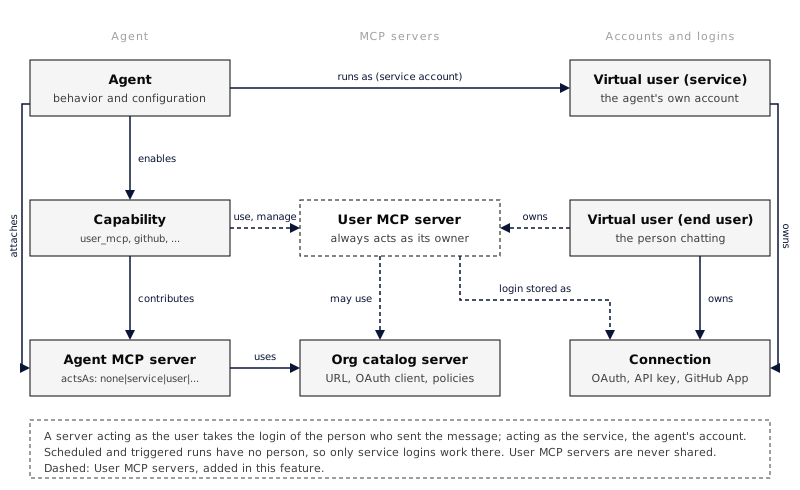 ## Add a server Open **Settings > MCP servers** and choose **Add server**. * **From catalog**: pick a server your organization already registered, such as Linear. It uses the catalog entry’s OAuth client, so signing in to it here and signing in from an agent that attaches the same entry share one login. * **By URL**: give it a name and an HTTPS URL, then choose how it signs in: * **OAuth**: choose **Connect** after adding it. Everruns discovers the server’s OAuth settings and registers a client automatically. * **API key**: the key is encrypted and never shown again. You can replace it, not read it. * **None**: for servers that need no sign-in. The name is the tool prefix agents see (`notes__search`), and it only has to be unique among your own servers: two people can each have a `notes` server. Each person can keep up to 50 servers. You do not have to add a catalog server before connecting it. Connecting one as yourself anywhere, in these settings, from an agent’s MCP servers sheet, or from a Connect card in a chat, adds it to **My MCP servers** if it is not there yet, so every agent that uses your MCP servers gets it too. Connecting again never adds a second entry; if the name is already used by another of your servers, the new entry is called `-2` (or the next free number). Turn a server off to hide it from agents without losing your sign-in. Remove it to delete both the server and your sign-in. For a catalog server that sign-in is also the one agents acting as you use for the same catalog entry, so they ask you to connect again. Signing out from the connection alone keeps the server on your list, waiting for you to connect again. ## Let an agent use them Add the **User MCP Servers** capability (`user_mcp`) to the agent. With its `use` setting on (the default), each turn adds the enabled servers of the person who sent the message. [Platform Chat](https://everruns.com/docs/built-ins/harnesses/platform-chat/) has it on. The agent gets nothing from it when: * **nobody is chatting**: a schedule, trigger or other unattended run has no person to act for; * **more than one person is in the conversation**: in a shared session, one person’s tools would otherwise show up in everyone’s turns; * **the agent already has a server with that name**: agent and capability servers always win, so an agent’s behaviour cannot be changed by a person adding a server with the same name; * the server is turned off, or a catalog entry it came from was archived. An OAuth server works for agents once you sign in to it; until then your list shows it as **Needs sign-in**. The agent’s **MCP servers** sheet shows a **User servers of the person chatting** group with these settings, and lists any of your own servers the agent skips because one of its servers has the same name. ## Add and connect from chat With the capability’s `manage` setting on, you can ask the agent instead of opening Settings, for example “add Linear and connect it”. The agent: 1. adds the server from your organization’s catalog, asking you to approve first when the agent’s [Tool Approval](https://everruns.com/docs/capabilities/tool-approval/) mode is `normal` or `protective`; 2. shows a **Connect** card, where you sign in in your own browser; the agent never sees your credentials; 3. can use the server’s tools from your next message. The **Connect** card also works for the agent’s own servers: an agent with a server that acts as you (`user` or `user_or_service`) can show it without `manage`. A server that acts as the agent sends you to the agent’s **MCP servers** sheet instead, where only someone who manages MCP servers can sign the agent in. It can also list, turn off, turn on (under the same approval policy) and remove your servers. It can add a server by URL only when the agent’s `allow_custom_urls` setting is on, and never with an API key or headers. These tools only ever change your own list, need you to be the one chatting, and do not work in conversations with several people. Platform Chat has `manage` on. Management adds no hard approval gate when Tool Approval is absent or set to `off`. Signing in through the Connect card remains a separate authorization step. ## API The same operations are available over the API, for yourself (`me`) or, with virtual-user management permission, for an account you manage: | Method | Path | Purpose | | -------- | ------------------------------------------------------------------- | ------------------------------------------------------------------------------------------------------------------------------------------ | | `GET` | `/v1/virtual-users/{id}/mcp-servers` | List your servers and their sign-in state | | `POST` | `/v1/virtual-users/{id}/mcp-servers` | Add a server (`{"catalog":"linear"}` or `{"name","url","auth_mode"}`) | | `GET` | `/v1/virtual-users/{id}/mcp-servers/{server_id}` | Read one server | | `PATCH` | `/v1/virtual-users/{id}/mcp-servers/{server_id}` | Rename, turn on or off, or replace the API key | | `DELETE` | `/v1/virtual-users/{id}/mcp-servers/{server_id}` | Remove the server and your sign-in | | `GET` | `/v1/virtual-users/{id}/mcp-servers/{server_id}/tools` | List a custom server’s tools, asked live, with your [risk labels](https://everruns.com/docs/features/mcp/#which-tools-ask-before-they-run) | | `PUT` | `/v1/virtual-users/{id}/mcp-servers/{server_id}/tools/{tool}/label` | Label a custom server’s tool `read_only` or `changes`, or `null` to clear | Sign in with `GET /v1/virtual-users/{id}/connections/{provider}/authorize`, where `provider` is the `connection.provider` value a server reports. The URL of a server cannot change; remove it and add it again instead.
```bash
curl -X POST "$EVERRUNS_URL/v1/virtual-users/me/mcp-servers" \
-H "Authorization: Bearer $EVERRUNS_API_KEY" \
-H "Content-Type: application/json" \
-d '{"name":"notes","url":"https://notes.example.com/mcp","auth_mode":"oauth"}'
```
## Security * Another person’s server answers `404` on every route, and only the owner can start its sign-in. An agent’s own account can never hold a grant for it. * Custom URLs go through the same address checks as catalog servers, so a user server cannot point at private or internal addresses. * API keys and header values are write-only. * A user server never appears in the organization catalog and cannot be attached to an agent by name.
---
# Voice
> Let people talk to an Everruns agent and hear its answers through a voice channel, with the same model, tools and instructions the agent uses for text.
Source:
A **voice channel** lets people talk to an Agent and hear its answers. Voice is a [channel](https://everruns.com/docs/features/channels/) like Slack or AG-UI, so the same Agent can be reachable by text and by voice at once, with one set of instructions, tools and memory. A call and a text chat on the same session share one transcript, so a conversation can move between typing and talking. > **Status:** Voice is an Adoption feature. An organization administrator turns on **Voice** in **Settings → Features**. Speech uses an OpenAI provider. ## How a call works A voice channel runs in **delegated** mode. A speech-to-speech model (`gpt-realtime-2` by default) only listens and speaks; the Agent, with its own model and tools, writes every answer. 1. The browser connects to the speech provider over WebRTC. Everruns places the call server-side, so the provider key never reaches the browser. 2. When the caller finishes talking, their words become a user message on the session, marked with `metadata.source = "voice"`. 3. The Agent runs a normal turn. Its answer is spoken sentence by sentence as it streams, so speech starts before the answer is complete. 4. If the turn says nothing for a moment, a short filler line (“One moment.”) is spoken so the line does not feel dead. 5. When the caller talks over the answer, speech stops at once. The transcript records what the caller actually heard. Tools, approvals, budgets and audit apply to a voice turn exactly as to a text turn. Raw audio is never stored; transcripts are kept like chat messages. ## Create a voice channel 1. Open the Agent and select the **Channels and triggers** tab. 2. Select **Add channel** and choose **Voice**. 3. Pick a voice and, optionally, a greeting, a language hint and a speaking style, then select **Create channel**. 4. Select **Talk to this channel** to test it from the browser. Over the API, create it like any channel:
```bash
curl -X POST "$EVERRUNS_API/v1/agents/$AGENT_ID/channels" \
-H "Authorization: Bearer $EVERRUNS_API_KEY" \
-H "Content-Type: application/json" \
-d '{
"channel_type": "voice",
"channel_config": {
"voice": "marin",
"greeting": "Hi, you are talking to an AI assistant. How can I help?"
}
}'
```
## Settings | Field | Default | What it does | | --------------------- | ------------------- | ------------------------------------------------------------------------------------------------------------------------------------------------------------------------------------------------------------------------------------ | | `mode` | `delegated` | How listening, thinking and speaking are split. The server runs `delegated` channels; `cascaded` (separate speech-to-text and text-to-speech) is available in the [Framework and serve](https://everruns.com/docs/framework/voice/). | | `model` | `gpt-realtime-2` | Speech model that listens and speaks. | | `transcription_model` | `gpt-4o-transcribe` | Speech-to-text model for the caller. | | `voice` | `marin` | Provider voice. | | `language` | none | Language hint for transcribing the caller, such as `en`. | | `greeting` | none | Spoken when the call connects. Say that the caller is talking to an AI. | | `turn_detection` | `server_vad` | `server_vad` ends a turn on a pause; `semantic_vad` waits for a finished thought. | | `interruption` | `steer` | What talking over the answer does to the running turn: `steer` keeps it running and the next utterance steers it, `cancel` stops it. | | `filler` | `One moment.` | Line spoken while the Agent works. | | `filler_after_ms` | `1500` | Silence before the filler is spoken. `0` turns fillers off. | | `speaking_style` | none | Delivery instructions for the speech model, such as pace or tone. Business rules belong in the Agent. | The speech provider is the organization’s default for realtime speech. Pass `provider_id` when placing a call to use another configured OpenAI provider. ## Place a call from your own app Your app creates a WebRTC offer with the microphone track, sends it to Everruns, and applies the SDP answer it gets back. | Method | Route | Use | | ------ | ----------------------------------------------------------- | -------------------------------------------------------------------------------------- | | `POST` | `/v1/agents/{agent_id}/channels/{channel_id}/voice/calls` | Call a voice channel. Starts a new session unless `session_id` is given. | | `POST` | `/v1/sessions/{session_id}/voice/calls` | Talk on an existing session. Uses the Agent’s voice channel, or `channel_id` if given. | | `POST` | `/v1/sessions/{session_id}/voice/{voice_connection_id}/end` | Hang up. |
```js
const pc = new RTCPeerConnection();
const mic = await navigator.mediaDevices.getUserMedia({ audio: true });
pc.addTrack(mic.getTracks()[0]);
const audio = new Audio();
audio.autoplay = true;
pc.ontrack = (event) => (audio.srcObject = event.streams[0]);
pc.createDataChannel("oai-events");
const offer = await pc.createOffer();
await pc.setLocalDescription(offer);
const response = await fetch(
`${api}/v1/agents/${agentId}/channels/${channelId}/voice/calls`,
{
method: "POST",
headers: { Authorization: `Bearer ${token}`, "Content-Type": "application/json" },
body: JSON.stringify({ sdp: offer.sdp }),
},
);
const { session, voice } = await response.json();
await pc.setRemoteDescription({ type: "answer", sdp: voice.answer_sdp });
```
The response carries the session, so your app can show the transcript by [streaming its events](https://everruns.com/docs/how-to/stream-events/). A call lasts at most one hour. ## Events A call emits `voice.session.started`, `voice.session.ended` and `voice.session.failed`, transcript events for the caller (`voice.input_transcript.*`) and for what was spoken (`voice.output_transcript.*`), and `voice.output.interrupted` when the caller talks over an answer. See the [event reference](https://everruns.com/docs/event-reference/). ## See also * [Channels](https://everruns.com/docs/features/channels/): the channel model, lifecycle and publishing. * [Stream events](https://everruns.com/docs/how-to/stream-events/): follow a session’s transcript live. * [Build a voice agent](https://everruns.com/docs/framework/voice/): the same voice channel in your own Rust host or a serve app.
---
# Work Reports
> See what an agent's turn is doing right now and what it got done, as one record built from the session's events and shown in chat, the sessions list and the API.
Source:
A **work report** answers two questions about a session: what is the agent doing right now, and what did it get done. Everruns builds it from events the session already records, so every agent has one without prompt changes or an extra model call. The same report appears in three places: * **Chat** shows the plan the agent shared (“Step 2 of 4”) above the work log while the turn runs, and a result box when it ends: “Done · 2 files changed”, the agent’s own summary, and links to what it produced. * **The sessions list, the thread board and run cards** show the headline of a session that is still working, such as “Running `cargo test` 7 of 12”. * **The API** returns it as JSON. ## What a report says | Field | What it holds | | ----------- | ------------------------------------------------------------------------------------------------------------ | | `state` | `working`, `needs_you`, `done`, `failed` or `stopped` | | `headline` | One line: the running step, what the work waits on, or the result (“Done in 13s · 2 files changed”) | | `plan` | The checklist the agent shared, with `done`, `total` and the current item. Absent when the agent shared none | | `steps` | The turn’s tool calls, newest last, each labelled by what it did (“Ran `cargo test`, 3 of 12 tests failed”) | | `attention` | What the agent waits on: an approval, a question or another action | | `result` | Facts measured from the run (files changed, tasks started, issues), a summary, checks, links | Progress is never invented. “Step N of M” appears only when the agent shared a plan with `write_todos`, `update_checklist` or `update_status`, and a step shows a count only when its tool reported one. Without a plan the report lists steps and draws no bar. The summary comes from the agent when it called [`report_done`](https://everruns.com/docs/capabilities/task-management/#report_done), and from the first sentence of its reply otherwise. `report_done` also records how the agent checked the work and whether it could finish. ## Read a report
```bash
curl "$EVERRUNS_API/v1/sessions/$SESSION_ID/work" \
-H "Authorization: Bearer $EVERRUNS_API_KEY"
```
```json
{
"report": {
"turn_id": "turn_01933b5a00007000800000000000001",
"state": "done",
"headline": "Done in 2m 13s · 2 files changed",
"steps": [
{
"id": "call_01",
"tool_name": "bash",
"label": "Ran `cargo test`, 12 tests passed",
"state": "done"
}
],
"result": {
"summary": "Fixed the proration rounding and added a test.",
"summary_source": "agent",
"checks": "Ran the 12 billing tests",
"facts": [{ "kind": "files_changed", "value": 2 }]
}
}
}
```
The route returns the latest turn’s report; pass `?turn_id=` for an earlier one. A session that has not run a turn returns `{"report": null}`. From the CLI, run `everruns sessions work get session_01h9`. ## In the Agent Execution API `GET /v1/channels/{channel_id}/sessions/{session_id}` on an [Agent API](https://everruns.com/docs/features/agent-api/) channel includes the latest turn’s report as `work`. What it shows follows the channel’s visibility: * `full`: the whole report. * `activity` and `messages`: the public view. It keeps the state, plan counts, facts, the agent’s summary and checks, and links. It leaves out step labels, plan item titles, approval prompts and file paths, because step labels are tool narration and can quote tool arguments. The headline becomes “Step 3 of 4”, “Working” or “Needs approval” while the work runs. ## Reporting progress from your own tools A tool that knows how far along it is can send a count with its progress message, and the report shows it on the running step. In the Framework, a tool calls `ctx.progress_of("Rendering frames", 7, 12).await` on its `ToolCallContext`.