Start here: choose between the Framework, a self-hosted Platform, and Everruns Cloud, then the first steps for each
---
# Everruns Documentation
> Tutorials, how-to guides, reference, and explanation for building and operating Everruns agents.
Source:
# Documentation Everruns is a **durable agentic harness engine** built on Rust. It provides APIs for managing agents, sessions, and long-running tasks, with real-time SSE event streaming and PostgreSQL-backed durability. Popular[Framework quickstart](https://everruns.com/docs/framework/quickstart/)[Docker Compose](https://everruns.com/docs/getting-started/docker-compose/)[Tools](https://everruns.com/docs/how-to/equip-agents-with-tools/)[Sessions API](https://everruns.com/docs/api/operations/tags/sessions/) ## Choose how you run Everruns [Start here compares the three →](https://everruns.com/docs/getting-started/introduction/) [Framework](https://everruns.com/docs/framework/quickstart/) Build and run agents inside a Rust process with the everruns crate. Nothing else to deploy. * [Quickstart](https://everruns.com/docs/framework/quickstart/) * [Agents and tools](https://everruns.com/docs/framework/agents/) * [Sessions](https://everruns.com/docs/framework/sessions/) * [Models and providers](https://everruns.com/docs/framework/models-and-providers/) `$ cargo add everruns` [Self-hosted](https://everruns.com/docs/getting-started/docker-compose/) Run the Platform (API, workers, PostgreSQL, UI) on infrastructure you control, starting with Docker Compose. * [Docker Compose quickstart](https://everruns.com/docs/getting-started/docker-compose/) * [Configure a model provider](https://everruns.com/docs/getting-started/docker-compose/#configure-llm-provider) * [Environment variables](https://everruns.com/docs/sre/environment-variables/) * [Architecture](https://everruns.com/docs/explanation/architecture/) `$ docker compose up -d` [Everruns Demo](https://everruns.com/docs/getting-started/cloud/) Use the Platform at app.everruns.com without running it. Explore with available promotional credit for built-in models, or bring your own provider keys. * [Try the demo](https://everruns.com/docs/getting-started/cloud/) * [Personal access tokens](https://everruns.com/docs/getting-started/cloud/#3-create-a-personal-access-token) * [Credit and the spend cap](https://everruns.com/docs/getting-started/cloud/#credit-and-the-spend-cap) * [Bring your own keys](https://everruns.com/docs/getting-started/cloud/#bring-your-own-keys-optional) `https://app.everruns.com` ## What kind of help do you need? [LearnTutorialsStep-by-step lessons that end with a running agent. Start here if you're new.](https://everruns.com/docs/tutorials/run-an-agent/)[DoHow-to guidesTask-oriented recipes for common problems, when you know what you want to build.](https://everruns.com/docs/how-to/)[UnderstandExplanationBackground and design rationale: durable execution, sessions, and harnesses.](https://everruns.com/docs/explanation/)[Look upReferenceAPI endpoints, event types, the capability catalog, CLI flags, and environment variables.](https://everruns.com/docs/api/)
---
# Everruns Demo quickstart
> Try the hosted demo with available promotional credit or your own provider keys, create a token, and connect from the SDK, CLI, or an AI tool.
Source:
[Everruns Demo](https://app.everruns.com) is a demo instance of the same open-source code you can run yourself. It is not a hosted service: use it to look around, then [run your own](https://everruns.com/docs/getting-started/docker-compose/) with Docker Compose or Kubernetes. The demo runs the API, the workers, the database, and the UI for you. Explore with available promotional credit for built-in models, or connect your own provider keys. This page takes you from sign-up to a first agent turn, then explains how credit works. ## 1. Sign up Open [app.everruns.com](https://app.everruns.com) and sign in. Verify your email address when asked. Open **Settings** > **Billing** to see any available promotional credit. Credit purchases and top-ups are unavailable. ## Manage your Everruns ID Open **Settings** > **Profile** > **Manage your Everruns ID**, or visit [id.everruns.com/account](https://id.everruns.com/account), to manage sign-in methods, security, sign-in sessions, and personal connections across your organizations. Passkeys are an optional second factor after your password or Google sign-in. In **Security**, choose **Add a passkey** and follow your browser’s native prompt. Compatible browsers can use Apple Passwords, a mobile credential manager, a password manager, or a security key. Save the recovery codes shown after enrollment; each code works once after primary sign-in. Keep a backup passkey or recovery codes so losing a device does not lock you out. **Sessions** shows signed-in devices, activity, and, for new sign-ins, masked IP addresses and approximate sign-in locations. Ending an ID session leaves an app’s separate session valid until its own expiry. **Connections** lists your ID-linked apps, approved AI clients, personal MCP servers, service connections, credentials, and API tokens, with revoke controls and recorded usage. Unknown usage is shown as unavailable. ## 2. Use the built-in provider New organizations come with the built-in model provider already set up. There are no keys to paste: create an agent in the UI and start a session, and its turns are charged against your organization’s credit. ## 3. Create a personal access token The SDKs, the CLI, and the API authenticate with a personal access token. In the UI, open **Settings** > **Personal Access Tokens** and create one. Tokens start with `evr_pat_` and are shown once, so copy it before you close the dialog. A token belongs to your user account, not to one organization, and can reach every organization you belong to. Choose **Read-only** for scripts that only read; it still reads every organization you belong to ([Token access](https://everruns.com/docs/features/ui/#token-access)). Revoke a token from the same page. ## 4. Connect Pick the client you want. All three talk to `https://app.everruns.com`. ### SDK Install an [SDK](https://everruns.com/docs/features/sdk/) and set two environment variables:
```bash
pip install everruns-sdk
export EVERRUNS_API_KEY=evr_pat_...
export EVERRUNS_API_URL=https://app.everruns.com/api
```
Newer SDK releases default to Everruns Demo; setting `EVERRUNS_API_URL` keeps older ones pointed at it too. Then run one turn:
```python
import asyncio
from everruns_sdk import Everruns
async def main():
client = Everruns() # reads EVERRUNS_API_KEY and EVERRUNS_API_URL
agent = await client.agents.apply_by_name(
name="hello", system_prompt="You are a concise assistant."
)
session = await client.sessions.create(agent_id=agent.id)
await client.messages.create(session.id, "Say hello in one sentence.")
print(f"Session: {session.id}")
await client.close()
asyncio.run(main())
```
The message starts a turn; the answer arrives as events. The [SDK tutorial](https://everruns.com/docs/tutorials/building-agents-using-sdk/) shows how to stream them. ### CLI The [CLI](https://everruns.com/docs/features/cli/) uses Everruns Demo by default, so there is no URL to configure:
```bash
everruns login # opens the browser to sign in
SESSION=$(everruns sessions create -q)
everruns chat --session "$SESSION" "Say hello in one sentence."
```
`everruns login` signs you in through the browser, creates a personal access token for this machine, and asks which organization to use when you belong to more than one. On a machine without a browser, run `everruns login --token` and paste a token you created in step 3. ### AI tools The `everruns` plugin connects Claude Code, Codex, and Cursor to Everruns Demo over MCP, at `https://app.everruns.com/mcp`. It signs in with OAuth on first use, so it needs no token. See [Use in AI Tools](https://everruns.com/docs/getting-started/use-in-ai-tools/). ## Credit and the spend cap The demo has no subscriptions, credit purchases, top-ups, or paid overage. * **Balance.** **Settings** > **Billing** shows the organization’s available credit and amounts held by work that is still running. Every organization member can see the balance. Historical purchased credit and refund records remain visible when present. * **Built-in models.** Requests use the organization’s available credit. When no credit is available, use your own provider keys or self-host Everruns to continue exploring. Work already in flight can still settle against its reservation. This credit is separate from [budgets](https://everruns.com/docs/advanced/budgets/). A budget is a limit you set on a session or an agent; credit is what pays for the built-in provider. ## Bring your own keys (optional) You can add your own provider API keys under **Models** > **Providers**, and point agents at those models. Calls through your own keys are billed by that provider, not against your Everruns credit, and keep working when the credit balance is zero. ## Next steps * [Concepts](https://everruns.com/docs/getting-started/concepts/): agents, sessions, harnesses, and capabilities. * [Build your first agent](https://everruns.com/docs/tutorials/building-agents-using-sdk/): a guided SDK lesson that streams the agent’s answer. * [Capabilities](https://everruns.com/docs/capabilities/): the tools you can give an agent. * [Self-hosted with Docker Compose](https://everruns.com/docs/getting-started/docker-compose/): run the same Platform on your own infrastructure.
---
# Concepts
> A glossary of the Everruns execution model, harnesses, agents, sessions, turns, events, capabilities, tools, endpoints, and settings, with links to the design pages.
Source:
This page defines each entity you meet in Everruns and links to the page that explains it in depth. The entities fall into three layers: | Layer | Entities | Lifetime | | ----------------- | -------------------------- | ------------------------------------------------ | | **Configuration** | Harness, Agent, Capability | Long-lived. You author these. | | **Runtime** | Session, Turn, TurnAgent | Created per conversation. The server owns these. | | **Data** | Event, Message | Append-only log produced during runtime. | Your application creates configuration, starts runtime, and consumes data. 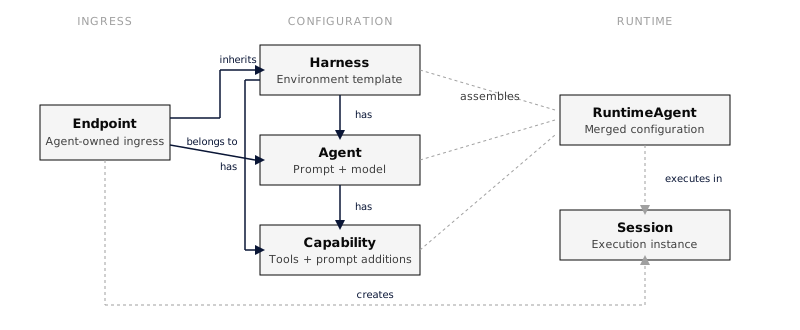 Solid arrows show configuration ownership: a Harness has Agents and Capabilities, and an Agent has Capabilities. Dashed arrows show runtime assembly: configuration merges into a TurnAgent, which executes in a Session. ## Configuration ### Harness What an agent runs on: the execution environment, defaults, and constraints for sessions. A harness sets which capabilities are available by default, the default model, network access, and starter files. * Each agent holds exactly one harness reference, and many agents can share one harness. * Each session runs on exactly one harness, the agent’s unless the session names another. * A harness can have capabilities attached to it. A Harness is not the agent loop. Elsewhere “agent harness” often means that loop, and Everruns uses the word that way when it calls itself a durable agentic harness engine. The loop is the runtime; a Harness is configuration the runtime reads. See [Harnesses](https://everruns.com/docs/features/harnesses/). ### Agent A domain-specific or task-specific configuration for the agentic loop: the system prompt, the default model, and the enabled capabilities. * A session may or may not have an agent, and the agent can change during the session. * Each agent has capabilities with position ordering and references a default model. ### Capability A reusable unit that extends a harness, agent, or session. A capability can contribute system prompt additions, tools, and mount points (files and directories in the session filesystem). * Session capabilities are additive to agent capabilities. * Built-in capabilities use `snake_case` IDs, such as `current_time` and `web_fetch`. * MCP servers appear as virtual capabilities with `mcp:{uuid}` IDs, and registry skills as `skill:{uuid}`. * Capabilities can depend on other capabilities. Dependencies resolve in topological order, so enabling `bashkit_shell` pulls in `session_file_system`. * Order matters: earlier capabilities’ prompt fragments appear first in the merged system prompt. A capability exists because the tool definition, the prompt text that teaches the model when to use it, and the session state it needs travel together. See [Capabilities](https://everruns.com/docs/features/capabilities/). ### Channel An Agent-owned way for an external caller to reach that Agent. Slack, AG-UI, A2A, FCP, and Public Chat each use a channel with transport-specific configuration. * Each channel belongs to exactly one Agent and has its own publish state, credentials, identity, and session routing. * An Agent can own several channels, each published or revoked independently. Create and manage channels from the Agent’s **Channels and triggers** tab. See [Channels](https://everruns.com/docs/features/channels/). For proactive scheduled work, use [Agent triggers](https://everruns.com/docs/features/agent-triggers/) instead. ### Everruns user and virtual user An **Everruns user** signs in to manage organizations, agents, permissions, and personal access tokens. A **virtual user** is the organization-scoped account that uses agents. It owns an agent-facing profile, preferences, and provider connections. Each organization membership has a default end-user virtual user. Chats and **Settings → Profile**, **Connections**, **MCP servers**, and **AI clients** use that account. Verified external callers, such as an authenticated public-chat visitor or Slack user, get virtual users without becoming Everruns organization members. Provider, issuer or workspace, and subject identify each external binding; matching email addresses do not merge accounts. A service virtual user is an agent’s account for unattended execution. User connections resolve from the speaker of the current turn. Service connections resolve from the responding agent’s service account. Neither inherits credentials from a session owner’s management identity. ## Runtime ### TurnAgent The merged configuration a session executes. When a session starts, harness, agent, and session settings fold into one `TurnAgent`: earlier layers form the base and later layers override or add. System prompts concatenate, capabilities are deduplicated by ID, and network policies can only narrow (allow lists intersect, blocklists union). Each layer answers a different question. The harness answers “what environment am I running in?”, the agent answers “what role am I playing?”, and the session answers “what is true for this one conversation?”. Operators control harnesses, application authors control agents, and end users or the runtime control sessions. ### Session A working instance of the agentic loop and the context where a conversation happens. A session owns an isolated filesystem, a key-value store, and the full event log. * Each session has a harness; the agent is optional. * Sessions can add their own capabilities and override the model. * Status flow: `started` → `active` → `idle`, with `waiting_for_tool_results` while client-side tools run and `paused` when a budget pauses work. Sessions do not terminate; they wait in `idle` for the next input. 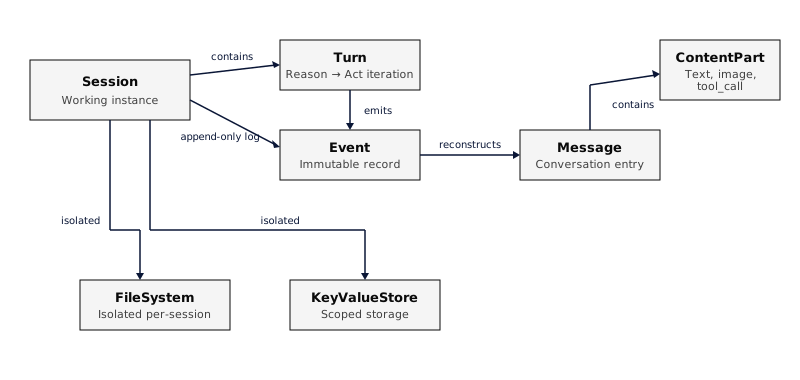 ### Turn The agent’s response to one input message: one or more iterations of the loop, each a reason step (call the model) followed by an act step (run the tools the model asked for, in parallel). The turn ends when the model produces a final answer. * Lifecycle: `turn.started` → reason → act → `turn.completed` (or `turn.failed`). * A turn runs at most **500 iterations** by default; set `max_iterations` on the agent or session to change it. On the Platform a worker leases a session and runs its turn from the durable event log. After a worker crash, another worker acquires the expired lease and reconstructs the turn; unfinished tool calls are retried only when their side-effect declarations permit it. See [The agentic loop](https://everruns.com/docs/explanation/agentic-loop/) and [Durable execution](https://everruns.com/docs/explanation/durable-execution/). ### Tool A function the agent can invoke during the act step. Capabilities provide tools. * Built-in tools have no name prefix. * MCP tools are prefixed: `mcp_{server_name}__{tool_name}`. ### File system Each session has an isolated virtual filesystem stored in PostgreSQL. Paths are relative to `/workspace`, capabilities can mount initial files, the File System and Bashkit Shell capabilities share it, and files can be marked read-only. ### Key-value store Each session has scoped storage in two tiers: plain key/value entries for state and intermediate results, and secrets encrypted at rest with AES-256-GCM. Storage cannot be read across sessions. ## Data ### Event An immutable, append-only record and the primary store for conversations and SSE notifications. * Atomic per-session sequence numbering. * Types cover input, output, turn, atom, tool, LLM, and session lifecycle. * Events carry correlation context: turn ID, input message ID, execution ID. See [Events as the primary store](https://everruns.com/docs/explanation/events/) for why the log comes first, and the [Event Reference](https://everruns.com/docs/event-reference/) for every type. ### Message A conversation entry reconstructed from the event log. There is no separate messages table. * Roles: `user`, `agent`, `tool_result`. * Content is an array of parts: text, image, tool_call, tool_result. * Agent messages may include extended thinking from reasoning models. * Per-message controls include a model override and reasoning effort. ## Settings 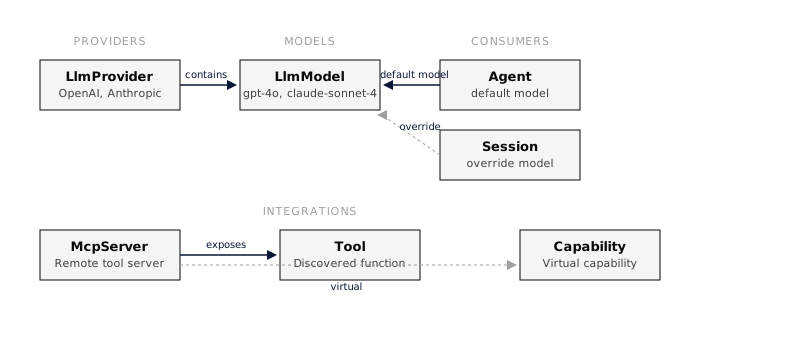 ### LLM provider A configured API provider such as OpenAI or Anthropic. Providers store encrypted API keys and contain models. See [Providers](https://everruns.com/docs/providers/). On the Everruns demo instance a built-in Everruns provider works without your own keys. ### LLM model A specific model within a provider, such as `gpt-6.2-sol` or `claude-sonnet-5`. Models are predefined, discovered from the provider API, or added manually. Resolution order: message controls → session override → agent default → system default. ### MCP server A remote server that exposes tools over the Model Context Protocol. Each server becomes a capability with ID `mcp:{server_uuid}`. Tools are discovered at runtime and cached for 24 hours, prefixed to avoid conflicts, and executed over HTTP JSON-RPC. See [MCP Servers](https://everruns.com/docs/features/mcp/). ## Further reading * [Architecture](https://everruns.com/docs/explanation/architecture/): control plane, workers, and the API-first design. * [The agentic loop](https://everruns.com/docs/explanation/agentic-loop/): the reason-act cycle and why turns are bounded. * [Durable execution](https://everruns.com/docs/explanation/durable-execution/): why agents survive crashes. * [Events as the primary store](https://everruns.com/docs/explanation/events/): why the event log is the source of truth.
---
# Docker Compose
> Deploy the Everruns platform with Docker Compose: control plane, workers, UI, and PostgreSQL.
Source:
Deploy the complete Everruns platform using Docker Compose. This guide sets up the control plane, workers, UI, and database in a single command. On your own computer, [`everruns docker up`](https://everruns.com/docs/getting-started/run-locally/) does these steps for you. On a cluster, use the [Helm chart](https://everruns.com/docs/getting-started/kubernetes/). ## Prerequisites * Docker Engine 20.10+ * Docker Compose v2.23.1+ (the file uses inline `configs.content`) * 4GB available RAM ## Quick Start ### 1. Download Docker Compose File
```bash
# Create directory and download docker-compose file
mkdir everruns && cd everruns
curl -o docker-compose.yaml https://raw.githubusercontent.com/everruns/everruns/main/infra/docker-compose/docker-compose.yaml
```
### 2. Generate Secrets Everruns encrypts LLM API keys at rest, signs login sessions, and authenticates workers to the control plane. Generate one value for each:
```bash
python3 -c "import os, base64; print('kek-v1:' + base64.b64encode(os.urandom(32)).decode())" # encryption key
openssl rand -hex 32 # JWT secret
openssl rand -hex 32 # worker token
openssl rand -hex 32 # data plane token
openssl rand -base64 32 # data plane key
```
### 3. Create Environment File Create a `.env` file next to `docker-compose.yaml`. The first seven values are required: Compose refuses to start without `AUTH_JWT_SECRET`, the server refuses to start without `WORKER_GRPC_AUTH_TOKEN`, and without the two data plane values new organizations run on v1. .env
```bash
SECRETS_ENCRYPTION_KEY=kek-v1:
AUTH_JWT_SECRET=
WORKER_GRPC_AUTH_TOKEN=
AUTH_ADMIN_EMAIL=admin@example.com
AUTH_ADMIN_PASSWORD=
EVERRUNS_DP_TOKEN=
EVERRUNS_DP_KEY=
# Optional: run agents on the workers only (data plane v1), see below
# EVERRUNS_DATA_PLANE=v1
# DATA_PLANE_REPLICAS=0
# DATA_PLANE_PULL_POLICY=never
# Optional: two extra workers and VictoriaMetrics (see Profiles below)
COMPOSE_PROFILES=scale,metrics
# Optional, single-tenant admin mode: encrypt these keys into the default org.
# The explicit seeding opt-in is required to skip UI credential configuration.
SEED_DEFAULT_PROVIDER_KEYS_FROM_ENV=true
DEFAULT_OPENAI_API_KEY=sk-...
DEFAULT_ANTHROPIC_API_KEY=sk-ant-...
DEFAULT_GEMINI_API_KEY=AIza...
DEFAULT_OPENROUTER_API_KEY=sk-or-...
```
The optional environment-key path stores keys encrypted in the default organization’s database. Production startup otherwise ignores `DEFAULT_*` keys for tenant execution. Enable seeding only for a single-tenant deployment with admin auth; built-in signup or OAuth self-provisioning prevents this opt-in from sharing host credentials. Leave it unset and use the UI for other deployments. ### 4. Start Services
```bash
docker compose pull # Fetch latest images
docker compose up -d
```
The published compose file defaults to app entry point on `9300`. If that port is busy, override before startup:
```bash
EXAMPLE_PROXY_PORT=10300 VICTORIAMETRICS_PORT=18428 docker compose up -d
```
This starts: * PostgreSQL database * Valkey (rate limiting) and NATS (event delivery and task notifications) * Control plane (`server`): HTTP API and worker gRPC * 1 worker, or 3 with the `scale` profile * Data plane v2: a shard (`shard`), an executor that runs its turns (`executor`), and the edge router (`edge`) that sends session calls to it * Next.js UI * Caddy reverse proxy * VictoriaMetrics, scraping server metrics at (`metrics` profile) Sign in to the UI with `AUTH_ADMIN_EMAIL` and `AUTH_ADMIN_PASSWORD`. ### 5. Access the Platform | Service | URL | | ------------------ | -------------------------------------------------------------- | | **Web UI** | | | **API** | … | | **OAuth** | … | | **MCP** | | | **OAuth Metadata** | | | **Health Check** | | ## Configuration ### Data Plane New organizations run their agents on data plane v2: the `shard` keeps each session (its history goes to the `shard_store` volume), the `executor` runs turns, and the proxy sends session calls through the `edge` router, which passes everything that is not a v2 session on to the API. An organization that already has sessions keeps running them on the workers (v1), so turning v2 on in an existing install leaves the organizations in use where they are. To run every organization on the workers instead, add to `.env`:
```bash
EVERRUNS_DATA_PLANE=v1
DATA_PLANE_REPLICAS=0
DATA_PLANE_PULL_POLICY=never
```
`DATA_PLANE_REPLICAS=0` stops the shard, executor and edge containers, and `DATA_PLANE_PULL_POLICY=never` skips pulling their image. Leave both out when switching an install that already ran v2: its v2 organizations’ sessions live in the shard. Data plane v2 needs images from the release that made it the default or later; an older `EVERRUNS_TAG` has no `agentd` image, so run v1 with it. ### Run Multiple Copies If you want multiple Everruns compose stacks on the same machine, set both a Compose project name and host-port overrides:
```bash
COMPOSE_PROJECT_NAME=everruns-demo-2 \
EXAMPLE_PROXY_PORT=10300 \
VICTORIAMETRICS_PORT=18428 \
docker compose up -d
```
This isolates Compose networks and volumes. With the `metrics` profile enabled, override **both** published ports: VictoriaMetrics also binds a host port. To restrict a local test to this machine, use `EXAMPLE_PROXY_BIND=127.0.0.1`, `EXAMPLE_PROXY_PORT=10300`, and `VICTORIAMETRICS_PORT=127.0.0.1:18428`. The downloaded file follows `main`, while its application images default to the published `latest` tag. These can be different revisions. Use `EVERRUNS_TAG=vX.Y.Z` to select a published release; `docker compose config --images` shows the selected images. Run `docker compose pull` before recreating services after a tag change. ### Configure LLM Provider If you didn’t set LLM API keys (`DEFAULT_OPENAI_API_KEY`, `DEFAULT_ANTHROPIC_API_KEY`, `DEFAULT_GEMINI_API_KEY`, or `DEFAULT_OPENROUTER_API_KEY`) in your `.env` file, configure via UI: 1. Open 2. Open **Models** > **Providers** (also available from Settings) 3. Click **Connect provider**, choose a provider such as OpenRouter, and enter an inference API key. Use an existing limited key, never an OpenRouter management key. 4. Wait for the key verification result, then click **Save Credentials** 5. Sync the provider’s models if needed, enable a model that supports chat and tools, and select it under **Defaults**. For OpenRouter, `openai/gpt-6-luna` is a suitable lightweight choice. A fresh **Chat** shows **No intelligence available** until a usable model is configured. Provider credentials are encrypted using `SECRETS_ENCRYPTION_KEY`; keep that key stable while retaining the database volume. ### Create Your First Agent 1. Go to **Agents** in the UI 2. Click **Create Agent** 3. Set a name and system prompt 4. Select your configured LLM provider 5. Save the agent You can also create an agent through **Chat**. Ask, for example: “Create an agent named `math-tutor` with the system prompt `You are a concise math tutor. Explain arithmetic in one sentence.` Use my configured default model.” If Chat asks for confirmation before creating the reusable agent, confirm that specific creation in Chat. Open the returned agent link to verify it was saved. To run it, open **Playground**, choose the agent, leave **Dry run** unchecked, start a chat, and ask “What is 7 multiplied by 8?” A successful response should explain that the result is 56. ### Repeatable real-provider E2E (repository checkout) The opt-in test downloads the same Compose file, starts all ten services with the `scale,metrics` profiles in a unique project with loopback ports and disposable volumes, opts in to application startup encrypting an existing OpenRouter environment key into the disposable database, signs in through the UI, verifies the configured provider, creates an agent through Chat, and runs the persisted agent in Playground. It checks durable events and the saved answer, records the real browser journey, and removes its project and volumes on exit. It makes paid requests; use a limited inference key and a low-cost model. No simulated responses satisfy this test.
```bash
cd apps/ui
pnpm install --frozen-lockfile
pnpm exec playwright install chromium
cd ../..
# Supply OPENROUTER_API_KEY securely in the environment, without shell tracing.
# This opt-in permits encrypted credential storage in the disposable test stack.
EVERRUNS_E2E_ALLOW_PROVIDER_STORAGE=1 node scripts/e2e-compose-openrouter.mjs
```
The test prints its evidence directory, containing a WebM video, `report.json`, and `commands.log`. The raw inference key is supplied only to the server environment, never written to the test `.env` or entered through browser UI/API. Secret values are excluded from command output, and no trace, HAR, or browser authentication state is saved. To verify startup and UI login without a key, run `node scripts/e2e-compose-openrouter.mjs --setup-only`; this does **not** verify inference, agent creation, or agent execution. Set `EVERRUNS_TAG` to pin published images, or set `COMPOSE_E2E_FILE` to your local [Compose file](https://github.com/everruns/everruns/blob/main/infra/docker-compose/docker-compose.yaml) to test a configuration change. See `node scripts/e2e-compose-openrouter.mjs --help` for options. ### Start a Session The API requires a token. Create a personal access token under **Settings** > **Personal Access Tokens** in the UI (it starts with `evr_pat_` and is shown once), or from the command line as described in [Authentication](https://everruns.com/docs/sre/runbooks/authentication/#create-personal-access-token).
```bash
export EVERRUNS_TOKEN=evr_pat_...
# Create a session (agent_id in request body)
curl -X POST http://localhost:9300/api/v1/sessions \
-H "Authorization: Bearer $EVERRUNS_TOKEN" \
-H "Content-Type: application/json" \
-d '{"agent_id": "{agent_id}"}'
# Send a message
curl -X POST http://localhost:9300/api/v1/sessions/{session_id}/messages \
-H "Authorization: Bearer $EVERRUNS_TOKEN" \
-H "Content-Type: application/json" \
-d '{"message": {"role": "user", "content": [{"type": "text", "text": "Hello!"}]}}'
```
## Profiles Without profiles the stack is the lean set: PostgreSQL, Valkey, NATS, the server, one worker, the UI and Caddy. Two optional [Compose profiles](https://docs.docker.com/compose/how-tos/profiles/) add the rest: | Profile | Adds | | ------------------ | ------------------------------------------------------------------------------------------------- | | `scale` | `worker-2` and `worker-3` | | `metrics` | VictoriaMetrics at | | `tailscale` | A public `*.ts.net` address through Tailscale Funnel (`TS_AUTHKEY`) | | `cloudflare` | A Cloudflare named tunnel (`CLOUDFLARE_TUNNEL_TOKEN`); its hostname points at `http://caddy:9300` | | `cloudflare-quick` | A Cloudflare quick tunnel: a random address that changes on every restart | | `ngrok` | Your ngrok static domain (`NGROK_AUTHTOKEN`, `PUBLIC_APP_URL`) | With a tunnel, or your own reverse proxy, set `PUBLIC_APP_URL` in `.env` to the public HTTPS origin, such as `https://agents.example.com`: Slack Request URLs, OAuth callbacks and links use it. Never give a public address to an instance with `AUTH_MODE=none`. [`everruns docker up --tunnel`](https://everruns.com/docs/getting-started/run-locally/#give-it-a-public-address) sets all of this up for you. Set them in `.env` as `COMPOSE_PROFILES=scale,metrics` (as above), or per command: `docker compose --profile metrics up -d`. Profiles need Docker Compose 2.20 or newer. ## Scaling Workers Add more workers by scaling the worker services (`worker-2` and `worker-3` need the `scale` profile):
```bash
# Scale to 5 workers
docker compose --profile scale up -d --scale worker-1=1 --scale worker-2=1 --scale worker-3=3
```
Or modify `docker-compose.yaml` to add more worker services. ## Monitoring ### View Logs
```bash
# All services
docker compose logs -f
# Specific service
docker compose logs -f server
docker compose logs -f worker-1
```
### Distributed Tracing Set `OTEL_EXPORTER_OTLP_ENDPOINT` to export traces to any OTLP-compatible backend (Grafana Tempo, Datadog, etc.). ## Stopping Services
```bash
# Stop all services
docker compose down
# Stop and remove volumes (deletes data)
docker compose down -v
```
## Troubleshooting ### Check Service Health
```bash
docker compose ps
```
`server` should report `healthy`. Its healthcheck runs `everruns-server --health-check`, which calls `/health` inside the container. Images released before that flag existed always show `unhealthy` even when the API works; check `curl http://localhost:9300/health` instead. ### Database Connection Issues If services fail to connect to PostgreSQL:
```bash
# Check postgres health
docker compose ps postgres
# View postgres logs
docker compose logs postgres
```
### Migration Failures Migrations are auto-applied when the server starts. If migrations fail:
```bash
# Check server logs for migration errors
docker compose logs server
# Restart the server to retry migrations
docker compose restart server
```
To inspect migration status, use the [admin container](https://everruns.com/docs/sre/admin-container/). ### Worker Not Processing Verify workers can reach the control plane:
```bash
# Check worker logs
docker compose logs worker-1
```
A worker that logs authentication errors has a different `WORKER_GRPC_AUTH_TOKEN` from the server. Both read it from the same `.env`, so recreate them after changing it: `docker compose up -d --force-recreate`. ## Next Steps * [API Reference](https://everruns.com/docs/api/) - Full API documentation * [Capabilities](https://everruns.com/docs/features/capabilities/) - Extend agent functionality * [Environment Variables](https://everruns.com/docs/sre/environment-variables/) - Advanced configuration
---
# Start here
> Choose how you run Everruns, the Framework, a self-hosted Platform, or Everruns Demo, and go to the right first page.
Source:
Everruns is a durable agentic harness engine built on Rust. You can use it in three ways. They run the same agent model (agents, sessions, capabilities, events) and differ in what you operate. 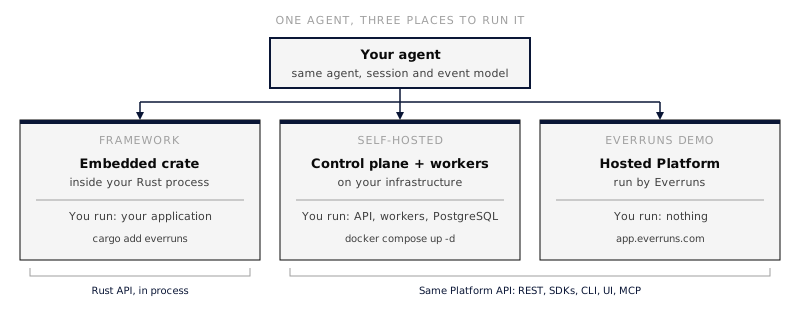 | | Framework | Self-hosted | Everruns Demo | | -------------------------- | ----------------------------------------------------------------------- | ----------------------------------------------------------------------------------------------------------------------------------------------------------------------------------------------------------------------------- | ----------------------------------------------------------------------------------------------------------- | | **For** | Rust developers who want agents inside their own application | Teams that need the full Platform on their own infrastructure | Anyone who wants the Platform without operating it | | **You operate** | Your application process. No server, database, or worker | The Platform: API server, workers, PostgreSQL, UI | Nothing. Everruns runs the Platform at [app.everruns.com](https://app.everruns.com) | | **You talk to it through** | The `everruns` Rust crate, in process | The REST API, SDKs, CLI, UI, and MCP | The REST API, SDKs, CLI, UI, and MCP | | **Cost** | Free and open source (MIT). You pay your model provider | Free and open source (MIT). You pay for your infrastructure and model providers | Available promotional credit for built-in models, or your own provider keys. No credit purchases or top-ups | | **First page** | [Framework quickstart](https://everruns.com/docs/framework/quickstart/) | [On your machine](https://everruns.com/docs/getting-started/run-locally/), [Docker Compose](https://everruns.com/docs/getting-started/docker-compose/) or [Kubernetes](https://everruns.com/docs/getting-started/kubernetes/) | [Everruns Demo quickstart](https://everruns.com/docs/getting-started/cloud/) | Pages across these docs carry an **Applies to** row under the title that names which of the three the page covers. ## Framework Embed agents in a Rust process with the `everruns` crate. The agent runs inside your application, so there is nothing else to deploy. Bring a model provider key.
```rust
let agent = Agent::builder().instructions("Be concise.")
.provider(OpenAI::from_env()?).model("gpt-6.2-sol").build()?;
let session = Engine::new().create(agent);
println!("{}", session.send_and_wait("Say hello.").await?.response);
```
Next: [Framework quickstart](https://everruns.com/docs/framework/quickstart/), which sets up the crate and runs this program end to end. ## Self-hosted Run the full Platform on infrastructure you control: the API server, durable workers, PostgreSQL, and the management UI. Use it when you need remote clients, multi-tenant organizations, or durable execution that survives a worker restart, and want to keep the deployment and data in your own environment.
```bash
brew install everruns/tap/everruns
everruns docker up # UI and API on http://localhost:9300
```
Pick the page for where it runs: * [On your machine](https://everruns.com/docs/getting-started/run-locally/): `everruns docker up` asks a few questions, starts the Platform in Docker and signs the CLI in. * [Docker Compose](https://everruns.com/docs/getting-started/docker-compose/): the same stack set up by hand on a server. * [Kubernetes](https://everruns.com/docs/getting-started/kubernetes/): the official Helm chart, with your own PostgreSQL and workers that can scale on queue depth. Operators continue with [Environment variables](https://everruns.com/docs/sre/environment-variables/). ## Everruns Demo Use the Platform at [app.everruns.com](https://app.everruns.com) without running it. Explore the hosted demo with available promotional credit for built-in models, or connect your own provider keys. Credit purchases and top-ups are unavailable.
```bash
everruns login
SESSION=$(everruns sessions create -q)
everruns chat --session "$SESSION" "Say hello."
```
Next: [Everruns Demo quickstart](https://everruns.com/docs/getting-started/cloud/), which covers sign-up, tokens, the SDK, CLI and AI-tool setup, and how credit works. ## After the first page * [Concepts](https://everruns.com/docs/getting-started/concepts/): agents, sessions, harnesses, capabilities, and events. * [Use in AI Tools](https://everruns.com/docs/getting-started/use-in-ai-tools/): give Claude Code, Codex, Cursor or Gemini CLI the Everruns skill. * [Build your first agent](https://everruns.com/docs/tutorials/building-agents-using-sdk/): a guided SDK lesson for the self-hosted Platform or Everruns Demo. * [Capabilities](https://everruns.com/docs/capabilities/): the tools an agent can use, each marked with where it is available.
---
# Kubernetes
> Install the self-hosted Everruns Platform on Kubernetes with one CLI command or the official Helm chart, using your own PostgreSQL and secrets kept across upgrades.
Source:
The `everruns` Helm chart installs the self-hosted Platform: the API server, workers, the UI, a proxy in front of them, and NATS. Each release publishes the chart as an OCI chart that runs that release’s images. ## Prerequisites * Kubernetes 1.27+ and Helm 3.8+ * PostgreSQL 15+ that the cluster can reach, such as a managed database or one run by an operator like CloudNativePG * About 2 GB of memory for the Everruns pods ## Install with the CLI With the [CLI](https://everruns.com/docs/features/cli/), `kubectl` and `helm` installed, one command installs Everruns into the cluster `kubectl` points at:
```bash
everruns k8s up
```
With multiple contexts on a first interactive run, choose a cluster from the list. The CLI shows the chosen context and namespace (`everruns` by default) and asks before installing. Then it asks who signs in, the admin email, your PostgreSQL URL (or a single PostgreSQL pod for trying it out), an optional public URL for an Ingress, and an LLM provider key, which it takes from `OPENAI_API_KEY`, `ANTHROPIC_API_KEY`, `GEMINI_API_KEY` or `OPENROUTER_API_KEY` when set. It checks the cluster first (Kubernetes version, permissions in the namespace, a default StorageClass when it needs volumes, and KEDA when worker autoscaling is on), installs this CLI version’s chart, waits for the pods while it shows how many of each are ready, and signs the CLI in as profile `k8s`. `everruns k8s password` prints the generated admin password for the UI. Every question has a flag, so it also runs in scripts and CI:
```bash
everruns k8s up --yes --context my-cluster \
--database-url "$DATABASE_URL" --admin-email you@example.com \
--public-url https://everruns.example.com --ingress-class nginx \
--set server.replicas=2 --set valkey.enabled=true
```
`--set` and `--values` pass chart values through, and later runs keep them. Running `up` again repairs the install without asking again and never changes the chart version; `everruns k8s upgrade` does that, and backs up a bundled database to this machine first. Nothing secret is written to this machine: the chart keeps its secrets in the cluster and Helm keeps the values. Without a public URL, `everruns k8s port-forward` keeps the install reachable at `http://localhost:9300` for the browser and the CLI, and `everruns k8s open` opens it. `status`, `logs [server|worker|ui|proxy]` and `doctor` show what it is doing; `uninstall` removes the workloads and keeps the data; `destroy` deletes everything after you type the install’s name, including the namespace when nothing else is in it. All commands: [`everruns k8s`](https://everruns.com/docs/reference/cli/k8s/). ## Local storage and Apple Container `k8s up` defaults to `--storage-class auto`. The CLI uses the cluster’s default class for new PostgreSQL, NATS, shard data, and shard store volumes that need a class. Explicit storage classes in chart values take precedence. On a verified local kind, k3d, or Apple Container cluster without a default, the CLI offers to install Local Path Provisioner and waits for it to be ready. Pass `--yes` to accept on a verified local cluster. For a remote cluster, configure its default or pass `--storage-class ` with an existing class. Existing release volume templates keep their storage settings. On a Mac with a current Apple Container release, create a local cluster first:
```bash
everruns k8s cluster create --provider apple
everruns k8s up --context everruns-dev --bundled-postgres
```
The command allocates 4 GB of memory, sets up storage, and gives the cluster read access to Apple Container’s local image store. Use this cluster for trusted workloads. On a Mac without Kubernetes contexts, interactive `k8s up` can offer this setup. With bundled PostgreSQL, the server pod waits for the database Service before it starts the server and its migrations. ## Install with Helm
```bash
helm install everruns oci://ghcr.io/everruns/charts/everruns \
--namespace everruns --create-namespace \
--set database.url='postgres://everruns:PASSWORD@db.example.com:5432/everruns' \
--set auth.adminEmail=you@example.com \
--set publicUrl=https://everruns.example.com
```
The first start runs the database migrations. Then sign in as the admin with the generated password:
```bash
kubectl -n everruns get secret everruns-generated \
-o jsonpath='{.data.AUTH_ADMIN_PASSWORD}' | base64 -d
kubectl -n everruns port-forward svc/everruns 9300:9300 # then open http://localhost:9300
```
To try the chart without a database of your own, add `--set postgresql.enabled=true`. It starts a single PostgreSQL pod with no backups or failover, so use it only for experiments. ## What it runs | Part | Notes | | ------------- | ---------------------------------------------------------------------------------------------------------------------------------------------------------------------------------------------------------------------------------------------------------------------------------------------------------- | | Server | `server.replicas` (default 1). It applies migrations when it starts. See [Run several servers](#run-several-servers). | | Data plane v2 | Where new organizations run agents (`dataPlane.version`, default `v2`): a shard (StatefulSet, `dataPlane.shard.nodes`, default 1), executors that run its turns (`dataPlane.executor.replicas`) and the edge router the proxy sends session calls to. See [Choose the data plane](#choose-the-data-plane). | | Workers | `worker.replicas` (default 1), or scaled by [KEDA](https://keda.sh) with `worker.autoscaling.enabled=true` on waiting and running work: background tasks and chat turns. | | UI | `ui.replicas` (default 1). | | Proxy | Caddy for installs without Ingress, with the same routes as the [Docker Compose](https://everruns.com/docs/getting-started/docker-compose/) setup. Service `everruns`, port 9300. See [Ingress routing](#ingress-routing). | | NATS | Bundled with JetStream and a generated password for live event delivery, or `nats.url` for your own. | | Valkey | Optional with one server (`valkey.enabled` or `valkey.url`), which then keeps rate limits in memory. Required with more. | ## Choose the data plane New organizations run their agents on data plane v2. The shard keeps each session and writes its history to an object store: storage.s3’s bucket (under `shards/`) when [S3 is on](#keep-files-in-s3), else a volume the shard and the executors share. A ReadWriteOnce volume keeps them on one node, so on a cluster of several nodes use S3 or a ReadWriteMany `dataPlane.storeVolume.storageClass`. An organization that already has sessions keeps running them on the workers (v1), so upgrading an existing install leaves the organizations in use where they are.
```bash
# Every organization on the workers (v1):
helm upgrade everruns oci://ghcr.io/everruns/charts/everruns --reuse-values \
--set dataPlane.version=v1
# Three shard nodes, so the shard keeps running when one is lost:
helm upgrade everruns oci://ghcr.io/everruns/charts/everruns --reuse-values \
--set dataPlane.shard.nodes=3 --set storage.s3.enabled=true --set storage.s3.bucket=my-bucket
```
`everruns k8s up --data-plane v1` does the first. Going back to v1 after an install ran v2 also needs `dataPlane.keepRunning=true` (the CLI sets it), since the v2 organizations’ sessions live in the shard. ## Expose it Enable Ingress to send traffic directly to the application Services:
```yaml
publicUrl: https://everruns.example.com
ingress:
enabled: true
className: nginx
host: everruns.example.com
tls:
- secretName: everruns-tls
hosts: [everruns.example.com]
```
`publicUrl` is the address people use. Sign-in callbacks and links are built from it. ### Ingress routing The chart sends browser routes to the UI and public API, MCP, OAuth and discovery routes to the server. When the data plane is running, session, command and workspace paths go through its edge router. The UI serves the server’s `llms.txt` at `/` for clients requesting `text/markdown`. Set the Ingress controller’s streaming options for the API and MCP endpoints. Disable response buffering and compression for `text/event-stream`, use timeouts that allow long-lived connections, and forward the original host and trusted client address. Keep request-size limits large enough for workspace uploads. Configure compression for eligible non-streaming responses at the controller. If you set `networkPolicy.enabled: true`, specify the controller’s network peers, for example a namespace selector for controllers in `ingress-system`:
```yaml
networkPolicy:
enabled: true
ingressFrom:
- namespaceSelector:
matchLabels:
kubernetes.io/metadata.name: ingress-system
```
Direct mode uses the public Ingress URL. The chart’s single-service port-forward for browser access uses Caddy. When no Ingress is configured, the chart deploys Caddy automatically. Set `proxy.enabled: true` to also use Caddy behind an Ingress, including on upgrades where you want to retain an existing proxy. `everruns k8s up --public-url https://everruns.example.com` uses the same default. Pass `--ingress-class` to select a controller and `--values` for TLS or controller-specific settings. If the public endpoint is still coming up, the CLI signs in through a temporary port-forward and saves the public URL in its profile. ## Run several servers With one server, an upgrade stops it before the new one starts, so requests wait for a short while. With two or more, servers roll one at a time and the API stays up through upgrades and node drains. This is how the managed demo runs:
```yaml
server:
replicas: 2
valkey:
enabled: true # shared rate limits; NATS is on by default
ui:
replicas: 2
proxy:
replicas: 2
worker:
autoscaling:
enabled: true # needs KEDA in the cluster
maxReplicas: 10
```
More than one server needs NATS, so each server’s event streams see events the others write, and Valkey, so rate limits are shared. The chart refuses to render without them. Workers find every server through a headless Service and spread their calls across them. ## Lock down traffic between pods `networkPolicy.enabled=true` adds NetworkPolicies so each part accepts traffic only from the parts that call it: the server from the proxy, the UI and workers; NATS from the server; Valkey from the server and workers; the UI from the proxy. Only the proxy accepts traffic from outside. It needs a network plugin that enforces NetworkPolicy, such as Calico or Cilium. With bundled PostgreSQL and worker autoscaling, KEDA’s namespace (`networkPolicy.kedaNamespace`, default `keda`) may read the database. ## Keep files in S3 Session files and other uploads are stored in PostgreSQL by default. To keep them in S3 or an S3-compatible store:
```yaml
storage:
s3:
enabled: true
bucket: everruns-files
region: us-east-1
# endpoint: https://minio.example.com # S3-compatible stores
# existingSecret: s3-keys # STORAGE_S3_ACCESS_KEY_ID / STORAGE_S3_SECRET_ACCESS_KEY
serviceAccount:
create: true
annotations:
eks.amazonaws.com/role-arn: arn:aws:iam::123456789012:role/everruns-files
```
Without `existingSecret`, the server uses its pod’s cloud identity, such as EKS IRSA or GKE Workload Identity, through `serviceAccount`. ## Metrics `metrics.enabled=true` serves the server’s Prometheus metrics on their own port (9090) and Service. With the Prometheus Operator, add `metrics.serviceMonitor.enabled=true`. ## Send agent traffic through an egress proxy `egressProxy.enabled=true` runs the tenant egress proxy. Agent tool calls, integrations and MCP traffic then leave through it, while the platform’s own calls, such as LLM providers, go direct. Schedule it on nodes with their own NAT gateway (`egressProxy.nodeSelector`, `egressProxy.tolerations`) and agent traffic gets its own public address, which you can drain or replace without touching the platform’s. `egressProxy.orgLimits` caps requests, concurrency and bytes per organization. With network policies on, the proxy also cannot reach private address ranges, the cluster or instance metadata. ## Run agent sandboxes as pods `sandboxes.kubernetes.enabled=true` adds the [Isolated sandbox](https://everruns.com/docs/features/isolated-sandboxes/) target: each agent sandbox runs as its own pod in `sandboxes.kubernetes.namespace`, with a workspace volume and its own network policy. Set `sandboxes.kubernetes.runtimeClassName` to `isolated-sandbox` on EKS with AWS Nitro Sandboxes, or `gvisor` or `kata`, so each sandbox gets its own kernel; without one, sandboxes are plain containers. Open-network sandboxes connect through the egress proxy, so turn on `egressProxy.enabled` too, or set `sandboxes.kubernetes.egress` to `direct` or `none`. ## Who signs in `auth.mode` works like the server’s `AUTH_MODE`: * `admin` (default): one admin account, `auth.adminEmail`, with a password generated on install or set with `auth.adminPassword`. * `full`: people sign up and sign in. Each organization adds its own provider keys. * `none`: no sign-in. Only with `deploymentGrade: dev`, and only on a network you trust. ## Secrets On the first install the chart generates the encryption key, the session signing key, the worker token and the admin password, and stores them in the Secret `-generated`, and the bundled NATS and Valkey passwords and the data plane link’s token and key in `-internal`. Upgrades read them back instead of making new ones, and uninstalling the chart leaves those Secrets in place. **Back up that Secret with the database.** The encryption key protects the provider keys and secrets stored in the database; without it they cannot be read. To manage these values yourself, create a Secret with `SECRETS_ENCRYPTION_KEY`, `AUTH_JWT_SECRET`, `WORKER_GRPC_AUTH_TOKEN` and `AUTH_ADMIN_PASSWORD` and set `secrets.existingSecret`. Provider keys for the whole server go in `providerKeys` or in a Secret named by `providerKeys.existingSecret`. With `seedDefaultProviderKeys: true` they become the default organization’s keys (not with `auth.mode: full`). ## Upgrade
```bash
helm upgrade everruns oci://ghcr.io/everruns/charts/everruns --version 0.49.0 \
--namespace everruns --reuse-values
```
The new server applies the database migrations when it starts. Migrations only go forward, so back up the database first. An upgrade does not interrupt running agents. The old server drains for up to 45 seconds (`server.terminationGracePeriodSeconds`): it lets in-flight requests finish and ends event streams with a `disconnecting` event so clients reconnect. Workers roll one at a time with the replacement started first, and a stopping worker hands each running turn to another worker at its next step. A PodDisruptionBudget (`worker.podDisruptionBudget`) keeps node drains to one worker at a time. With one server, it is stopped before its replacement starts, so requests in that gap wait for it to come back; with [several servers](#run-several-servers) there is no gap. ## No operator Everruns ships a chart, not an operator. PostgreSQL is the only stateful part, and managed databases or a PostgreSQL operator handle its lifecycle. The server migrates itself, and KEDA scales workers. Agents and sessions live in the database behind the API, so they are managed with the [CLI](https://everruns.com/docs/features/cli/), the UI or MCP, not as Kubernetes objects. All chart values, with comments: [`charts/everruns/values.yaml`](https://github.com/everruns/everruns/blob/main/charts/everruns/values.yaml).
---
# Use in AI Tools
> Give Claude Code, Codex, Cursor or Gemini CLI the Everruns skill so your coding agent can use the Framework, install Everruns, and build, run and ship agents.
Source:
The `everruns` skill teaches a coding agent to work with Everruns: build agents into a Rust application, install and run your own Everruns, and create, run, debug, evaluate and ship agents on it. It is one skill: a short `SKILL.md` that maps each task to a guide in `references/`, so the agent reads only what the task needs. | Task | Guide | | -------------------------------------------------------------- | -------------------------------------- | | Build agents into a Rust application | `framework.md` | | Install, upgrade, or remove your own Everruns | `install.md` | | Use the CLI, or connect over MCP | `cli.md`, `mcp.md` | | Call a deployment over HTTP or from Python, TypeScript or Rust | `api.md`, `sdk.md` | | Build an agent from a brief, or revise its definition | `build-agent.md`, `agent-authoring.md` | | Hand a task to an agent | `run-agent.md` | | Find out why a session failed | `debug-session.md` | | Evaluate an agent, or compare models | `evaluate-agent.md` | | Put an agent on Slack, the web, A2A, webhooks or a schedule | `ship-agent.md` | | Check spending, health and change history | `operate.md` | | Keep agent definitions in a repository | `agents-as-files.md` | ## Install the skill Pick one. They install the same skill. * **Any agent that reads skills** (Claude Code, Codex, Cursor, Gemini CLI and others):
```bash
npx skills add everruns/everruns
```
* **The Everruns CLI** writes the copy that matches its version into the project, or into your user folders with `--global`:
```bash
everruns agent-skill install
```
* **The Everruns plugin** adds the skill and an MCP connection. In Claude Code:
```text
/plugin install everruns --marketplace everruns/plugins
```
On Claude Code older than 2.1.275, run `/plugin marketplace add everruns/plugins` first, then `/plugin install everruns@everruns`. In Codex:
```bash
codex plugin marketplace add everruns/plugins
codex plugin add everruns@everruns
```
Or open `/plugins` in Codex and pick **Everruns**, then start a new session. In Cursor, open **Settings > Plugins**, paste `https://github.com/everruns/plugins`, and install **Everruns**. In Gemini CLI: `gemini extensions install https://github.com/everruns/plugins`. 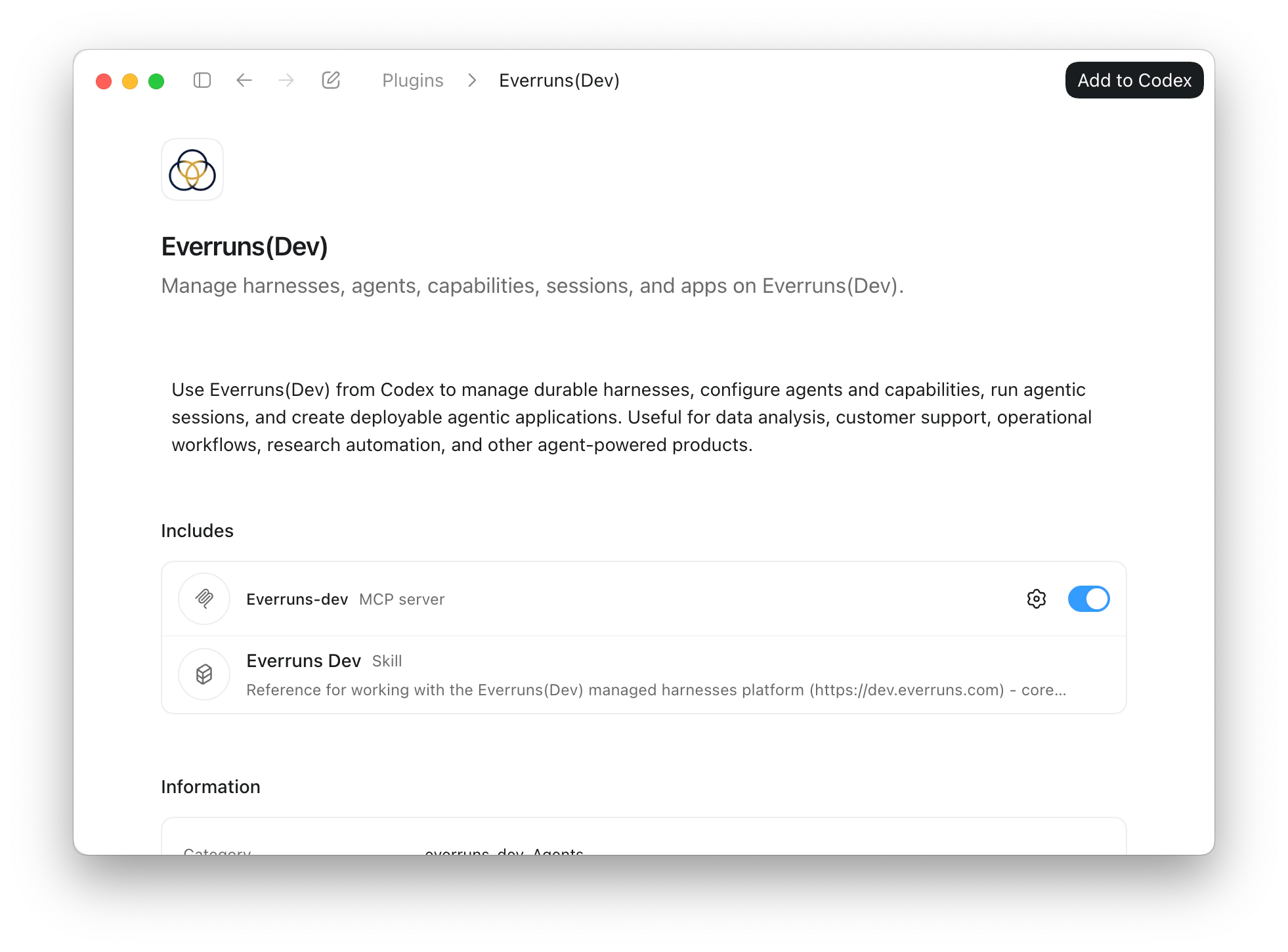 * **Without installing**: add `Instructions: https://everruns.com/.well-known/agent-skills/everruns/SKILL.md` to your prompt. Every Everruns MCP server also serves the skill as `skill://everruns/SKILL.md`, matching that server’s version. ## Connect to your Everruns The skill works with the Everruns you run. After `everruns docker up` or `everruns k8s up` the CLI is already signed in, and the agent uses it. For MCP, register your server’s endpoint, for example with Claude Code:
```bash
claude mcp add --transport http everruns http://localhost:9300/mcp
```
The plugin’s built-in MCP connection points at the [demo instance](https://everruns.com/docs/getting-started/cloud/), because a plugin cannot know your address; register your own endpoint as above to use your install. In the Everruns UI, the user menu’s **Connect your coding agent** gives a setup prompt with your deployment’s address already in it. **Settings → AI clients** shows OAuth approvals and lets you revoke them. ## First run 1. Ask your agent “Who am I on Everruns?” and complete the sign-in if asked. 2. Ask for real work, for example “create a Hacker News summarizer agent and run it” or “why did this session fail?” with a session link. Every change the agent makes is recorded in the entity’s [change history](https://everruns.com/docs/features/change-history/) with the reason it gave. Your coding-agent subscription does not configure model access inside Everruns. Running Everruns agents, including Platform Chat, requires a model provider in **Models → Providers**, or one set during install (`everruns docker up --provider ...`). ## Use the CLI too The skill speaks the same commands as the [`everruns` CLI](https://everruns.com/docs/features/cli/). When the CLI is installed and signed in, the agent runs commands there directly, which is faster than going through MCP. ## Read the docs as text The documentation site publishes itself as plain Markdown for agents and other tools that would rather read text than HTML. * [`/llms.txt`](https://everruns.com/docs/llms.txt): the index: the three ways to run Everruns, every documentation set, and the machine-readable surfaces. Start here. * [`/llms-full.txt`](https://everruns.com/docs/llms-full.txt): every prose page in one file (roughly 250k tokens). * [`/llms-small.txt`](https://everruns.com/docs/llms-small.txt): the same corpus without the vendor- and operator-specific long tails. * `/_llms-txt/.txt`: one topic at a time, mirroring the sidebar: [start-here](https://everruns.com/docs/_llms-txt/start-here.txt), [framework](https://everruns.com/docs/_llms-txt/framework.txt), [platform](https://everruns.com/docs/_llms-txt/platform.txt), [built-ins](https://everruns.com/docs/_llms-txt/built-ins.txt), [guides](https://everruns.com/docs/_llms-txt/guides.txt), [integrations](https://everruns.com/docs/_llms-txt/integrations.txt), [explanation](https://everruns.com/docs/_llms-txt/explanation.txt), [reference](https://everruns.com/docs/_llms-txt/reference.txt), [operations](https://everruns.com/docs/_llms-txt/operations.txt). Prefer a set over the complete text. * [`/api/openapi.json`](https://everruns.com/docs/api/openapi.json): the REST API as OpenAPI 3.0. The text sets carry prose only, so take endpoint shapes from here. Every page in those files begins with its title, its description, and a `Source:` line holding the canonical URL. Cite that URL, not the text file.