

User MCP Servers
People add MCP servers for themselves, sign in once, and agents that opt in get those tools while that person is chatting. Nobody else can use them.
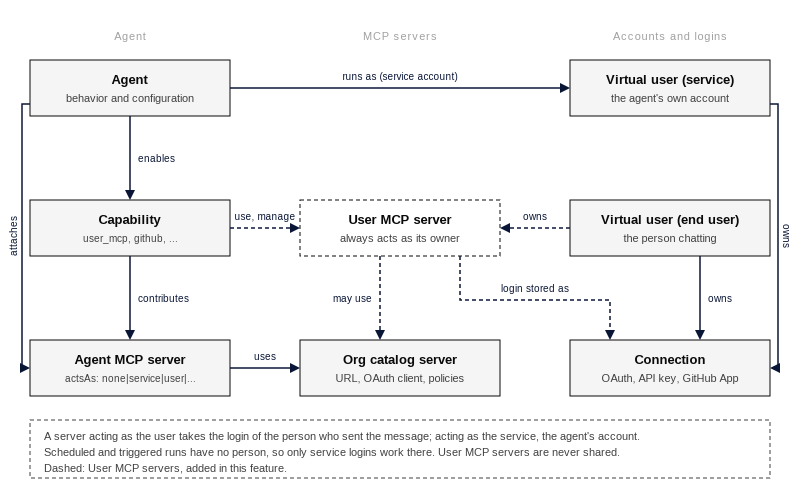
A user MCP server belongs to one person. You add it in your settings, sign in to it once, and every agent that uses your MCP servers gets its tools while you chat with that agent. Other people never see it, and agents never use it when you are not the one talking to them.
This is the third place an MCP server can live:
| Where | Who adds it | Who it signs in as |
|---|---|---|
| Organization catalog | An admin, under Settings > Organization > MCP catalog | Whatever the agent attaching it chooses |
| Agent | Whoever edits the agent | The agent’s service account, the user, or the user with the agent as a fallback, per server (acts as) |
| User | You, for yourself | Always you |
Add a server
Section titled “Add a server”Open Settings > MCP servers and choose Add server.
- From catalog: pick a server your organization already registered, such as Linear. It uses the catalog entry’s OAuth client, so signing in to it here and signing in from an agent that attaches the same entry share one login.
- By URL: give it a name and an HTTPS URL, then choose how it signs in:
- OAuth: choose Connect after adding it. Everruns discovers the server’s OAuth settings and registers a client automatically.
- API key: the key is encrypted and never shown again. You can replace it, not read it.
- None: for servers that need no sign-in.
The name is the tool prefix agents see (notes__search), and it only has to be
unique among your own servers: two people can each have a notes server. Each
person can keep up to 50 servers.
You do not have to add a catalog server before connecting it. Connecting one as
yourself anywhere, in these settings, from an agent’s MCP servers sheet, or from
a Connect card in a chat, adds it to My MCP servers if it is not there yet,
so every agent that uses your MCP servers gets it too. Connecting again never
adds a second entry; if the name is already used by another of your servers,
the new entry is called <name>-2 (or the next free number).
Turn a server off to hide it from agents without losing your sign-in. Remove it to delete both the server and your sign-in. For a catalog server that sign-in is also the one agents acting as you use for the same catalog entry, so they ask you to connect again. Signing out from the connection alone keeps the server on your list, waiting for you to connect again.
Let an agent use them
Section titled “Let an agent use them”Add the User MCP Servers capability (user_mcp) to the agent. With its use
setting on (the default), each turn adds the enabled servers of the person who
sent the message. Platform Chat has it on.
The agent gets nothing from it when:
- nobody is chatting: a schedule, trigger or other unattended run has no person to act for;
- more than one person is in the conversation: in a shared session, one person’s tools would otherwise show up in everyone’s turns;
- the agent already has a server with that name: agent and capability servers always win, so an agent’s behaviour cannot be changed by a person adding a server with the same name;
- the server is turned off, or a catalog entry it came from was archived.
An OAuth server works for agents once you sign in to it; until then your list shows it as Needs sign-in.
The agent’s MCP servers sheet shows a User servers of the person chatting group with these settings, and lists any of your own servers the agent skips because one of its servers has the same name.
Add and connect from chat
Section titled “Add and connect from chat”With the capability’s manage setting on, you can ask the agent instead of
opening Settings, for example “add Linear and connect it”. The agent:
- adds the server from your organization’s catalog, asking you to approve
first when the agent’s Tool Approval mode is
normalorprotective; - shows a Connect card, where you sign in in your own browser; the agent never sees your credentials;
- can use the server’s tools from your next message.
The Connect card also works for the agent’s own servers: an agent with a
server that acts as you (user or user_or_service) can show it without
manage. A server that acts as the agent sends you to the agent’s MCP
servers sheet instead, where only someone who manages MCP servers can sign
the agent in.
It can also list, turn off, turn on (under the same approval policy) and remove your
servers. It can add a server by URL only when the agent’s allow_custom_urls
setting is on, and never with an API key or headers. These tools only ever
change your own list, need you to be the one chatting, and do not work in
conversations with several people. Platform Chat has manage on. Management
adds no hard approval gate when Tool Approval is absent or set to off.
Signing in through the Connect card remains a separate authorization step.
The same operations are available over the API, for yourself (me) or, with
virtual-user management permission, for an account you manage:
| Method | Path | Purpose |
|---|---|---|
GET |
/v1/virtual-users/{id}/mcp-servers |
List your servers and their sign-in state |
POST |
/v1/virtual-users/{id}/mcp-servers |
Add a server ({"catalog":"linear"} or {"name","url","auth_mode"}) |
GET |
/v1/virtual-users/{id}/mcp-servers/{server_id} |
Read one server |
PATCH |
/v1/virtual-users/{id}/mcp-servers/{server_id} |
Rename, turn on or off, or replace the API key |
DELETE |
/v1/virtual-users/{id}/mcp-servers/{server_id} |
Remove the server and your sign-in |
GET |
/v1/virtual-users/{id}/mcp-servers/{server_id}/tools |
List a custom server’s tools, asked live, with your risk labels |
PUT |
/v1/virtual-users/{id}/mcp-servers/{server_id}/tools/{tool}/label |
Label a custom server’s tool read_only or changes, or null to clear |
Sign in with GET /v1/virtual-users/{id}/connections/{provider}/authorize, where
provider is the connection.provider value a server reports. The URL of a
server cannot change; remove it and add it again instead.
curl -X POST "$EVERRUNS_URL/v1/virtual-users/me/mcp-servers" \ -H "Authorization: Bearer $EVERRUNS_API_KEY" \ -H "Content-Type: application/json" \ -d '{"name":"notes","url":"https://notes.example.com/mcp","auth_mode":"oauth"}'Security
Section titled “Security”- Another person’s server answers
404on every route, and only the owner can start its sign-in. An agent’s own account can never hold a grant for it. - Custom URLs go through the same address checks as catalog servers, so a user server cannot point at private or internal addresses.
- API keys and header values are write-only.
- A user server never appears in the organization catalog and cannot be attached to an agent by name.